HITLayout
Description
A HITLayout is a reusable Amazon Mechanical Turk project template used to provide Human
Intelligence Task (HIT) question data for CreateHIT. You can create a HITLayout
template by creating a Mechanical Turk project on the
Amazon Mechanical Turk Requester website
Obtaining a Layout ID
A Layout ID is assigned to each Mechanical Turk project you create on the Requester website.
You use the Layout ID as the value for HITLayoutId
when calling CreateHIT to identify the HITLayout project template to use.
Mechanical Turk projects can contain parameter placeholders in the format ${parameter_name}.
The names for the parameter placeholders used in a HITLayout project template are listed as
Parameters along with the Layout ID on the Requester website.
To view the Layout ID and the Parameters used in your HITLayout project template
-
Go to the Amazon Mechanical Turk Requester website
. Or for the Requester Sandbox site, go to the Amazon Mechanical Turk Requester Sandbox website . -
Click Create, and then click New Batch with an Existing Project.
-
Click the Project Name of an existing project to view Layout ID and Parameters.
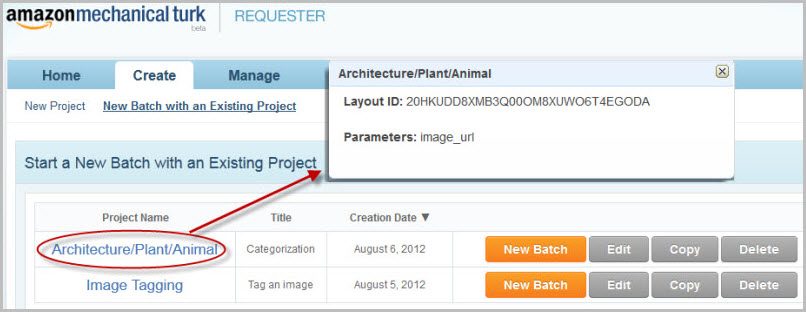
Using a HITLayout
You can use the HITLayout form of a HIT by calling CreateHIT with a
HITLayoutId and a list of HITLayoutParameter structures.
The project parameter placeholders are replaced with values from the HITLayoutParameter structures
when you call CreateHIT to create a HIT.
You need one structure for each of the parameter values you want substituted.
The parameter names that you pass to CreateHIT must match the parameter names used in the HITLayout
project template created on the Requester website. The parameter values cannot be changed after the HIT has been created.
Note
You can use either the HITLayoutId or the Question parameter
when calling CreateHIT, but not both.
Each CreateHIT call merges the parameter values from HITLayoutParameter structures into the HITLayout template
to generate the HIT question document. You use the same Layout ID in HITLayoutId to call CreateHIT
multiple times, with different parameter values supplied each time for the placeholders.
Requesters can use this parameter substitution capability to create a large number of HITs that all
share a common design. For example, you can create a HIT question that asks Workers to
provide keywords for an image and draw boxes around key image features using a
JavaScript library. First, you use the Requester website to create a Mechanical Turk project
that uses a parameter placeholder for the image URL. Then you call
CreateHIT using the same HITLayout template iteratively, using a
different image URL value each time. Each call to CreateHIT uses the same
Layout ID, but each call uses a different HITLayoutParameter structure that contains a unique image URL.
Guidelines for Using HITLayouts
-
After a HIT is created, the HIT behaves like an HTMLQuestion HIT, which gives you the option to use HTML and JavaScript features in your HIT design, including Asynchronous JavaScript and XML (AJAX) callbacks.
-
Parameter substitution allows you to replace a short parameter name with long strings of text. You will receive errors if the resulting document is longer than permitted by the
Questionparameter ofCreateHIT. -
The HITLayout is used to create an HTMLQuestion document. HITLayoutParameter values with reserved characters or invalid HTML markup may result in an invalid HTMLQuestion document. For more information, see HTMLQuestion.
