Configuring MFA delete
When working with S3 Versioning in Amazon S3 buckets, you can optionally add another layer of security by configuring a bucket to enable MFA (multi-factor authentication) delete. When you do this, the bucket owner must include two forms of authentication in any request to delete a version or change the versioning state of the bucket.
MFA delete requires additional authentication for either of the following operations:
-
Changing the versioning state of your bucket
-
Permanently deleting an object version
MFA delete requires two forms of authentication together:
-
Your security credentials
-
The concatenation of a valid serial number, a space, and the six-digit code displayed on an approved authentication device
MFA delete thus provides added security if, for example, your security credentials are compromised. MFA delete can help prevent accidental bucket deletions by requiring the user who initiates the delete action to prove physical possession of an MFA device with an MFA code and adding an extra layer of friction and security to the delete action.
To identify buckets that have MFA delete enabled, you can use Amazon S3 Storage Lens metrics. S3 Storage Lens is a cloud-storage analytics feature that you can use to gain organization-wide visibility into object-storage usage and activity. For more information, see Assessing your storage activity and usage with S3 Storage Lens. For a complete list of metrics, see S3 Storage Lens metrics glossary.
The bucket owner, the AWS account that created the bucket (root account), and all
authorized users can enable versioning. However, only the bucket owner (root account)
can enable MFA delete. For more information, see Securing Access
to AWS Using MFA
Note
To use MFA delete with versioning, you enable MFA Delete. However, you cannot
enable MFA Delete using the AWS Management Console. You must use the AWS Command Line Interface (AWS CLI)
or the API.
For examples of using MFA delete with versioning, see the examples section in the topic Enabling versioning on buckets.
You cannot use MFA delete with lifecycle configurations. For more information about lifecycle configurations and how they interact with other configurations, see How S3 Lifecycle interacts with other bucket configurations.
To enable or disable MFA delete, you use the same API that you use to configure versioning on a bucket. Amazon S3 stores the MFA delete configuration in the same versioning subresource that stores the bucket's versioning status.
<VersioningConfiguration xmlns="http://s3.amazonaws.com/doc/2006-03-01/">
  <Status>VersioningState</Status>
  <MfaDelete>MfaDeleteState</MfaDelete>
</VersioningConfiguration>
To use MFA delete, you can use either a hardware or virtual MFA device to generate an authentication code. The following example shows a generated authentication code displayed on a hardware device.
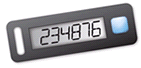
MFA delete and MFA-protected API access are features intended to provide protection for different scenarios. You configure MFA delete on a bucket to help ensure that the data in your bucket cannot be accidentally deleted. MFA-protected API access is used to enforce another authentication factor (MFA code) when accessing sensitive Amazon S3 resources. You can require any operations against these Amazon S3 resources to be done with temporary credentials created using MFA. For an example, see Requiring MFA.
For more information about how to purchase and activate an authentication device, see
Multi-factor
authentication
To enable S3 Versioning and configure MFA delete
The serial number is the number that uniquely identifies the MFA device. For physical MFA devices, this is the unique serial number that's provided with the device. For virtual MFA devices, the serial number is the device ARN. To use the following commands, replace the user input placeholders with your own information.
The following example enables S3 Versioning and multi-factor authentication (MFA) delete on a bucket for a physical MFA device. For physical MFA devices, in the --mfa parameter, pass a concatenation of the MFA device serial number, a space character, and the value that is displayed on your authentication device.
aws s3api put-bucket-versioning --bucketamzn-s3-demo-bucket1--versioning-configuration Status=Enabled,MFADelete=Enabled --mfa "SerialNumber 123456"
The following example enables S3 Versioning and multi-factor authentication (MFA) delete on a bucket for a virtual MFA device. For virtual MFA devices, in the --mfa parameter, pass a concatenation of the MFA device ARN, a space character, and the value that is displayed on your authentication device.
aws s3api put-bucket-versioning --bucketamzn-s3-demo-bucket1--versioning-configuration Status=Enabled,MFADelete=Enabled --mfa "arn:aws:iam::account-id:mfa/root-account-mfa-device123789"
For more information, see the AWS rePost article How do I turn on MFA delete for my Amazon S3 bucket?
For more information about specifying MFA delete using the Amazon S3 REST API, see PutBucketVersioning Amazon Simple Storage Service API Reference.
