Getting Started with Chef 11 Linux Stacks
Important
The AWS OpsWorks Stacks service reached end of life on May 26, 2024 and has been disabled for both new and existing customers.
We strongly recommend customers migrate their workloads to other solutions as soon as possible. If you have questions about migration, reach out to the AWS Support Team on AWS re:Post
Note
This section describes how to get started with Linux stacks using Chef 11. For information about getting started with Chef 12 Linux stacks, see Getting Started: Linux. For information about getting started with Chef 12 Windows stacks, see Getting Started: Windows.
Cloud-based applications usually require a group of related resources—application servers, database servers, and so on—that must be created and managed collectively. This collection of instances is called a stack. A simple application stack might look something like the following.
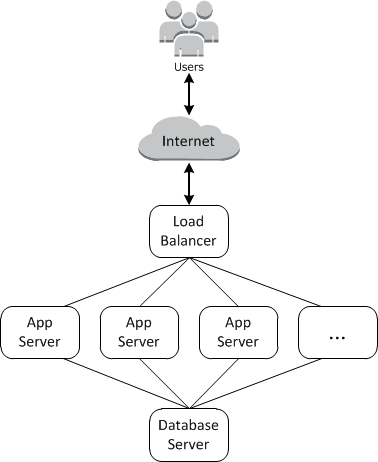
The basic architecture consists of the following:
-
A load balancer to distribute incoming traffic from users evenly across the application servers.
-
A set of application server instances, as many as needed to handle the traffic.
-
A database server to provide the application servers with a back-end data store.
In addition, you typically need a way to distribute applications to the application servers, monitor the stack, and so on.
OpsWorks Stacks provides a simple and straightforward way to create and manage stacks and their associated applications and resources. This chapter introduces the basics of OpsWorks Stacks—along with some of its more sophisticated features—by walking you through the process of creating the application server stack in the diagram. It uses an incremental development model that OpsWorks Stacks makes easy to follow: Set up a basic stack and, once it's working correctly, add components until you arrive at a full-featured implementation.
-
Step 1: Complete the Prerequisites shows how to get set up to start the walkthrough.
-
Step 2: Create a Simple Application Server Stack - Chef 11 shows how to create a minimal stack that consists of a single application server.
-
Step 3: Add a Back-end Data Store shows how to add a database server and connect it to the application server.
-
Step 4: Scale Out MyStack shows how to scale out a stack to handle increased load by adding more application servers, and a load balancer to distribute incoming traffic.
Topics
