Working with Amazon S3 Files
What is S3 Files?
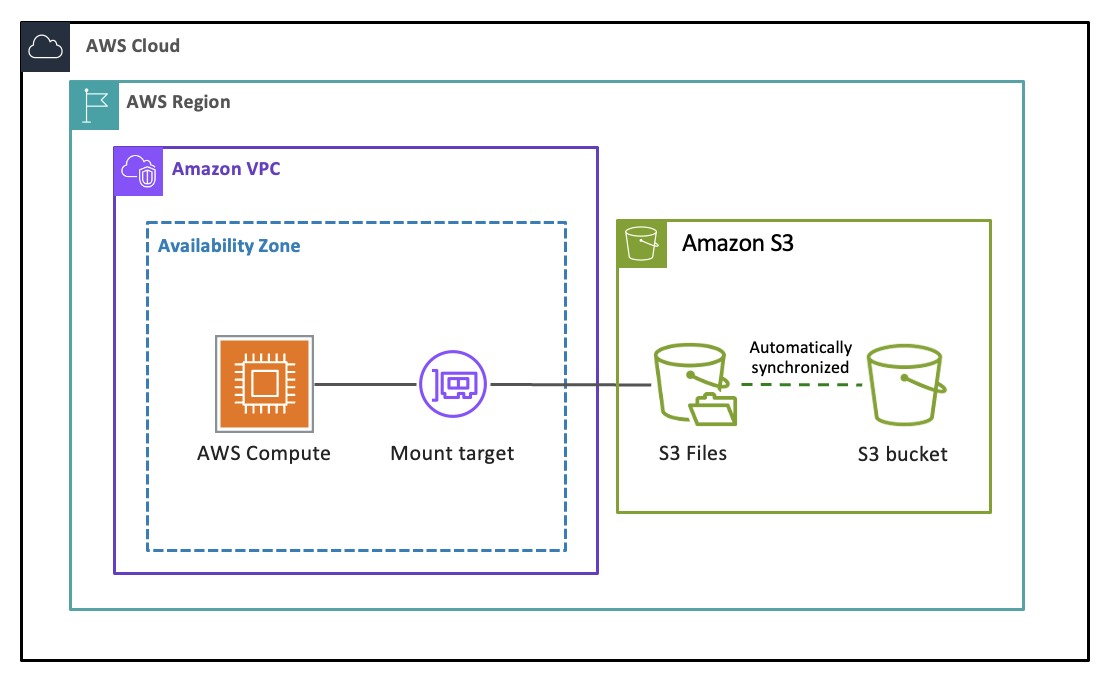
S3 Files is a shared file system that connects any AWS compute resource directly with your data in Amazon S3. It provides fast, direct access to all of your S3 data as files with full file system semantics and low-latency performance, without your data ever leaving S3. Every file-based application, agent, and team can access and work with your S3 data as a file system using the tools they already depend on. Built using Amazon EFS, S3 Files gives you the performance and simplicity of a file system with the scalability, durability, and cost-effectiveness of S3. You can read, write, and organize data using file and directory operations, while S3 Files manages the synchronization of changes between your bucket and file system.
How does S3 Files work?
When you create an S3 file system linked to your S3 bucket or to a prefix within it and mount it on a compute resource such as an EC2 instance or a Lambda function, S3 Files first presents a traversable view of your bucket's objects as files. As you navigate through directories and open files, associated metadata and contents are placed onto the file system's high-performance storage. When you read files, S3 Files loads file contents onto the high-performance storage on demand without duplicating your entire dataset. When you write data, your writes go to the high-performance storage and are synchronized back to your S3 bucket. S3 Files intelligently translates your file system operations into efficient S3 requests on your behalf. Many read operations bypass the file system entirely, with data served directly from S3.
You can configure the file size threshold for what gets loaded onto the high-performance storage (default 128 KB), as latencies matter most for small files. Data that does not meet this threshold is read directly from S3. For reads of 128 KB or larger on data that has already been synchronized to S3, S3 Files streams directly from S3 even if the data resides on the high-performance storage, since S3 is optimized for high throughput while the file system's high performance storage layer is optimized for low-latency small-file access. Recently modified data that has not yet been synchronized to S3 is always served from the file system. For more information, see Customizing synchronization for S3 Files.
Data that has not been read within a configurable window (1 to 365 days, default 30) automatically expires from the high-performance storage. Your authoritative data always remains in S3, and background synchronization keeps the file system and bucket consistent in both directions. For more information, see Understanding how synchronization works.
Supported compute services to mount your S3 file systems are Amazon EC2, AWS Lambda, Amazon EKS, and Amazon ECS. For more information, see Mounting your S3 buckets on compute resources.
Are you a first-time user of S3 Files?
If you are a first-time user of S3 Files, create your first S3 file system using the S3 Console or the AWS CLI by following the Tutorial: Getting started with S3 Files.
Key concepts
The following terms are used throughout S3 Files documentation:
- File system
A shared file system linked to your S3 bucket.
- High-performance storage
The low-latency storage layer within your file system where actively used file data and metadata reside. S3 Files automatically manages this storage, copying data onto it when you access files and removing data that has not been read within a configurable expiration window. You pay a storage rate for data residing on the high-performance storage.
- Synchronization
The process by which S3 Files keeps your active working dataset and your changes consistent between your file system and S3 bucket. Importing copies data from your S3 bucket onto the file system. Exporting copies changes you make through the file system back to your S3 bucket. S3 Files performs synchronization automatically in both directions.
- Mount target
A mount target provides network access to your file system within a single Availability Zone in your VPC. You need at least one mount target to access your file system from compute resources, and you can create a maximum of one mount target per Availability Zone.
- Access point
Access points are application-specific entry points to a file system that simplify managing data access at scale for shared datasets. You can use access points to enforce user identities and permissions for all file system requests that are made through the access point. When you create a file system using the AWS Management Console, S3 Files automatically creates one access point for the file system.
Features
- High performance without full data replication
S3 Files delivers low-latency file access by copying only your active working set onto the file system's high performance storage, not your entire dataset. Small, frequently accessed files are served from the high-performance storage at sub-millisecond to single-digit millisecond latencies. Large reads are streamed directly from S3 at up to terabytes per second of aggregate throughput. This means you get file system performance for interactive workloads and S3 throughput for streaming workloads, without paying to store or import data you are not using or doesn't benefit from low latency. For more information, see Performance specifications.
- Intelligent read routing
S3 Files automatically routes read requests to the storage layer (S3 file system or S3 bucket) best suited for them, while maintaining full file system semantics including consistency, locking, and POSIX permissions. Small, random reads of actively used files are served from the high-performance storage for low latency. Large sequential reads and reads of data not on the file system are served directly from your S3 bucket for high throughput, with no file system data charge.
- Automatic synchronization
S3 Files automatically keeps your file system and S3 bucket consistent in both directions. Changes you make through the file system are copied back to your S3 bucket, and changes made directly to your S3 bucket are reflected in your file system's view. You can customize synchronization behavior, including what data is imported and how long it stays on the file system. For more information, see Understanding how synchronization works.
- Scalable performance
S3 Files automatically scales throughput and IOPS to match your workload activity. You do not need to provision or manage performance capacity and you pay only for what you use.
- Regional durability
Data written to the high performance storage layer has the same durability as Amazon S3. It stores data redundantly across multiple geographically separated Availability Zones within the same AWS Region, providing high durability and availability for your data.
- Encryption
S3 Files encrypts all data in transit using TLS and all data at rest using AWS KMS keys. You can use AWS owned keys (default) or your own customer managed keys. For more information, see Encryption.
- File system semantics
S3 Files supports the NFS version 4.2 and 4.1 protocols. It provides file-system-access semantics, such as read-after-write data consistency, file locking, and POSIX permissions.
How are you billed for S3 Files?
You pay a storage rate for the fraction of active data resident on the
high-performance storage, and you pay file system access charges for reading from and
writing to your file system's high performance storage. For reads of 128 KB or larger on
data that has already been synchronized to S3, S3 Files streams directly from S3 even if
the data resides on the high-performance storage, since S3 is optimized for high
throughput while the file system's high performance storage layer is optimized for
low-latency small-file access. These reads incur only standard S3 GET request cost with
no file system access charge. The file system access charges apply to synchronization
operations: importing data onto the file system incurs write charges, and exporting
changes back to S3 incurs read charges. For more information, see How S3 Files is metered. For current
pricing, see the S3 Files pricing
page
Topics
