MCP App (Preview)
Security Hub provides an agentic experience with a Model Context Protocol (MCP) App that brings your exposure findings into Claude Desktop. Your AI agent can investigate your security posture using the data in Security Hub, and each MCP tool call returns both a text summary for the agent to reason over and an interactive visualization for you to verify in the same conversation.
The MCP App is a local MCP server that runs on your machine and calls Security Hub APIs directly using your existing AWS credentials. Every tool is read-only and does not modify your security posture. The MCP App is available in all AWS commercial Regions where Security Hub is available.
Important
The Security Hub MCP App is in public preview.
MCP App examples
The following examples show how the MCP App renders interactive visualizations inside Claude Desktop while you investigate your exposures.
Top exposures – Lists your most critical exposure findings, in an interactive table. The following image shows the top exposures table.

Finding detail – Review a single exposure finding’s overview alongside its correlated-finding trait summary, attack path, and remediation guidance. The following image shows the finding detail view.

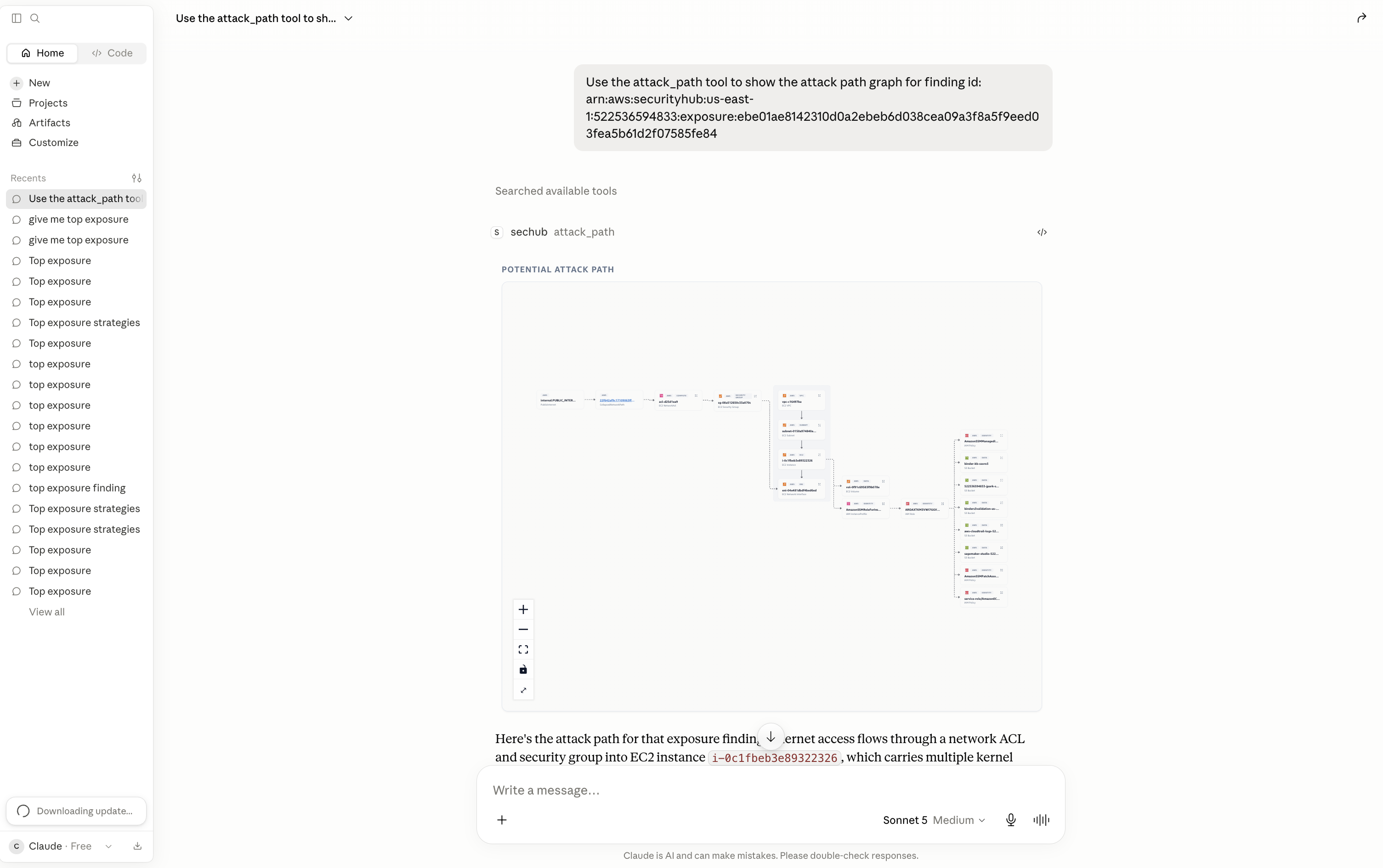
Attack path – Visualize how an exposure is reachable as an interactive graph. Nodes represent resources, identities, and services. Edges represent the relationships between them. The following image shows the attack path graph.
Network path – Explore the ordered network hops from the AWS edge to the target resource (for example, Internet Gateway to NACL to Security Group to ENI to Instance). The following image shows the network path.

Key concepts
Exposure finding – A finding that correlates multiple signals — such as vulnerabilities, misconfigurations, network reachability, and sensitive data — into a single view of a resource that is exposed to risk.
Local MCP server – A program that runs on your computer and acts as a secure, two-way bridge between Claude Desktop and Security Hub. The server contains the tools your AI agent uses, including the tools that render the UI within Claude Desktop. It uses your machine’s AWS credential chain and holds no credentials of its own.
MCP App – An interactive application that renders inside Claude Desktop. Each MCP App view performs a single job, such as showing the top exposures table or an attack path graph.
Dual response – A single tool call returns two outputs: a compact text summary that your agent reasons over, and an interactive visualization rendered in the same conversation for you to review.
Prerequisites
-
An AWS account with Security Hub enabled and exposure findings available.
-
Claude Desktop installed (https://claude.ai/download
). -
AWS credentials configured in your standard AWS SDK credential chain.
Setting up the MCP server
The MCP App installs in Claude Desktop from a bundle file. Before you install,
confirm that aws sts get-caller-identity succeeds and that aws
configure get region returns a Region in your terminal, so that the server can
read your AWS credentials and Region.
-
Download the Security Hub MCP App bundle: download link
. -
Open the downloaded
.mcpbfile. Claude Desktop starts a configuration flow. Follow the instructions to install the server. -
To verify the connection, enter a question in Claude Desktop, such as “What are my top security exposures?”. If you receive an error, review the guidance in the error message and confirm your AWS credentials and Region.
Available tools
top_exposures – Lists your most
urgent exposure findings as an interactive table. Call this tool first because the
per-finding tools require a finding ID from this list.
finding_detail – Returns the
overview of one finding, including its correlated-finding trait summary.
finding_overview – Returns a text
summary of one finding by finding ID.
correlated_finding_detail – Lists
the findings correlated to one exposure for a single trait, such as Vulnerability,
Misconfiguration, or Reachability.
attack_path – Builds the attack
path graph for one finding.
network_path – Expands a
finding’s network path into ordered hops from the AWS edge to the target
resource.
recommendation – Returns
remediation guidance for one finding, including documentation links.
resource_detail – Returns the
configuration of one AWS resource by short ID (for example, i-1234) or
ARN.
