Le traduzioni sono generate tramite traduzione automatica. In caso di conflitto tra il contenuto di una traduzione e la versione originale in Inglese, quest'ultima prevarrà.
# Crea la rete VPC
Amazon Managed Workflows for Apache Airflow richiede un Amazon VPC e componenti di rete specifici per supportare un ambiente. Questa guida descrive le diverse opzioni per creare la rete Amazon VPC per un ambiente Amazon Managed Workflows for Apache Airflow.
**Nota**
Apache Airflow funziona al meglio in un ambiente di rete a bassa latenza. Se stai utilizzando un Amazon VPC esistente che indirizza il traffico verso un'altra regione o verso un ambiente locale, ti consigliamo di aggiungerlo AWS PrivateLink endpoint per Amazon SQS, CloudWatch, Amazon S3 e AWS KMS. Per ulteriori informazioni sulla configurazione AWS PrivateLink per Amazon MWAA, consulta [Creazione di una rete Amazon VPC senza accesso a Internet](#vpc-create-template-private-only).
**Contents**
+ [Prerequisiti](#vpc-create-prereqs)
+ [Prima di iniziare](#vpc-create-how-networking)
+ [Opzioni per creare la rete Amazon VPC](#vpc-create-options)
+ [Opzione 1: creazione della rete VPC sulla console Amazon MWAA](#vpc-create-mwaa-console)
+ [Opzione due: creazione di una rete Amazon VPC *con* Accesso a Internet](#vpc-create-template-private-or-public)
+ [Opzione tre: creazione di una rete Amazon VPC *senza* Accesso a Internet](#vpc-create-template-private-only)
+ [Fasi successive](#create-vpc-next-up)
## Prerequisiti
Il AWS Command Line Interface (AWS CLI) è uno strumento open source con cui puoi interagire AWS servizi che utilizzano i comandi nella shell della riga di comando. Per completare i passaggi indicati in questa pagina, è necessario quanto segue:
+ [AWS CLI — Installa la versione 2](https://docs.aws.amazon.com/cli/latest/userguide/install-cliv2.html).
+ [AWS CLI — Configurazione rapida con `aws configure`](https://docs.aws.amazon.com/cli/latest/userguide/cli-chap-configure.html).
## Prima di iniziare
+ Il [Rete VPC](#vpc-create) specificate per il vostro ambiente non può essere modificata dopo la creazione dell'ambiente.
+ Puoi utilizzare un routing privato o pubblico per il tuo server web Amazon VPC e Apache Airflow. Per accedere a un elenco di opzioni, consulta [Esempi di casi d'uso per una modalità di accesso Amazon VPC e Apache Airflow](networking-about.md#networking-about-network-usecase).
## Opzioni per creare la rete Amazon VPC
La sezione seguente descrive le opzioni disponibili per creare la rete Amazon VPC per un ambiente.
**Nota**
Amazon MWAA non supporta l'uso di `use1-az3` Zona di disponibilità (AZ) nella regione Stati Uniti orientali (Virginia settentrionale). Quando crei il VPC per Amazon MWAA nella regione Stati Uniti orientali (Virginia settentrionale), devi assegnare esplicitamente il `AvailabilityZone` nel CloudFormation modello (CFN). Il nome della zona di disponibilità assegnata non deve essere associato a `use1-az3`. È possibile recuperare la mappatura dettagliata dei nomi AZ ai corrispondenti ID AZ eseguendo il comando seguente:
```
aws ec2 describe-availability-zones --region us-east-1
```
Scegli due diverse zone di disponibilità supportate nella tua regione. Se gestisci più ambienti, distribuiscili in zone diverse.
### Opzione 1: creazione della rete VPC sulla console Amazon MWAA
La sezione seguente spiega come creare una rete Amazon VPC sulla console Amazon MWAA. Questa opzione utilizza [Routing pubblico su Internet](networking-about.md#networking-about-overview-public). Può essere utilizzato per un server web Apache Airflow con **Rete privata** o **Rete pubblica** modalità di accesso.
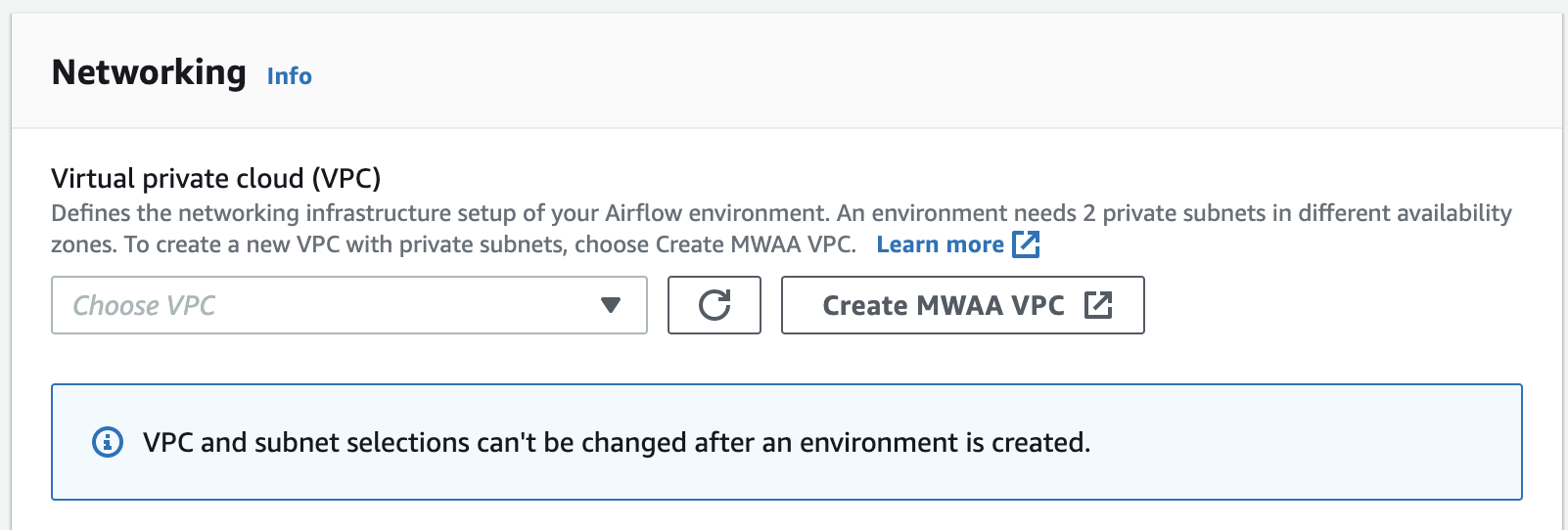
L'immagine seguente mostra dove è possibile trovare **Crea MWAA VPC** pulsante sulla console Amazon MWAA.
### Opzione due: creazione di una rete Amazon VPC *con* Accesso a Internet
Quanto segue CloudFormation il modello crea una rete Amazon VPC con accesso a Internet predefinito Regione AWS. Questa opzione utilizza [Routing pubblico su Internet](networking-about.md#networking-about-overview-public). Questo modello può essere utilizzato per un server web Apache Airflow con **Rete privata** o **Rete pubblica** modalità di accesso.
1. Copia il contenuto del seguente modello e salvalo localmente con nome `cfn-vpc-public-private.yaml`. Puoi anche [scarica il modello](./samples/cfn-vpc-public-private.zip).
```
Description: This template deploys a VPC, with a pair of public and private subnets spread
across two Availability Zones. It deploys an internet gateway, with a default
route on the public subnets. It deploys a pair of NAT gateways (one in each AZ),
and default routes for them in the private subnets.
Parameters:
EnvironmentName:
Description: An environment name that is prefixed to resource names
Type: String
Default: mwaa-
VpcCIDR:
Description: Please enter the IP range (CIDR notation) for this VPC
Type: String
Default: 10.192.0.0/16
PublicSubnet1CIDR:
Description: Please enter the IP range (CIDR notation) for the public subnet in the first Availability Zone
Type: String
Default: 10.192.10.0/24
PublicSubnet2CIDR:
Description: Please enter the IP range (CIDR notation) for the public subnet in the second Availability Zone
Type: String
Default: 10.192.11.0/24
PrivateSubnet1CIDR:
Description: Please enter the IP range (CIDR notation) for the private subnet in the first Availability Zone
Type: String
Default: 10.192.20.0/24
PrivateSubnet2CIDR:
Description: Please enter the IP range (CIDR notation) for the private subnet in the second Availability Zone
Type: String
Default: 10.192.21.0/24
AvailabilityZone1:
Description: >-
First Availability Zone for the subnets. Any two different AZs work.
Changing this on an existing stack replaces the subnets.
Type: AWS::EC2::AvailabilityZone::Name
AvailabilityZone2:
Description: >-
Second Availability Zone. Must differ from the first.
Changing this on an existing stack replaces the subnets.
Type: AWS::EC2::AvailabilityZone::Name
Rules:
DifferentAZs:
Assertions:
- Assert: !Not [ !Equals [ !Ref AvailabilityZone1, !Ref AvailabilityZone2 ] ]
AssertDescription: The two Availability Zones must be different.
Resources:
VPC:
Type: AWS::EC2::VPC
Properties:
CidrBlock: !Ref VpcCIDR
EnableDnsSupport: true
EnableDnsHostnames: true
Tags:
- Key: Name
Value: !Ref EnvironmentName
InternetGateway:
Type: AWS::EC2::InternetGateway
Properties:
Tags:
- Key: Name
Value: !Ref EnvironmentName
InternetGatewayAttachment:
Type: AWS::EC2::VPCGatewayAttachment
Properties:
InternetGatewayId: !Ref InternetGateway
VpcId: !Ref VPC
PublicSubnet1:
Type: AWS::EC2::Subnet
Properties:
VpcId: !Ref VPC
AvailabilityZone: !Ref AvailabilityZone1
CidrBlock: !Ref PublicSubnet1CIDR
MapPublicIpOnLaunch: true
Tags:
- Key: Name
Value: !Sub ${EnvironmentName} Public Subnet (AZ1)
PublicSubnet2:
Type: AWS::EC2::Subnet
Properties:
VpcId: !Ref VPC
AvailabilityZone: !Ref AvailabilityZone2
CidrBlock: !Ref PublicSubnet2CIDR
MapPublicIpOnLaunch: true
Tags:
- Key: Name
Value: !Sub ${EnvironmentName} Public Subnet (AZ2)
PrivateSubnet1:
Type: AWS::EC2::Subnet
Properties:
VpcId: !Ref VPC
AvailabilityZone: !Ref AvailabilityZone1
CidrBlock: !Ref PrivateSubnet1CIDR
MapPublicIpOnLaunch: false
Tags:
- Key: Name
Value: !Sub ${EnvironmentName} Private Subnet (AZ1)
PrivateSubnet2:
Type: AWS::EC2::Subnet
Properties:
VpcId: !Ref VPC
AvailabilityZone: !Ref AvailabilityZone2
CidrBlock: !Ref PrivateSubnet2CIDR
MapPublicIpOnLaunch: false
Tags:
- Key: Name
Value: !Sub ${EnvironmentName} Private Subnet (AZ2)
NatGateway1EIP:
Type: AWS::EC2::EIP
DependsOn: InternetGatewayAttachment
Properties:
Domain: vpc
NatGateway2EIP:
Type: AWS::EC2::EIP
DependsOn: InternetGatewayAttachment
Properties:
Domain: vpc
NatGateway1:
Type: AWS::EC2::NatGateway
Properties:
AllocationId: !GetAtt NatGateway1EIP.AllocationId
SubnetId: !Ref PublicSubnet1
NatGateway2:
Type: AWS::EC2::NatGateway
Properties:
AllocationId: !GetAtt NatGateway2EIP.AllocationId
SubnetId: !Ref PublicSubnet2
PublicRouteTable:
Type: AWS::EC2::RouteTable
Properties:
VpcId: !Ref VPC
Tags:
- Key: Name
Value: !Sub ${EnvironmentName} Public Routes
DefaultPublicRoute:
Type: AWS::EC2::Route
DependsOn: InternetGatewayAttachment
Properties:
RouteTableId: !Ref PublicRouteTable
DestinationCidrBlock: 0.0.0.0/0
GatewayId: !Ref InternetGateway
PublicSubnet1RouteTableAssociation:
Type: AWS::EC2::SubnetRouteTableAssociation
Properties:
RouteTableId: !Ref PublicRouteTable
SubnetId: !Ref PublicSubnet1
PublicSubnet2RouteTableAssociation:
Type: AWS::EC2::SubnetRouteTableAssociation
Properties:
RouteTableId: !Ref PublicRouteTable
SubnetId: !Ref PublicSubnet2
PrivateRouteTable1:
Type: AWS::EC2::RouteTable
Properties:
VpcId: !Ref VPC
Tags:
- Key: Name
Value: !Sub ${EnvironmentName} Private Routes (AZ1)
DefaultPrivateRoute1:
Type: AWS::EC2::Route
Properties:
RouteTableId: !Ref PrivateRouteTable1
DestinationCidrBlock: 0.0.0.0/0
NatGatewayId: !Ref NatGateway1
PrivateSubnet1RouteTableAssociation:
Type: AWS::EC2::SubnetRouteTableAssociation
Properties:
RouteTableId: !Ref PrivateRouteTable1
SubnetId: !Ref PrivateSubnet1
PrivateRouteTable2:
Type: AWS::EC2::RouteTable
Properties:
VpcId: !Ref VPC
Tags:
- Key: Name
Value: !Sub ${EnvironmentName} Private Routes (AZ2)
DefaultPrivateRoute2:
Type: AWS::EC2::Route
Properties:
RouteTableId: !Ref PrivateRouteTable2
DestinationCidrBlock: 0.0.0.0/0
NatGatewayId: !Ref NatGateway2
PrivateSubnet2RouteTableAssociation:
Type: AWS::EC2::SubnetRouteTableAssociation
Properties:
RouteTableId: !Ref PrivateRouteTable2
SubnetId: !Ref PrivateSubnet2
SecurityGroup:
Type: AWS::EC2::SecurityGroup
Properties:
GroupName: "mwaa-security-group"
GroupDescription: "Security group with a self-referencing inbound rule."
VpcId: !Ref VPC
SecurityGroupIngress:
Type: AWS::EC2::SecurityGroupIngress
Properties:
GroupId: !Ref SecurityGroup
IpProtocol: "-1"
SourceSecurityGroupId: !Ref SecurityGroup
Outputs:
VPC:
Description: A reference to the created VPC
Value: !Ref VPC
PublicSubnets:
Description: A list of the public subnets
Value: !Join [ ",", [ !Ref PublicSubnet1, !Ref PublicSubnet2 ]]
PrivateSubnets:
Description: A list of the private subnets
Value: !Join [ ",", [ !Ref PrivateSubnet1, !Ref PrivateSubnet2 ]]
PublicSubnet1:
Description: A reference to the public subnet in the 1st Availability Zone
Value: !Ref PublicSubnet1
PublicSubnet2:
Description: A reference to the public subnet in the 2nd Availability Zone
Value: !Ref PublicSubnet2
PrivateSubnet1:
Description: A reference to the private subnet in the 1st Availability Zone
Value: !Ref PrivateSubnet1
PrivateSubnet2:
Description: A reference to the private subnet in the 2nd Availability Zone
Value: !Ref PrivateSubnet2
SecurityGroupIngress:
Description: Security group with self-referencing inbound rule
Value: !Ref SecurityGroupIngress
```
1. Nel prompt dei comandi, vai alla directory in cui `cfn-vpc-public-private.yaml` è memorizzato. Ad esempio:
```
cd mwaaproject
```
1. Usa il [create-stack](https://docs.aws.amazon.com/cli/latest/reference/cloudformation/create-stack.html) comando per creare lo stack usando il AWS CLI. Sostituire {{availability-zone-1}} e {{availability-zone-2}} con due diverse zone di disponibilità supportate nella tua regione.
```
aws cloudformation create-stack --stack-name mwaa-environment --template-body file://cfn-vpc-public-private.yaml --parameters ParameterKey=AvailabilityZone1,ParameterValue={{availability-zone-1}} ParameterKey=AvailabilityZone2,ParameterValue={{availability-zone-2}}
```
**Nota**
Sono necessari circa 30 minuti per creare l'infrastruttura Amazon VPC.
### Opzione tre: creazione di una rete Amazon VPC *senza* Accesso a Internet
Quanto segue CloudFormation il modello crea una rete Amazon VPC *senza accesso a Internet* nella tua impostazione predefinita Regione AWS.
Questa opzione utilizza [Routing privato senza accesso a Internet](networking-about.md#networking-about-overview-private). Questo modello può essere utilizzato per un server web Apache Airflow con **Rete privata** solo modalità di accesso. Crea il necessario [Endpoint VPC per AWS servizi utilizzati da un ambiente](vpc-vpe-create-access.md#vpc-vpe-create-view-endpoints-attach-services).
1. Copia il contenuto del seguente modello e salvalo localmente con nome `cfn-vpc-private.yaml`. Puoi anche [scarica il modello](./samples/cfn-vpc-private-no-ops.zip).
```
AWSTemplateFormatVersion: "2010-09-09"
Parameters:
VpcCIDR:
Description: The IP range (CIDR notation) for this VPC
Type: String
Default: 10.192.0.0/16
PrivateSubnet1CIDR:
Description: The IP range (CIDR notation) for the private subnet in the first Availability Zone
Type: String
Default: 10.192.10.0/24
PrivateSubnet2CIDR:
Description: The IP range (CIDR notation) for the private subnet in the second Availability Zone
Type: String
Default: 10.192.11.0/24
AvailabilityZone1:
Description: >-
First Availability Zone for the subnets. Any two different AZs work.
Changing this on an existing stack replaces the subnets.
Type: AWS::EC2::AvailabilityZone::Name
AvailabilityZone2:
Description: >-
Second Availability Zone. Must differ from the first.
Changing this on an existing stack replaces the subnets.
Type: AWS::EC2::AvailabilityZone::Name
Rules:
DifferentAZs:
Assertions:
- Assert: !Not [ !Equals [ !Ref AvailabilityZone1, !Ref AvailabilityZone2 ] ]
AssertDescription: The two Availability Zones must be different.
Resources:
VPC:
Type: AWS::EC2::VPC
Properties:
CidrBlock: !Ref VpcCIDR
EnableDnsSupport: true
EnableDnsHostnames: true
Tags:
- Key: Name
Value: !Ref AWS::StackName
RouteTable:
Type: AWS::EC2::RouteTable
Properties:
VpcId: !Ref VPC
Tags:
- Key: Name
Value: !Sub "${AWS::StackName}-route-table"
PrivateSubnet1:
Type: AWS::EC2::Subnet
Properties:
VpcId: !Ref VPC
AvailabilityZone: !Ref AvailabilityZone1
CidrBlock: !Ref PrivateSubnet1CIDR
MapPublicIpOnLaunch: false
Tags:
- Key: Name
Value: !Sub "${AWS::StackName} Private Subnet (AZ1)"
PrivateSubnet2:
Type: AWS::EC2::Subnet
Properties:
VpcId: !Ref VPC
AvailabilityZone: !Ref AvailabilityZone2
CidrBlock: !Ref PrivateSubnet2CIDR
MapPublicIpOnLaunch: false
Tags:
- Key: Name
Value: !Sub "${AWS::StackName} Private Subnet (AZ2)"
PrivateSubnet1RouteTableAssociation:
Type: AWS::EC2::SubnetRouteTableAssociation
Properties:
RouteTableId: !Ref RouteTable
SubnetId: !Ref PrivateSubnet1
PrivateSubnet2RouteTableAssociation:
Type: AWS::EC2::SubnetRouteTableAssociation
Properties:
RouteTableId: !Ref RouteTable
SubnetId: !Ref PrivateSubnet2
S3VpcEndoint:
Type: AWS::EC2::VPCEndpoint
Properties:
ServiceName: !Sub "com.amazonaws.${AWS::Region}.s3"
VpcEndpointType: Gateway
VpcId: !Ref VPC
RouteTableIds:
- !Ref RouteTable
SecurityGroup:
Type: AWS::EC2::SecurityGroup
Properties:
VpcId: !Ref VPC
GroupDescription: Security Group for Amazon MWAA Environments to access VPC endpoints
GroupName: !Sub "${AWS::StackName}-mwaa-vpc-endpoints"
SecurityGroupIngress:
Type: AWS::EC2::SecurityGroupIngress
Properties:
GroupId: !Ref SecurityGroup
IpProtocol: "-1"
SourceSecurityGroupId: !Ref SecurityGroup
SqsVpcEndoint:
Type: AWS::EC2::VPCEndpoint
Properties:
ServiceName: !Sub "com.amazonaws.${AWS::Region}.sqs"
VpcEndpointType: Interface
VpcId: !Ref VPC
PrivateDnsEnabled: true
SubnetIds:
- !Ref PrivateSubnet1
- !Ref PrivateSubnet2
SecurityGroupIds:
- !Ref SecurityGroup
CloudWatchLogsVpcEndoint:
Type: AWS::EC2::VPCEndpoint
Properties:
ServiceName: !Sub "com.amazonaws.${AWS::Region}.logs"
VpcEndpointType: Interface
VpcId: !Ref VPC
PrivateDnsEnabled: true
SubnetIds:
- !Ref PrivateSubnet1
- !Ref PrivateSubnet2
SecurityGroupIds:
- !Ref SecurityGroup
CloudWatchMonitoringVpcEndoint:
Type: AWS::EC2::VPCEndpoint
Properties:
ServiceName: !Sub "com.amazonaws.${AWS::Region}.monitoring"
VpcEndpointType: Interface
VpcId: !Ref VPC
PrivateDnsEnabled: true
SubnetIds:
- !Ref PrivateSubnet1
- !Ref PrivateSubnet2
SecurityGroupIds:
- !Ref SecurityGroup
KmsVpcEndoint:
Type: AWS::EC2::VPCEndpoint
Properties:
ServiceName: !Sub "com.amazonaws.${AWS::Region}.kms"
VpcEndpointType: Interface
VpcId: !Ref VPC
PrivateDnsEnabled: true
SubnetIds:
- !Ref PrivateSubnet1
- !Ref PrivateSubnet2
SecurityGroupIds:
- !Ref SecurityGroup
Outputs:
VPC:
Description: A reference to the created VPC
Value: !Ref VPC
MwaaSecurityGroupId:
Description: Associates the Security Group to the environment to allow access to the VPC endpoints
Value: !Ref SecurityGroup
PrivateSubnets:
Description: A list of the private subnets
Value: !Join [ ",", [ !Ref PrivateSubnet1, !Ref PrivateSubnet2 ]]
PrivateSubnet1:
Description: A reference to the private subnet in the 1st Availability Zone
Value: !Ref PrivateSubnet1
PrivateSubnet2:
Description: A reference to the private subnet in the 2nd Availability Zone
Value: !Ref PrivateSubnet2
```
1. Nel prompt dei comandi, vai alla directory in cui `cfn-vpc-private.yaml` è memorizzato. Ad esempio:
```
cd mwaaproject
```
1. Usa il [create-stack](https://docs.aws.amazon.com/cli/latest/reference/cloudformation/create-stack.html) comando per creare lo stack usando il AWS CLI. Sostituire {{availability-zone-1}} e {{availability-zone-2}} con due diverse zone di disponibilità supportate nella tua regione.
```
aws cloudformation create-stack --stack-name mwaa-private-environment --template-body file://cfn-vpc-private.yaml --parameters ParameterKey=AvailabilityZone1,ParameterValue={{availability-zone-1}} ParameterKey=AvailabilityZone2,ParameterValue={{availability-zone-2}}
```
**Nota**
Sono necessari circa 30 minuti per creare l'infrastruttura Amazon VPC.
1. Dovrai creare un meccanismo per accedere a questi endpoint VPC dal tuo computer. Per saperne di più, consulta [Gestione dell'accesso agli endpoint Amazon VPC specifici del servizio su Amazon MWAA](vpc-vpe-access.md).
**Nota**
Puoi limitare ulteriormente l'accesso in uscita nel CIDR del tuo gruppo di sicurezza Amazon MWAA. Ad esempio, puoi limitarti a se stesso aggiungendo una regola autoreferenziale in uscita, la [elenco di prefissi](https://docs.aws.amazon.com/vpc/latest/privatelink/vpce-gateway.html) per Amazon S3 e il CIDR del tuo Amazon VPC.
## Fasi successive
+ Scopri come creare un ambiente Amazon MWAA in [Crea un ambiente Amazon MWAA](create-environment.md).
+ Scopri come creare un tunnel VPN dal tuo computer al tuo Amazon VPC con routing privato [Tutorial: Configurazione dell'accesso alla rete privata utilizzando un AWS Client VPN](tutorials-private-network-vpn-client.md).