Amazon Timestream for LiveAnalytics와 유사한 기능을 사용하려면 Amazon Timestream for InfluxDB를 고려하세요. 실시간 분석을 위해 간소화된 데이터 수집 및 한 자릿수 밀리초 쿼리 응답 시간을 제공합니다. 여기에서 자세히 알아보세요.
기계 번역으로 제공되는 번역입니다. 제공된 번역과 원본 영어의 내용이 상충하는 경우에는 영어 버전이 우선합니다.
마이그레이션 개요
사전 조건을 충족한 후:
마이그레이션 스크립트 실행: 선택한 터미널 앱을 사용하여 Python 스크립트를 실행하여 소스 InfluxDB 인스턴스에서 대상 InfluxDB 인스턴스로 데이터를 전송합니다.
자격 증명 제공: 호스트 주소 및 포트를 CLI 옵션으로 제공합니다.
데이터 확인: 다음을 통해 데이터가 올바르게 전송되었는지 확인합니다.
InfluxDB UI 사용 및 버킷 검사.
를 사용하여 버킷 나열
influx bucket list -t <destination token> --host <destination host address> --skip-verify.influx v1 shell -t <destination token> --host <destination host address> --skip-verify및SELECT * FROM <migrated bucket>.<retention period>.<measurement name> LIMIT 100 to view contents of a bucket or SELECT COUNT(*) FROM <migrated bucket>.<retention period>.<measurment name>를 사용하여 올바른 수의 레코드가 마이그레이션되었는지 확인합니다.
예 실행 예
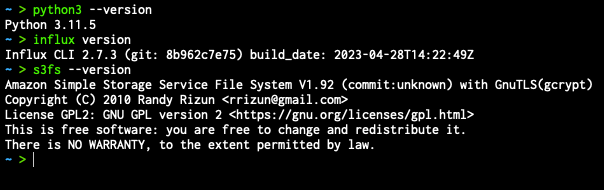
원하는 터미널 앱을 열고 필요한 사전 조건이 올바르게 설치되었는지 확인합니다.
마이그레이션 스크립트로 이동합니다.

다음 정보를 준비합니다.
마이그레이션할 소스 버킷의 이름입니다.
(선택 사항) 대상 서버에서 마이그레이션된 버킷의 새 버킷 이름을 선택합니다.
소스 및 대상 Influx 인스턴스의 루트 토큰입니다.
소스 및 대상 Influx 인스턴스의 호스트 주소입니다.
(선택 사항) S3 버킷 이름 및 자격 증명; AWS Command Line Interface 자격 증명은 OS 환경 변수에서 설정해야 합니다.
# AWS credentials (for timestream testing)
    export AWS_ACCESS_KEY_ID="xxx"
    export AWS_SECRET_ACCESS_KEY="xxx"
명령을 다음과 같이 구성합니다.
python3 influx_migration.py --src-bucket [amzn-s3-demo-source-bucket] --dest-bucket [amzn-s3-demo-destination-bucket] --src-host [source host] --dest-host [dest host] --s3-bucket [amzn-s3-demo-bucket2](optional) --log-level debug스크립트를 실행합니다.

스크립트 실행이 완료될 때까지 기다립니다.
새로 마이그레이션된 버킷의 데이터 무결성을 확인합니다
performance.txt. 스크립트가 실행된 디렉터리에 있는이 파일에는 각 단계의 소요 시간에 대한 몇 가지 기본 정보가 포함되어 있습니다.
마이그레이션 시나리오
예제 1: 로컬 스토리지를 사용한 간단한 마이그레이션
단일 버킷인 amzn-s3-demo-primary-bucket을 소스 서버에서 대상 서버 (http://localhost:8086)로 마이그레이션하려고 합니다(http://dest-server-address:8086).
포트 8086에서 InfluxDB 인스턴스를 호스팅하는 두 시스템에 대한 TCP 액세스(HTTP 액세스용)가 있고 소스 토큰과 대상 토큰이 모두 있으며 보안을 강화하기 위해 INFLUX_DEST_TOKEN각각 환경 변수 및 INFLUX_SRC_TOKEN 로 저장했는지 확인한 후:
python3 influx_migration.py --src-bucket amzn-s3-demo-primary-bucket --src-host http://localhost:8086 --dest-host http://dest-server-address:8086
다음과 같이 출력됩니다
INFO: influx_migration.py: Backing up bucket data and metadata using the InfluxDB CLI
2023/10/26 10:47:15 INFO: Downloading metadata snapshot
2023/10/26 10:47:15 INFO: Backing up TSM for shard 1
2023/10/26 10:47:15 INFO: Backing up TSM for shard 8245
2023/10/26 10:47:15 INFO: Backing up TSM for shard 8263
[More shard backups . . .]
2023/10/26 10:47:20 INFO: Backing up TSM for shard 8240
2023/10/26 10:47:20 INFO: Backing up TSM for shard 8268
2023/10/26 10:47:20 INFO: Backing up TSM for shard 2
INFO: influx_migration.py: Restoring bucket data and metadata using the InfluxDB CLI
2023/10/26 10:47:20 INFO: Restoring bucket "96c11c8876b3c016" as "amzn-s3-demo-primary-bucket"
2023/10/26 10:47:21 INFO: Restoring TSM snapshot for shard 12772
2023/10/26 10:47:22 INFO: Restoring TSM snapshot for shard 12773
[More shard restores . . .]
2023/10/26 10:47:28 INFO: Restoring TSM snapshot for shard 12825
2023/10/26 10:47:28 INFO: Restoring TSM snapshot for shard 12826
INFO: influx_migration.py: Migration complete
디렉터리가 생성influxdb-backup-<timestamp>되어 스크립트가 실행된 디렉터리에 저장되며 백업 파일이 포함됩니다.
예제 2: 로컬 스토리지 및 디버그 로깅을 사용한 전체 마이그레이션
--confirm-full 옵션을 사용하여 모든 버킷, 토큰, 사용자 및 대시보드를 마이그레이션하고, 대상 서버에서 버킷을 삭제하고, 사용자가 전체 데이터베이스 마이그레이션을 확인하지 않고 진행하려는 경우를 제외하고 위와 동일합니다. 디버그 로깅을 활성화하려면 성능 측정값도 확인해야 합니다.
python3 influx_migration.py --full --confirm-full --src-host http://localhost:8086 --dest-host http://dest-server-address:8086 --log-level debug
다음과 같이 출력됩니다
INFO: influx_migration.py: Backing up bucket data and metadata using the InfluxDB CLI
2023/10/26 10:55:27 INFO: Downloading metadata snapshot
2023/10/26 10:55:27 INFO: Backing up TSM for shard 6952
2023/10/26 10:55:27 INFO: Backing up TSM for shard 6953
[More shard backups . . .]
2023/10/26 10:55:36 INFO: Backing up TSM for shard 8268
2023/10/26 10:55:36 INFO: Backing up TSM for shard 2
DEBUG: influx_migration.py: backup started at 2023-10-26 10:55:27 and took 9.41 seconds to run.
INFO: influx_migration.py: Restoring bucket data and metadata using the InfluxDB CLI
2023/10/26 10:55:36 INFO: Restoring KV snapshot
2023/10/26 10:55:38 WARN: Restoring KV snapshot overwrote the operator token, ensure following commands use the correct token
2023/10/26 10:55:38 INFO: Restoring SQL snapshot
2023/10/26 10:55:39 INFO: Restoring TSM snapshot for shard 6952
2023/10/26 10:55:39 INFO: Restoring TSM snapshot for shard 6953
[More shard restores . . .]
2023/10/26 10:55:49 INFO: Restoring TSM snapshot for shard 8268
2023/10/26 10:55:49 INFO: Restoring TSM snapshot for shard 2
DEBUG: influx_migration.py: restore started at 2023-10-26 10:55:36 and took 13.51 seconds to run.
INFO: influx_migration.py: Migration complete
예제 3: CSV, 대상 조직 및 S3 버킷을 사용한 전체 마이그레이션
이전 예제와 동일하지만 Linux 또는 Mac을 사용하고 S3 버킷에 파일을 저장합니다amzn-s3-demo-bucket. 이렇게 하면 백업 파일이 로컬 스토리지 용량에 과부하를 일으키지 않습니다.
python3 influx_migration.py --full --src-host http://localhost:8086 --dest-host http://dest-server-address:8086 --csv --dest-org MyOrg --s3-bucket amzn-s3-demo-bucket
다음과 같이 출력됩니다
INFO: influx_migration.py: Creating directory influxdb-backups
INFO: influx_migration.py: Mounting amzn-s3-demo-influxdb-migration-bucket
INFO: influx_migration.py: Creating directory influxdb-backups/amzn-s3-demo-bucket/influxdb-backup-1698352128323
INFO: influx_migration.py: Backing up bucket data and metadata using the InfluxDB v2 API
INFO: influx_migration.py: Restoring bucket data and metadata from csv
INFO: influx_migration.py: Restoring bucket amzn-s3-demo-some-bucket
INFO: influx_migration.py: Restoring bucket amzn-s3-demo-another-bucket
INFO: influx_migration.py: Restoring bucket amzn-s3-demo-primary-bucket
INFO: influx_migration.py: Migration complete
INFO: influx_migration.py: Unmounting influxdb-backups
INFO: influx_migration.py: Removing temporary mount directory
