Plan HCX connectivity
You can use VMware Hybrid Cloud Extension (HCX) to migrate VMware workloads to Amazon Elastic VMware Service over private connectivity or over the public internet. Choose the option before you create the environment, because internet connectivity needs a public CIDR block in your VPC and a matching HCX VLAN subnet.
HCX isn’t installed in an Amazon EVS environment by default.
Choose a connectivity option
Choose one connectivity option for your environment.
- Private connectivity
-
Uses Direct Connect or AWS Site-to-Site VPN with a transit gateway. It gives more consistent performance and reliability.
- Internet connectivity
-
Uses the public internet. It is quicker to set up and needs Amazon VPC IP Address Manager (IPAM) and Elastic IP addresses.
Some sites have private connectivity with consistent performance but lower throughput, because of VPN encryption or limited link speed. Others have high-throughput internet connectivity with more variable performance. Choose the option that works best for your sites.
We don’t recommend HCX internet connectivity for applications that are sensitive to network jitter or latency, time-critical vMotion operations, or large-scale migrations with strict performance requirements. For these cases, use HCX private connectivity, because a private dedicated connection gives more reliable performance.
The following table compares the two options.
| Aspect | Private connectivity | Internet connectivity |
|---|---|---|
|
Overview |
Uses only private connections within the VPC. You can use Direct Connect or Site-to-Site VPN with a transit gateway for external connectivity. |
Uses public internet connectivity with Elastic IP addresses. You can migrate without a dedicated private connection. |
|
Best suited for |
|
|
|
Key benefits |
|
|
|
Key considerations |
|
|
Private connectivity architecture
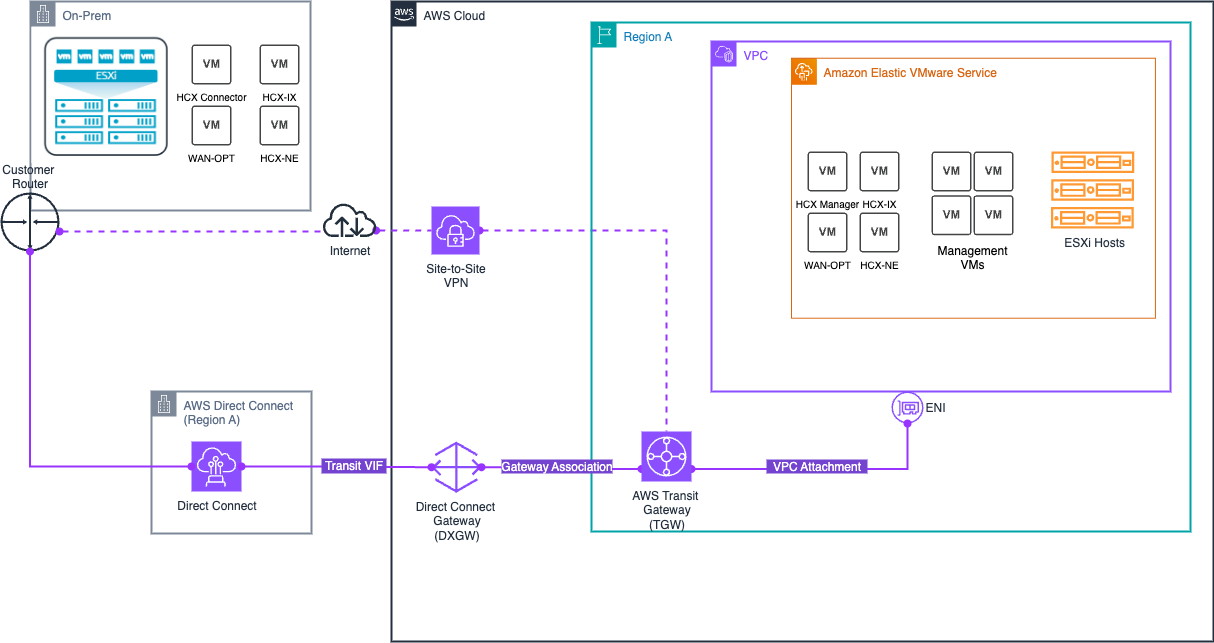
HCX private connectivity uses these components:
-
Amazon EVS network components
-
Private VLAN subnets only, including a private HCX VLAN subnet.
-
Network ACLs for traffic control.
-
Dynamic Border Gateway Protocol (BGP) propagation of routes through Amazon VPC Route Server.
-
-
Transit options to your on-premises network
-
Direct Connect with AWS Transit Gateway, over a private dedicated connection. For more information, see AWS Direct Connect and AWS Transit Gateway.
-
AWS Site-to-Site VPN with AWS Transit Gateway, over an IPsec VPN connection across the internet. For more information, see AWS Transit Gateway and AWS Site-to-Site VPN.
-
Amazon EVS doesn’t support connectivity through an Direct Connect private virtual interface (VIF), or through a Site-to-Site VPN connection that terminates directly in the Amazon EVS VPC. For the full list, see Supported network configurations.
The following diagram shows HCX private connectivity through a transit gateway.
Internet connectivity architecture
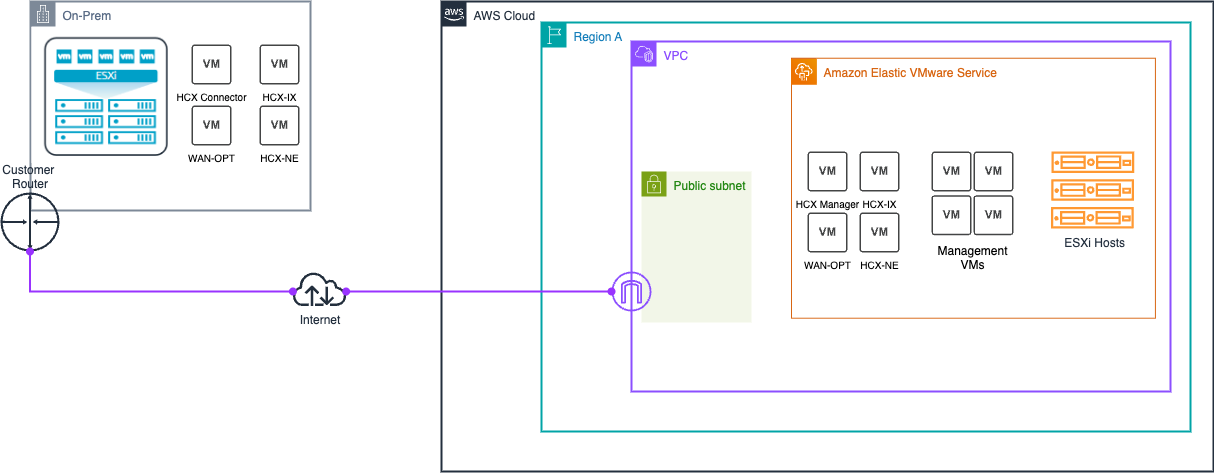
HCX internet connectivity uses these components:
-
Amazon EVS network components
-
An isolated public HCX VLAN subnet for internet connectivity between Amazon EVS and your on-premises HCX appliances.
-
Network ACLs for traffic control.
-
Dynamic BGP propagation of routes through VPC Route Server.
-
-
IPAM and public IP address management
-
IPAM manages public IPv4 address allocation from an Amazon-owned public IPAM pool.
-
A /28 public CIDR block from the IPAM pool is added to the VPC as a secondary CIDR. It is separate from the main VPC CIDR block.
-
HCX doesn’t support destination network address translation (DNAT). HCX needs an uplink network that is routable and has a default gateway IP address. Amazon EVS VLAN subnets have a default gateway like other VPC subnets, but they are always private subnets, even when you use CIDR blocks outside the RFC 1918 range. To give HCX internet connectivity without DNAT, Amazon EVS uses a public HCX VLAN subnet whose CIDR block matches an internet-routable CIDR block from IPAM. Traffic for each associated Elastic IP address goes directly to the HCX appliance that has the same IP address.
The following diagram shows HCX internet connectivity.
CIDR and Elastic IP address rules for internet connectivity
These rules apply only to HCX internet connectivity.
IPAM and the public CIDR block
-
Create an IPAM and a public IPv4 IPAM pool in the public scope, with Amazon-owned as the public IP source. The pool locale must be the Region of your VPC.
-
Your IPAM quota for the netmask length of Amazon-provided contiguous public IPv4 CIDR blocks must allow a /28. For more information, see Quotas for your IPAM.
-
Provision a CIDR block from the pool with a minimum netmask length of /28.
-
You can use the IPAM Free Tier for these resources. You still pay for other services that you use with IPAM, such as NAT gateways and public IPv4 addresses beyond the free tier. For more information, see the Amazon VPC pricing page
.
VPC and the public HCX VLAN subnet
-
Add the public IPv4 CIDR block to your VPC as an additional CIDR. You must enter the CIDR block manually. Amazon EVS doesn’t support an IPAM-allocated CIDR block for the VPC, and one can cause Elastic IP address association to fail.
-
When you create the environment, use the same public CIDR block for the HCX uplink VLAN subnet. Because you add the public CIDR block to the VPC as an additional CIDR, it meets the rule that every VLAN CIDR block is inside a CIDR block associated with the VPC.
-
The public HCX VLAN CIDR block must have a netmask length of exactly /28. Amazon EVS returns a validation error for any other size.
-
The first usable address of the CIDR block is the default gateway that you configure on your HCX appliances.
-
Configure route server propagation for both the service access subnet and the public subnet that you create with the VPC.
Elastic IP addresses
-
Allocate at least two Elastic IP addresses from the IPAM pool, one for the HCX Manager and one for the HCX Interconnect (HCX-IX) appliance. Allocate one more for each HCX network appliance that you deploy, for example HCX Network Extension (HCX-NE). HCX internet connectivity fails if fewer than two are associated with the HCX VLAN subnet.
-
You can associate up to 13 Elastic IP addresses with the /28 public HCX VLAN subnet. They must all come from the same IPAM pool.
-
You can’t associate the first two addresses or the last address of the public CIDR block. They are reserved as the network, default gateway, and broadcast addresses, and Amazon EVS returns a validation error if you try.
-
When you allocate the Elastic IP addresses, enter the addresses within the IPAM pool manually, so that the reserved addresses aren’t allocated.
-
Amazon EVS supports Elastic IP address associations only with the HCX VLAN subnet. You can associate and disassociate them after deployment. Each association has its own association ID.
Security
Associating an Elastic IP address with a VLAN subnet gives direct internet access to all resources on that subnet.
We strongly recommend that you create a custom network ACL dedicated to the HCX VLAN subnet, with rules that allow only the inbound and outbound connections that HCX needs.
For the HCX port requirements, see the VMware HCX User Guide
Security groups don’t apply to traffic on the HCX public VLAN subnet. Use network ACLs for traffic control. For more information, see Create a network ACL for VLAN subnet traffic.
Requirements for both options
Before you use HCX with Amazon EVS, make sure that you meet the following requirements.
-
Your network meets the HCX underlay requirements. For more information, see Network Underlay Minimum Requirements
in the Broadcom documentation. -
VMware NSX is installed and configured in the environment. For more information, see the VMware NSX Installation Guide
in the Broadcom documentation. -
HCX is activated and installed in the environment. For more information, see About Getting Started with VMware HCX
in the Broadcom documentation.
Record your HCX values in the Deployment prerequisite checklist. For the steps to set up HCX internet connectivity, see Configure HCX public internet connectivity. To check your environment before migration, see Prepare for HCX migration.
