# Configuration options for debugging serverless applications
When you open the `launch.json` file to edit debug configurations, you can use the VS Code [IntelliSense](https://code.visualstudio.com/docs/editor/intellisense) feature to view and automatically complete valid properties. To trigger IntelliSense in the editor, press **Ctrl**\+**Spacebar**.
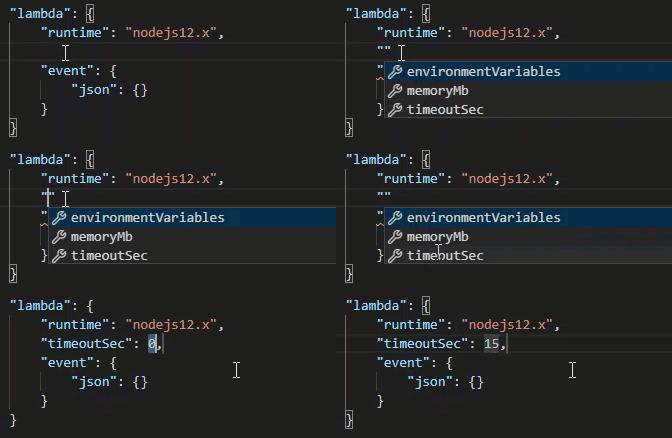
IntelliSense enables you to find and define properties for invoking Lambda functions directly or with the AWS SAM template. You can also define properties for `"lambda"` (how the function runs), `"sam"` (how the AWS SAM CLI builds the application), and `"aws"` (how AWS connection information is provided).
**AWS SAM: Direct Lambda handler invoke / Template-based Lambda invoke**
| Property | Description |
| --- | --- |
| `type` | Specifies which extension manages the launch configuration. Always set to `aws-sam` to use the AWS SAM CLI to build and debug locally. |
| `name` | Specifies a reader-friendly name to appear in the **Debug launch configuration** list. |
| `request` | Specifies the type of configuration to be performed by the designated extension (`aws-sam`). Always set to `direct-invoke` to start the Lambda function. |
| `invokeTarget` | Specifies the entry point for invoking the resource.
For invoking the Lambda function directly, set values for the following `invokeTarget` fields:+ `target` – Set to `code`.
+ `lambdaHandler` – The name of the Lambda function handler to invoke.
+ `projectRoot` – The path for the application file containing the Lambda function handler.
+ `architecture` – Processor architecture of the emulated environment in which your local SAM Lambda application runs. For certain runtimes, you can choose `arm64` instead of the default `x86_64` architecture. For more information, see [Creating a new serverless application (local)](sam-get-started.md#serverless-apps-create).
For invoking the Lambda resources with the AWS SAM template, set values for the following `invokeTarget` fields:+ `target` – Set to `template`.
+ `templatePath` – The path to the AWS SAM template file.
+ `logicalId` – The resource name of the `AWS::Lambda::Function` or `AWS::Serverless::Function` to invoke. You can find the resource name in the YAML-formatted AWS SAM template. Note that the AWS Toolkit implicitly recognizes functions defined with `PackageType: Image` in the AWS SAM template as [Image-based](https://docs.aws.amazon.com/lambda/latest/dg/lambda-images.html) Lambda functions. For more information, see [Lambda deployment packages](https://docs.aws.amazon.com/lambda/latest/dg/gettingstarted-package.html) in the *AWS Lambda Developer Guide*. |
**Lambda (`"lambda"`) properties**
| Property | Description |
| --- | --- |
| `environmentVariables` | Passes operational parameters to your Lambda function. For example, if you're writing to an Amazon S3 bucket, instead of hard-coding the bucket name that you're writing to, configure the bucket name as an environment variable. When specifying environment variables for a serverless application, you must add configurations to both the AWS SAM template (`template.yaml`) and the `launch.json` file.
Example of formatting for an environment variable in the AWS SAM template: Resources:
HelloWorldFunction:
Type: AWS::Serverless::Function
Properties:
CodeUri: hello-world/
Handler: app.lambdaHandlerN10
Runtime: nodejs10.x
Environment:
Variables:
SAMPLE1: Default Sample 1 Value
Example of formatting for an environment variable in the `launch.json` file: "environmentVariables": {
"SAMPLE1": "My sample 1 value"
} |
| `payload` | Provides two options for the event payload that you provide to your Lambda function as input.+ `"json"`: JSON-formatted key-value pairs that define the event payload.
+ `"path"`: A path to the file that's used as the event payload. |
| `memoryMB` | Specifies megabytes (MB) of memory provided for running an invoked Lambda function. |
| `runtime` | Specifies the runtime that the Lambda function uses. For more information, see [AWS Lambda runtimes](https://docs.aws.amazon.com/lambda/latest/dg/lambda-runtimes.html). |
| `timeoutSec` | Sets the time allowed, in seconds, before the debug session times out. |
| `pathMappings` | Specifies where local code is in relation to where it runs in the container.
By default, the Toolkit for VS Code sets `localRoot` to the Lambda function's code root in the local workspace, and `remoteRoot` to `/var/task`, which is the default working directory for code running in Lambda. If the working directory is changed in the Dockerfile or with the `WorkingDirectory` parameter in the CloudFormation template file, at least one `pathMapping` entry must be specified so that the debugger can successfully map locally set breakpoints to the code running in the Lambda container.
Example of formatting for `pathMappings` in the `launch.json` file:"pathMappings": [
{
"localRoot": "{{${workspaceFolder}/sam-app/HelloWorldFunction}}",
"remoteRoot": "{{/var/task}}"
}
]
Caveats:+ For .NET image-based Lambda functions, the `remoteRoot` entry must be the build directory.
+ For Node.js-based Lambda functions, you can specify only a single path mapping entry. |
The Toolkit for VS Code uses the AWS SAM CLI to build and debug serverless applications locally. You can configure the behavior of AWS SAM CLI commands using properties of the `"sam"` configuration in the `launch.json` file.
**AWS SAM CLI (`"sam"`) properties**
| Property | Description | Default value |
| --- | --- | --- |
| `buildArguments` | Configures how the `sam build` command builds your Lambda source code. To view build options, see [sam build](https://docs.aws.amazon.com/serverless-application-model/latest/developerguide/sam-cli-command-reference-sam-build.html) in the *AWS Serverless Application Model Developer Guide*. | Empty string |
| `containerBuild` | Indicates whether to build your function inside a Lambda-like Docker container. | `false` |
| `dockerNetwork` | Specifies the name or ID of an existing Docker network that the Lambda Docker containers should connect to, along with the default bridge network. If not specified, the Lambda containers connect only to the default bridge Docker network. | Empty string |
| `localArguments` | Specifies additional local invoke arguments. | Empty string |
| `skipNewImageCheck` | Specifies whether the command should skip pulling down the latest Docker image for Lambda runtime. | `false` |
| `template` | Customizes your AWS SAM template using parameters to input customer values. For more information, see [Parameters](https://docs.aws.amazon.com/AWSCloudFormation/latest/UserGuide/parameters-section-structure.html) in the *AWS CloudFormation User Guide*. | `"parameters":{}` |
**AWS connection (`"aws"`) properties**
| Property | Description | Default value |
| --- | --- | --- |
| `credentials` | Selects a specific profile (for example, `profile:default`) from your credential file to get AWS credentials. | The AWS credentials that your existing [shared AWS config file or shared AWS credentials file](setup-credentials.md) provide to the Toolkit for VS Code. |
| `region` | Sets the AWS Region of the service (for example, us-east-1). | The default AWS Region associated with the active credentials profile. |
## Example: Template launch configuration
Here is an example launch configuration file for an AWS SAM template target:
```
{
"configurations": [
{
"type": "aws-sam",
"request": "direct-invoke",
"name": "my-example:HelloWorldFunction",
"invokeTarget": {
"target": "template",
"templatePath": "template.yaml",
"logicalId": "HelloWorldFunction"
},
"lambda": {
"payload": {},
"environmentVariables": {}
}
}
]
}
```
## Example: Code launch configuration
Here is an example launch configuration file for a Lambda function target:
```
{
"configurations": [
{
"type": "aws-sam",
"request": "direct-invoke",
"name": "my-example:app.lambda_handler (python3.7)",
"invokeTarget": {
"target": "code",
"projectRoot": "hello_world",
"lambdaHandler": "app.lambda_handler"
},
"lambda": {
"runtime": "python3.7",
"payload": {},
"environmentVariables": {}
}
}
]
}
```