PERF04-BP03 Choose appropriate dedicated connectivity or VPN for your workload
When a workload spans on-premises and cloud resources, the connection between them becomes a performance boundary. Under-provisioned or poorly chosen hybrid connectivity adds latency and caps throughput for everything that crosses it.
Desired outcome:
-
You select the hybrid connectivity option, either a dedicated connection or a VPN, that matches your workload's bandwidth, latency, and reliability requirements.
-
Your connection is sized from measured or estimated traffic rather than guesswork.
-
You have redundant or backup connectivity where availability requirements demand it.
Common anti-patterns:
-
Teams evaluate only VPN options for their network encryption requirements.
-
Teams do not plan backup or redundant connectivity.
-
Teams choose a connection without identifying all workload requirements, such as encryption, protocol, bandwidth, and traffic needs.
Benefits of establishing this best practice:
-
You increase reliability because the connectivity option matches the workload's availability needs.
-
You maximize performance because bandwidth and latency are sized to real traffic.
-
You reduce expensive physical network changes by planning capacity and redundancy ahead of time.
-
You shorten time-to-value by evaluating hybrid options before you commit to a design.
Level of risk exposed if this best practice is not established: High
Implementation guidance
A dedicated connection requires provisioning at a colocation facility and can take weeks to establish. A VPN comes up in minutes over the public internet. A VPN chosen for its short lead time might not meet your workload's throughput or jitter requirements under real traffic.
The choice depends on whether your workload needs deterministic performance. A dedicated connection gives you private, consistent bandwidth and predictable latency, because traffic never touches the public internet. A VPN encrypts traffic and sends it over the internet, so its performance varies with internet conditions. Use a dedicated connection when you need high bandwidth, low latency, and consistent performance. Use a VPN when the connection is temporary, when cost is the deciding factor, or as a contingency while a dedicated connection is being provisioned. Figure 1 shows this decision flow.
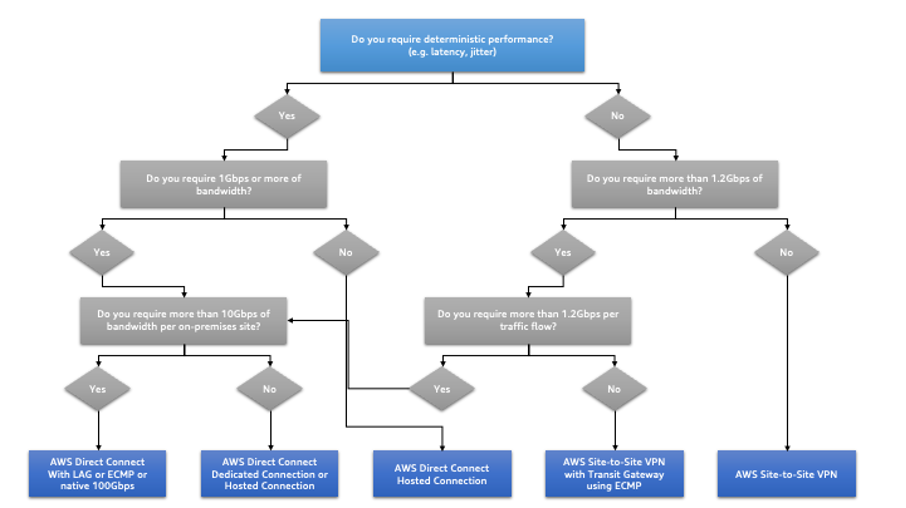
Choosing between a dedicated connection and a VPN for hybrid networking
Estimate bandwidth and latency before you choose, because sizing errors surface only under load. When one connection cannot carry the traffic, you can run several dedicated connections or VPN tunnels and spread load across them. Do not load balance across a dedicated connection and a VPN together, because their latency and bandwidth differ enough to produce inconsistent, hard-to-diagnose performance. Redundancy is a separate decision from capacity: a single connection remains a single point of failure at any bandwidth.
A VPN provides encryption by default. A dedicated connection does not. When you need encryption over it, layer a VPN on top or run a private IP VPN over a transit virtual interface. For connectivity between data centers worldwide, you can route traffic over the provider network between connection locations, bypassing Regions. Match these options to your compliance, segmentation, and throughput requirements.
Implementation steps
-
Estimate bandwidth and latency requirements: For existing workloads moving to AWS, use data from your internal network monitoring systems. For new workloads without monitoring data, work with product owners to set performance targets that support a good user experience.
-
Choose dedicated connectivity, VPN, or both: Match all requirements (encryption, bandwidth, and traffic needs) to a connectivity option, using Figure 1 as a guide. AWS Direct Connect
provides dedicated connectivity from 50 Mbps to 100 Gbps with managed latency and provisioned bandwidth. AWS Site-to-Site VPN provides a managed IPsec service, and each connection includes two tunnels for high availability. -
Size and scale the connection: For AWS Direct Connect, select the bandwidth your traffic requires and scale it using native 100 Gbps, a link aggregation group (LAG), or BGP equal-cost multipath (ECMP). For a Site-to-Site VPN that reaches a Region from multiple locations, use an accelerated Site-to-Site VPN connection to improve network performance.
-
Add encryption and segmentation where required: For an IPsec VPN over AWS Direct Connect, consider AWS Site-to-Site Private IP VPN over a transit virtual interface for segmentation. See Selecting the Right Site-to-Site VPN Solution: A Decision Framework
to compare it against other Site-to-Site VPN options. Use AWS Direct Connect SiteLink to create low-latency, redundant connections between data centers over the fastest path between AWS Direct Connect locations , bypassing Regions. -
Validate before deploying to production: Run security and performance testing to confirm the setup meets your bandwidth, reliability, latency, and compliance requirements.
-
Monitor and optimize: Monitor connectivity performance and usage on a regular cadence, and adjust capacity or redundancy as your traffic changes.
Resources
Related best practices:
Related documents:
Related videos:
-
AWS re:Invent 2025 - Advanced VPC design and new capabilities (NET340)
-
AWS re:Invent 2025 - AWS Networking Fundamentals: Connect, secure and scale (NET208)
-
AWS re:Invent 2025 - Powering your success through AWS Infrastructure innovations (NET402)
-
AWS re:Invent 2025 - Hybrid connectivity at scale: A deep dive into AWS Direct Connect (NET403)
-
AWS re:Invent 2024 - Design well-architected networks on AWS
-
AWS re:Invent 2024 - Dive into the depths of routing on AWS (NET318)
-
AWS re:Invent 2023 - What can networking do for your application?
-
AWS re:Invent 2023 - Building hybrid network connectivity with AWS (TNC217)
Related examples:
Related workshops:
