REL12-BP04 Test resilience using chaos engineering
Chaos engineering injects controlled faults into a system to verify that it withstands and recovers from real-world disruptions. Running these experiments regularly, in or close to production, builds confidence that recovery mechanisms work.
Desired outcome:
-
You verify workload resilience regularly through fault injection experiments and injection of unexpected load.
-
You combine chaos engineering with resilience testing that validates known, expected behavior during an event.
-
Your experiments run both inside the delivery pipeline and outside deployments, under real-world conditions and load.
-
Successful experiments become automated regression tests that guard resilience over time.
Common anti-patterns:
-
Teams design for resilience but never verify how the whole workload behaves when faults occur.
-
Experiments never run under real-world conditions or expected load.
-
Experiments are not treated as code or maintained through the development cycle.
-
Chaos experiments run only in the pipeline, or only outside it, but not both.
-
Teams ignore past post-incident analyses when choosing which faults to inject.
Benefits of establishing this best practice:
-
Recovery procedures are proven against real faults, not assumed to work.
-
Hidden weaknesses surface in a controlled setting where you can address them safely.
-
Alerting and notification paths are validated as part of each experiment.
-
Resilience improves continually as experiments become permanent regression tests.
Level of risk exposed if this best practice is not established: Medium
Implementation guidance
The Principles of Chaos Engineering
Steady state is a measurable output that indicates normal behavior, such as processing 300 transactions per second at a 99 percent success rate with a 500 ms round-trip time. A hypothesis predicts that steady state will hold under a specific fault, because the workload's mitigations handle it. Define both before you inject a fault: the steady-state metric is your baseline, and the hypothesis is the claim the experiment tests. Post-incident analyses are a strong source of both the faults worth injecting and the metrics worth watching.
Guardrails keep experiments safe. Define stop conditions on the metrics that represent steady state and on the components you are injecting faults into, so an experiment halts automatically before it causes unacceptable impact. Include a synthetic monitor, or user canary, as a proxy for customer experience. Simulate faults in a non-production environment first to confirm that stop conditions activate and observability catches exceptions, then move toward production, where real load reveals behavior that no lower environment reproduces. Run first experiments during off-peak hours, and use synthetic traffic against control and experimental deployments when customer traffic poses too much risk.
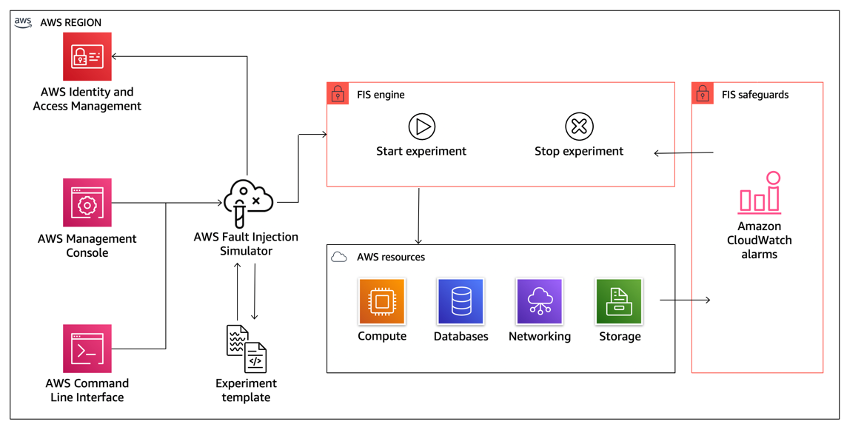
AWS Fault Injection Service running experiments across resource types
The preceding figure shows AWS Fault Injection Service (AWS FIS), a managed service for running experiments inside or outside your delivery pipeline. AWS FIS introduces faults across resource types including Amazon EC2, Amazon ECS, Amazon EKS, Amazon RDS, Amazon DynamoDB, AWS Lambda, Amazon S3, and networking services. Fault types include:
-
Instance termination
-
Forced failover
-
CPU and memory stress
-
Throttling
-
Latency
-
Packet loss
-
Full-AZ interruption scenarios
-
Network disruptions between AZs, VPCs, or specific services
Use multi-step experiment workflows to sequence actions and model cascading failures. Use cross-account experiments to run scenarios against resources in multiple accounts from a central account. The experiment templates library provides pre-built scenarios for common resilience patterns such as AZ failover, Region failover, and dependency failure. AWS Resilience Hub recommends and can trigger FIS experiments based on resilience assessment findings. AWS FIS integrates with Amazon CloudWatch alarms for stop conditions that roll back an experiment on unexpected impact. Open-source tools such as Chaos Toolkit, Chaos Mesh, and Litmus Chaos, and commercial tools such as Gremlin, extend the range of faults. AWS FIS coordinates workflows across several of these tools.
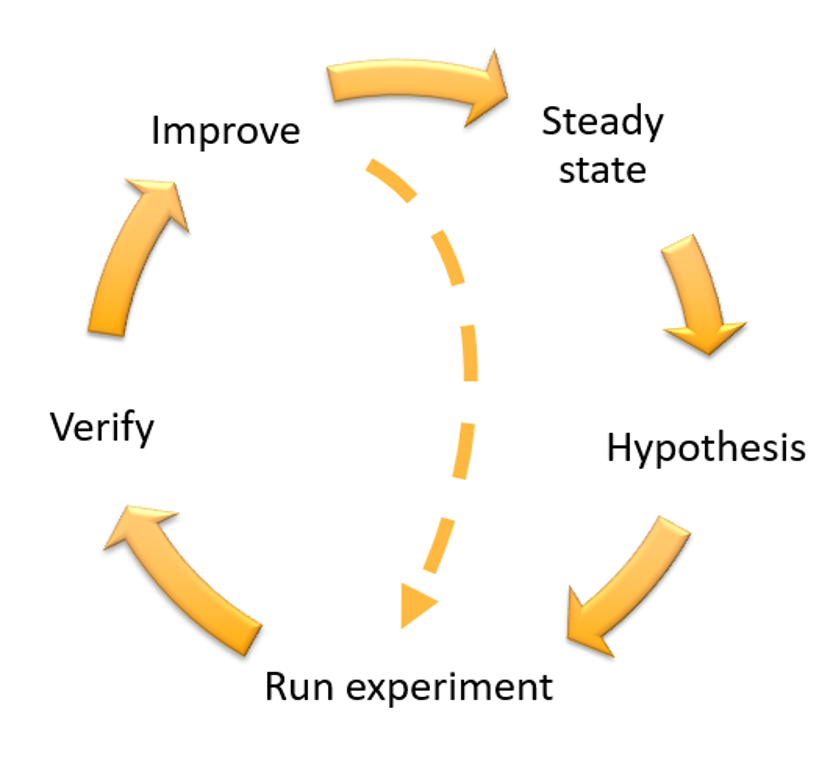
Continuous resilience flywheel for chaos engineering
The experiment loop follows the continuous resilience flywheel in the preceding figure: define steady state, form a hypothesis, run the experiment, verify the result, and improve the design before running again. When a workload survives an experiment, keep it as an automated regression test in your systems development lifecycle and delivery pipeline, so a future change cannot silently reintroduce the weakness. A fault design or a failed experiment can leave a workload in an unexpected state. Give every experiment a rollback path, such as an AWS FIS post action, and document it in a playbook.
Implementation steps
-
Determine which faults to experiment with: Assess your workload design for resilience and list each element intended to maintain it, along with the faults it mitigates. Draw on critical dependencies, past events, known issues, and compliance requirements. The Failure Modes and Effects Analysis (FMEA) process gives you a framework for component-level analysis of failures and their impact. Start with the AWS FIS experiment templates library for pre-built scenarios covering common resilience patterns, and review AWS Resilience Hub assessment recommendations for targeted experiments specific to your application.
-
Prioritize each fault: Categorize faults as high, medium, or low priority using frequency and impact. Estimate frequency from historical data for this workload, or from similar workloads when none exists. Weigh impact by the scope of the fault and the workload's purpose, and use post-incident analyses to ground both estimates.
-
Define steady state and form a hypothesis: Confirm the workload is healthy, then define steady state as a measurable output such as a success rate and latency percentile. Write a hypothesis stating that, given a specific fault, the workload maintains steady state because of specific mitigations. Specify the fault type and the mitigating controls.
-
Run the experiment with guardrails: Inject the fault using AWS FIS actions or custom actions defined in AWS Systems Manager documents. Set stop conditions on steady-state and component metrics, include a synthetic monitor as a user proxy, and run in a non-production environment before production. Inform operations, reliability, and support teams before you begin.
-
Verify the hypothesis: Compare the measured output against the steady-state metrics you defined. Focus on customer-facing signals such as server-side error rates and failed requests, supplemented by the direct consequence of the fault. If steady state held, the hypothesis is confirmed.
-
Improve the design and re-run: If steady state was not maintained, investigate how to strengthen the design, applying the best practices of the Reliability pillar and resources in the AWS Builders' Library
. After implementing changes, run the experiment again to confirm they work. -
Automate and run experiments regularly: Once a workload meets a hypothesis, automate the experiment as a regression test in your delivery pipeline and run it on a regular cadence. Use FIS scheduled experiments to run tests on a recurring schedule without requiring pipeline integration for every execution. Include fault injection in your game days so teams rehearse the response as if a real event occurred.
-
Capture and store results: Persist each experiment's results with enough context to analyze trends later, including time, workload, and conditions. Use experiment logging with AWS FIS alongside dashboards and recorded observations.
Resources
Related best practices:
Related documents:
Related videos:
Related tools:
Related workshops:
