The AWS SDK for JavaScript v2 has reached end-of-support. We recommend
that you migrate to AWS SDK for JavaScript v3.
For additional details and information on how to migrate, please refer to this announcement
What Is the AWS SDK for JavaScript?
The AWS SDK for JavaScript provides a JavaScript API for AWS services. You can use the JavaScript API to build
libraries or applications for Node.js
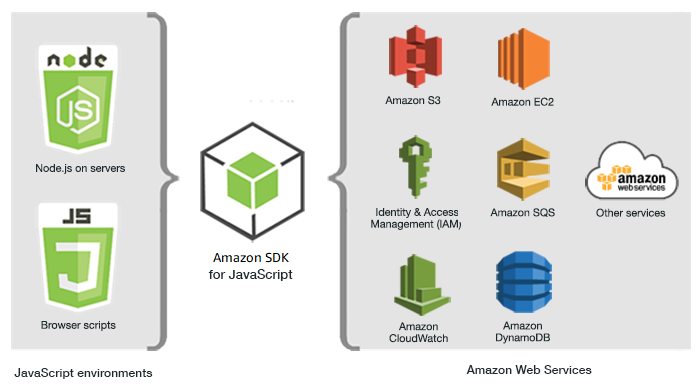
Not all services are immediately available in the SDK. To find out which services are currently supported by the AWS SDK for JavaScript,
see https://github.com/aws/aws-sdk-js/blob/master/SERVICES.md
Maintenance and support for SDK major versions
For information about maintenance and support for SDK major versions and their underlying dependencies, see the following in the AWS SDKs and Tools Reference Guide:
Using the SDK with Node.js
Node.js is a cross-platform runtime for running server-side JavaScript applications. You can set up Node.js on an Amazon EC2 instance to run on a server. You can also use Node.js to write on-demand AWS Lambda functions.
Using the SDK for Node.js differs from the way in which you use it for JavaScript in a web browser. The difference comes from the way in which you load the SDK and in how you obtain the credentials needed to access specific web services. When use of particular APIs differs between Node.js and the browser, those differences will be called out.
Using the SDK with AWS Amplify
For browser-based web, mobile, and hybrid apps, you can also use the AWS Amplify Library on GitHub
Note
Frameworks such as AWS Amplify might not offer the same browser support as the SDK for JavaScript. Check a framework's documentation for details.
Using the SDK with Web Browsers
All major web browsers support execution of JavaScript. JavaScript code that is running in a web browser is often called client-side JavaScript.
Using the SDK for JavaScript in a web browser differs from the way in which you use it for Node.js. The difference comes from the way in which you load the SDK and in how you obtain the credentials needed to access specific web services. When use of particular APIs differs between Node.js and the browser, those differences will be called out.
For a list of browsers that are supported by the AWS SDK for JavaScript, see Web Browsers Supported.
Common Use Cases
Using the SDK for JavaScript in browser scripts makes it possible to realize a number of compelling use cases. Here are several ideas for things you can build in a browser application by using the SDK for JavaScript to access various web services.
Build a custom console to AWS services in which you access and combine features across Regions and services to best meet your organizational or project needs.
Use Amazon Cognito Identity to enable authenticated user access to your browser applications and websites, including use of third-party authentication from Facebook and others.
Use Amazon Kinesis to process click streams or other marketing data in real time.
Use Amazon DynamoDB for serverless data persistence such as individual user preferences for website visitors or application users.
Use AWS Lambda to encapsulate proprietary logic that you can invoke from browser scripts without downloading and revealing your intellectual property to users.
About the Examples
You can browse the SDK for JavaScript examples in the AWS Code Example Library.
