What is Amazon VPC?
With Amazon Virtual Private Cloud (Amazon VPC), you can launch AWS resources in a logically isolated virtual network that you've defined. This virtual network closely resembles a traditional network that you'd operate in your own data center, with the benefits of using the scalable infrastructure of AWS.
The following diagram shows an example VPC. The VPC has one subnet in each of the Availability Zones in the Region, EC2 instances in each subnet, and an internet gateway to allow communication between the resources in your VPC and the internet.
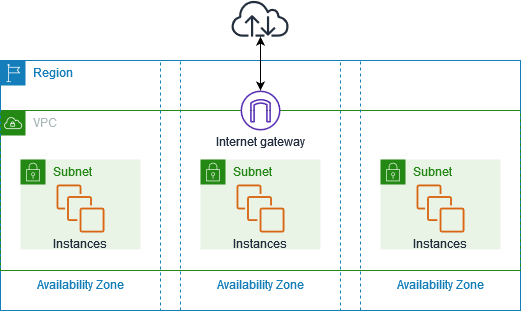
For more information, see Amazon Virtual Private Cloud (Amazon VPC)
Features
The following features help you configure a VPC to provide the connectivity that your applications need:
- Virtual private clouds (VPC)
A VPC is a virtual network that closely resembles a traditional network that you'd operate in your own data center. After you create a VPC, you can add subnets.
- Subnets
A subnet is a range of IP addresses in your VPC. A subnet must reside in a single Availability Zone. After you add subnets, you can deploy AWS resources in your VPC.
- IP addressing
You can assign IP addresses, both IPv4 and IPv6, to your VPCs and subnets. You can also bring your public IPv4 addresses and IPv6 GUA addresses to AWS and allocate them to resources in your VPC, such as EC2 instances, NAT gateways, and Network Load Balancers.
- Routing
Use route tables to determine where network traffic from your subnet or gateway is directed.
- Gateways and endpoints
A gateway connects your VPC to another network. For example, use an internet gateway to connect your VPC to the internet. Use a VPC endpoint to connect to AWS services privately, without the use of an internet gateway or NAT device.
- Peering connections
Use a VPC peering connection to route traffic between the resources in two VPCs.
- Traffic Mirroring
Copy network traffic from network interfaces and send it to security and monitoring appliances for deep packet inspection.
- Transit gateways
Use a transit gateway, which acts as a central hub, to route traffic between your VPCs, VPN connections, and Direct Connect connections.
- VPC Flow Logs
A flow log captures information about the IP traffic going to and from network interfaces in your VPC.
- VPN connections
Connect your VPCs to your on-premises networks using AWS Virtual Private Network (Site-to-Site VPN).
Getting started with Amazon VPC
Your AWS account includes a default VPC in each AWS Region. Your default VPCs are configured such that you can immediately start launching and connecting to EC2 instances. For more information, see Plan your VPC.
You can choose to create additional VPCs with the subnets, IP addresses, gateways and routing that you need. For more information, see Create a VPC.
Working with Amazon VPC
You can create and manage your VPCs using any of the following interfaces:
-
AWS Management Console — Provides a web interface that you can use to access your VPCs.
-
AWS Command Line Interface (AWS CLI) — Provides commands for a broad set of AWS services, including Amazon VPC, and is supported on Windows, Mac, and Linux. For more information, see AWS Command Line Interface
. -
AWS SDKs — Provides language-specific APIs and takes care of many of the connection details, such as calculating signatures, handling request retries, and error handling. For more information, see AWS SDKs
. -
Query API — Provides low-level API actions that you call using HTTPS requests. Using the Query API is the most direct way to access Amazon VPC, but it requires that your application handle low-level details such as generating the hash to sign the request, and error handling. For more information, see Amazon VPC actions in the Amazon EC2 API Reference.
Pricing for Amazon VPC
There's no additional charge for using a VPC. There are, however, charges for some VPC
components, such as NAT gateways, IP Address Manager, traffic mirroring, Reachability Analyzer, and
Network Access Analyzer. For more information, see Amazon VPC Pricing
Nearly all resources that you launch in your virtual private cloud (VPC) provide you with an IP address for connectivity. The vast majority of resources in your VPC use private IPv4 addresses. Resources that require direct access to the internet over IPv4, however, use public IPv4 addresses.
Amazon VPC enables you to launch managed services, such as Elastic Load Balancing, Amazon RDS, and Amazon EMR, without having a VPC set up beforehand. It does this by using the default VPC in your account if you have one. Any public IPv4 addresses provisioned to your account by the managed service will be charged. These charges will be associated with Amazon VPC service in your AWS Cost and Usage Report.
Pricing for public IPv4 addresses
A public IPv4 address is an IPv4 address that is routable from the internet. A public IPv4 address is necessary for a resource to be directly reachable from the internet over IPv4.
If you are an existing or new AWS Free Tier
Private IPv4 addresses (RFC
1918
Public IPv4 addresses have the following types:
Elastic IP addresses (EIPs): Static, public IPv4 addresses provided by Amazon that you can associate with an EC2 instance, elastic network interface, or AWS resource.
EC2 public IPv4 addresses: Public IPv4 addresses assigned to an EC2 instance by Amazon (if the EC2 instance is launched into a default subnet or if the instance is launched into a subnet that’s been configured to automatically assign a public IPv4 address).
BYOIPv4 addresses: Public IPv4 addresses in the IPv4 address range that you’ve brought to AWS using Bring your own IP addresses (BYOIP).
Service-managed IPv4 addresses: Public IPv4 addresses automatically provisioned on AWS resources and managed by an AWS service. For example, public IPv4 addresses on Amazon ECS, Amazon RDS, or Amazon WorkSpaces.
The following list shows the most common AWS services that can use public IPv4 addresses.
-
Amazon WorkSpaces Applications
-
AWS Database Migration Service
-
Amazon EC2
-
Amazon Elastic Container Service
-
Amazon EKS
-
Amazon EMR
-
Amazon GameLift Servers
-
AWS Global Accelerator
-
AWS Mainframe Modernization
-
Amazon Managed Streaming for Apache Kafka
-
Amazon MQ
-
Amazon RDS
-
Amazon Redshift
-
AWS Site-to-Site VPN
-
Amazon VPC NAT gateway
-
Amazon WorkSpaces
-
Elastic Load Balancing
