Using Lambda MicroVMs in your GitHub development workflows
You can use AWS Lambda MicroVMs to act on events from your GitHub repositories, such as new pull requests, pushes, or new issues. GitHub webhooks connect those repository events to your AWS account, where each event starts a fresh MicroVM that runs a CI job or a coding-agent task inside a Firecracker-isolated environment, then terminates when the work is done.
Because every job runs in its own MicroVM, you get VM-level isolation between jobs, a clean environment every time (no state leaks between runs), and no idle compute – the MicroVM exists only for the duration of a single job. This makes the pattern a good fit for two broad use cases:
-
Ephemeral CI runners – register a self-hosted GitHub Actions runner that processes exactly one job and is thrown away, so a compromised or misbehaving job doesn't carry over to the next one.
-
Sandboxed coding agents – run an AI coding agent against a repository inside the MicroVM, where it can freely read, build, test, and execute code without touching your other workloads.
Deploying the reference solution
A deployable reference
implementation
-
Deploy the reference solution into your AWS account.
-
Store a strong secret in a AWS Systems Manager Parameter Store SecureString parameter (for example,
github_webhook_secret), and, for the CI-runner use case, store your GitHub App credentials the same way. -
In your GitHub repository or organization, go to Settings > Webhooks > Add webhook.
-
Payload URL – use the Amazon API Gateway endpoint URL from your deployed stack.
-
Secret – paste the same secret token string from step 2.
-
Content type –
application/json. -
Select the events you want to send to the MicroVM (for the CI-runner use case, Workflow jobs).
You can modify the reference solution to implement sandboxed coding agents by changing the source webhook events and MicroVM application code.
The step-by-step build, deploy, and GitHub App setup instructions – including how the durable function orchestrates the MicroVM lifecycle – live in the reference solution's README.
How the integration works
The pattern has three moving parts: GitHub (the event source), a thin webhook receiver in your account (the control plane), and the MicroVM (the isolated workers). The reference solution and architecture diagram below show how to use Lambda durable functions as an orchestrator.
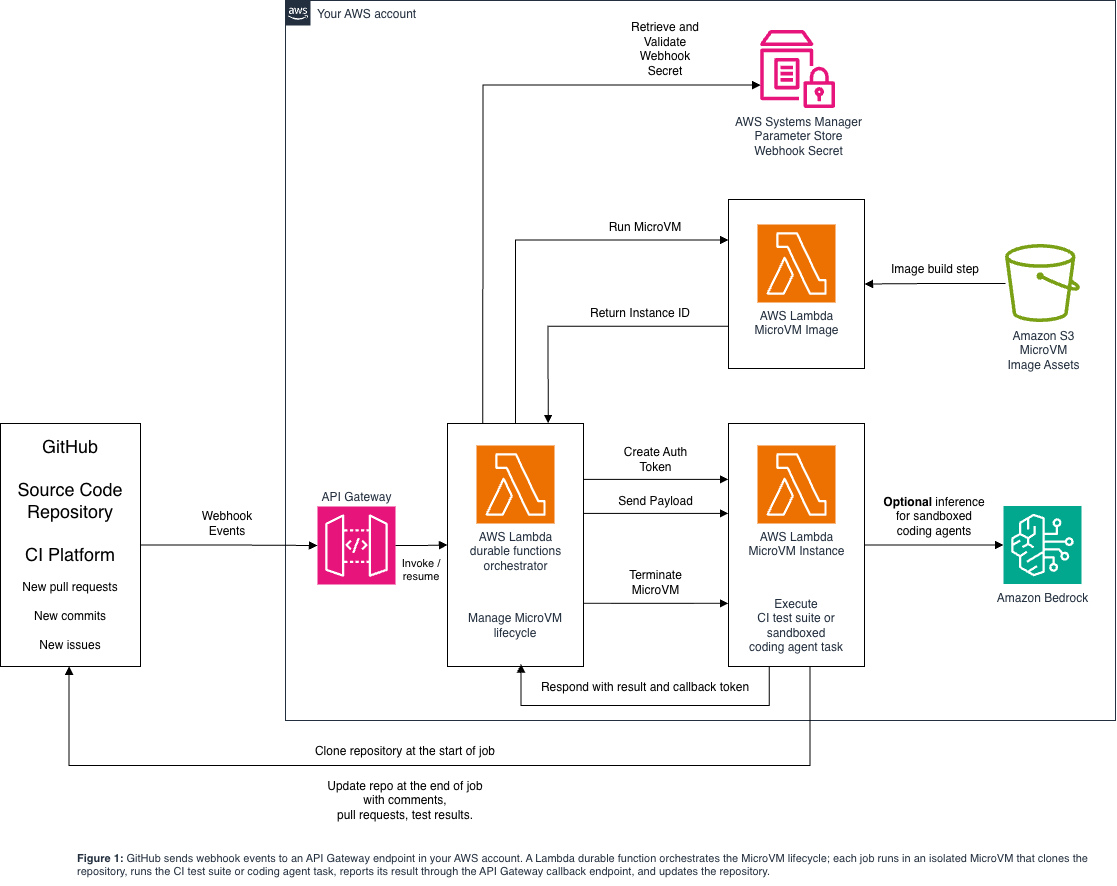
Figure 1: GitHub webhook architecture for event-driven CI runner payloads or sandboxed coding agents as part of a CI workflow
Verifying the webhook
GitHub signs every webhook delivery with an HMAC-SHA256 signature over
the raw request body, sent in the X-Hub-Signature-256 header.
Your receiver must recompute that HMAC using your shared secret and compare
it in constant time before acting on the payload. This is a critical
security control in the pattern – without it, anyone who discovers
your endpoint URL could start MicroVMs in your account.
Verify the signature over the exact raw bytes GitHub sent, before parsing the JSON. Re-serializing the body first will change the bytes and the signature will not match your verification check.
Starting and connecting to the MicroVM
Once a delivery is trusted, your receiver calls RunMicrovm
to boot a VM from an image you built ahead of time. You pass a small
runHookPayload to the VM's /run lifecycle hook to
tell it what to do – for example, a callback URL to report results
to.
Reporting completion and tearing down
When the job finishes, the MicroVM signals your control plane (for
example, by calling back to an API Gateway endpoint). The control plane
then calls TerminateMicrovm. Keeping termination in the
control plane – rather than relying only on the idle timeout for
termination – makes the one-job-per-VM model explicit and keeps cost
tied directly to work performed.
Use case: ephemeral CI runners
GitHub's just-in-time (JIT) self-hosted runners fit this pattern. A JIT runner registers, runs exactly one job, automatically deregisters, and exits – which is precisely the MicroVM lifecycle.
The flow:
-
A workflow job is queued in your repository. GitHub sends a
workflow_jobwebhook withaction: queued. -
Your receiver verifies the signature, checks that the job carries the label you reserve for MicroVM runners, and mints a JIT runner configuration from GitHub (using a GitHub App).
-
A MicroVM boots, registers itself with GitHub using the JIT configuration, and GitHub dispatches the one queued job to it.
-
The runner finishes, deregisters, and the MicroVM is terminated.
Because the runner is destroyed after a single job, there is no persistent runner to patch, no shared workspace between jobs, and no long-lived credentials sitting on a host. This is a fit for untrusted or fork-originated CI, and for teams that want per-job isolation without managing a runner fleet.
Use case: sandboxed coding agents
A common pattern is to run coding agents inside MicroVMs to support your team's development cycle – often called background coding agents. The agent gets a disposable, isolated environment with full access to a checkout of your repository, where it can install dependencies, run builds and tests, and execute code it writes, all without any risk to your other workloads.
A few ways teams use background coding agents triggered from GitHub events:
-
Adversarial code review – on a new pull request, spin up an agent that reviews the diff for security issues and coding-standard violations, then posts its findings back as a review comment.
-
Fixing defects and tech debt – on a new issue labeled for automation, have an agent reproduce the problem, implement a fix, run the test suite, and open a pull request.
-
Building new features – from an issue describing desired behavior, let an agent draft an implementation and open a draft PR for a human to refine.
The MicroVM's isolation is what makes this safe to run on untrusted input: an agent executing model-generated code is contained within the Firecracker VM, and the environment is discarded when the task completes.
Security considerations
-
Always verify
X-Hub-Signature-256over the raw body, in constant time, before acting on any delivery. -
Store the webhook secret and any GitHub App credentials in AWS Secrets Manager or AWS Systems Manager Parameter Store (SecureString) over storing them in code or environment variables committed to a repository.
-
Scope the MicroVM execution role to only what the job needs. CI jobs and coding agents run arbitrary code; treat the execution role as the blast radius.
-
Restrict outbound traffic for production workloads by attaching a Lambda Network Connector, so a job can only reach the destinations it needs. See Networking.
-
Treat registration tokens and JIT configs as short-lived secrets – deliver them to the VM over the authenticated ingress channel and never log them.
Related
