| Next » | |
![]() ![]() ![]() | Did this page help you? Yes | No | Tell us about it... |
Amazon Web Services (AWS) comprises about 25 services, each of which exposes an area of functionality. While the variety of services offers flexibility for how you want to manage your AWS infrastructure, it can be challenging to figure out which services to use and how to provision them.
With AWS Elastic Beanstalk, you can quickly deploy and manage applications in the AWS cloud without worrying about the infrastructure that runs those applications. AWS Elastic Beanstalk reduces management complexity without restricting choice or control. You simply upload your application, and AWS Elastic Beanstalk automatically handles the details of capacity provisioning, load balancing, scaling, and application health monitoring. AWS Elastic Beanstalk uses highly reliable and scalable services that are available in the AWS Free Usage Tier such as:
To learn more about the AWS Free Usage Tier, and how to deploy a sample web application in it using AWS Elastic Beanstalk, go to Deploy a Sample Web Application in the Free Usage Tier.
You can also perform most deployment tasks, such as changing the size of your fleet of Amazon EC2 instances or monitoring your application, directly from the AWS Elastic Beanstalk web interface.
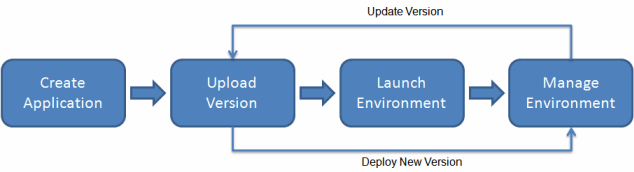
To use AWS Elastic Beanstalk, you create an application, upload an application version (for example, a Java .war file) to AWS Elastic Beanstalk, and then provide some information about the application. Elastic Beanstalk automatically launches an environment and creates and configures the AWS resources needed to run your code. After your environment is launched, you can then manage your environment and deploy new application versions. The following diagram illustrates the workflow of AWS Elastic Beanstalk.

After you create and deploy your application, information about the application—including metrics, events, and environment status—is available through the AWS Management Console, APIs, and CLI. For step-by-step instructions on how to create, deploy, and manage your application using the AWS Management Console, go to Getting Started Using AWS Elastic Beanstalk. To learn more about an AWS Elastic Beanstalk application and its components, see AWS Elastic Beanstalk Components.
AWS Elastic Beanstalk provides developers and systems administrators an easy, fast way to deploy and manage your application without having to worry about AWS infrastructure. If you already know the AWS resources you want to use and how they work, you might prefer AWS CloudFormation to create your AWS resources by creating a template. You can then use this template to launch new AWS resources in the exact same way without having to recustomize your AWS resources. Once your resources are deployed, you can modify and update the AWS resources in a controlled and predictable way, providing the same sort of version control over your AWS infrastructure that you exercise over your software. For more information about AWS CloudFormation, go to AWS CloudFormation Getting Started Guide.
AWS Elastic Beanstalk supports applications developed in Java, PHP, .NET, Node.js, Python, and Ruby as well as different container types for each language. AWS Elastic Beanstalk provisions the resources needed to run your application including one or more Amazon EC2 instances. The software stack running on the Amazon EC2 instances is dependent on the container type. A container type defines the infrastructure topology and software stack to be used for that environment. For example, the AWS Elastic Beanstalk for Apache Tomcat 7 container uses the Amazon Linux operating system, Apache web server, and Apache Tomcat software.
You can get started with Java using the AWS Toolkit for Eclipse. The toolkit is a downloadable package that includes the AWS libraries, project templates, code samples, and documentation. The AWS SDK for Java supports developing applications using either Java 5 or Java 6. AWS Elastic Beanstalk supports the following container types:
32-bit Amazon Linux running Tomcat 6
64-bit Amazon Linux running Tomcat 6
32-bit Amazon Linux running Tomcat 7
64-bit Amazon Linux running Tomcat 7
You can get started in minutes using the AWS Toolkit for Visual Studio. The toolkit includes the AWS libraries, project templates, code samples, and documentation. The AWS SDK for .NET supports the development of applications using .NET Framework 2.0 or later. To learn how to get started deploying a .NET application using the AWS Toolkit for Visual Studio, see Creating and Deploying AWS Elastic Beanstalk Applications in .NET Using AWS Toolkit for Visual Studio. AWS Elastic Beanstalk supports the following container types:
64-bit Windows Server 2008 R2 running IIS 7.5
64-bit Windows Server 2012 running IIS 8
You can get started in minutes using the AWS Management Console or the eb command line interface. You can deploy applications by simply zipping them up and uploading them through the console. To learn how to upload an application using the AWS Management Console, see Creating New Applications. To learn how to get started deploying a Node.js application to AWS Elastic Beanstalk using eb and Git, see Deploying AWS Elastic Beanstalk Applications in Node.js Using Eb and Git. AWS Elastic Beanstalk supports the following container types:
32-bit Amazon Linux running Node.js
64-bit Amazon Linux running Node.js
You can get started in minutes using the AWS Management Console or the eb command line interface. You can deploy applications by simply zipping them up and uploading them through the console. To learn how to upload an application using the AWS Management Console, see Creating New Applications. To learn how to get started deploying a PHP application to AWS Elastic Beanstalk using eb and Git, see Deploying AWS Elastic Beanstalk Applications in PHP. AWS Elastic Beanstalk supports the following container types:
32-bit Amazon Linux running PHP 5.3
64-bit Amazon Linux running PHP 5.3
32-bit Amazon Linux running PHP 5.4
64-bit Amazon Linux running PHP 5.4
AWS Elastic Beanstalk supports Python applications running on Apache and WSGI. This includes support for many popular frameworks such as Django and Flask. You can get started in minutes using the AWS Management Console or the eb command line interface. You can deploy applications by simply zipping them up and uploading them through the console. To learn how to upload an application using the AWS Management Console, see Creating New Applications. To learn how to get started deploying a Python application to AWS Elastic Beanstalk using eb and Git, see Deploying AWS Elastic Beanstalk Applications in Python Using Eb and Git. AWS Elastic Beanstalk supports the following container types:
32-bit Amazon Linux running Python
64-bit Amazon Linux running Python
AWS Elastic Beanstalk supports Python 2.6 running on Amazon Linux.
AWS Elastic Beanstalk runs Ruby applications including support for many popular frameworks such as Rails and Sinatra. You can deploy applications in minutes using the eb command line interface and Git or the AWS Management Console. To learn how to get started deploying a Ruby application to AWS Elastic Beanstalk using eb and Git, see Deploying AWS Elastic Beanstalk Applications in Ruby Using Eb and Git. To learn how to upload an application using the AWS Management Console, see Creating New Applications. AWS Elastic Beanstalk supports the following container types:
32-bit Amazon Linux running Ruby 1.8.7
64-bit Amazon Linux running Ruby 1.8.7
32-bit Amazon Linux running Ruby 1.9.3
64-bit Amazon Linux running Ruby 1.9.3
AWS Elastic Beanstalk does not restrict your choice of persistent storage and database service options. For more information on AWS storage options, go to Storage Options in the AWS Cloud.
There is no additional charge for AWS Elastic Beanstalk; you pay only for the underlying AWS resources that your application consumes. For details about pricing, see the AWS Elastic Beanstalk service detail page.
Customers have built a wide variety of products, services, and applications on top of AWS. Whether you are searching for ideas about what to build, looking for examples, or just want to explore, you can find many solutions at the AWS Customer App Catalog. You can browse by audience, services, and technology. We also invite you to share applications you build with the community. Developer resources produced by the AWS community are at http://aws.amazon.com/resources/.
This guide contains conceptual information about the AWS Elastic Beanstalk web service, as well as information about how to use the service to create and deploy new web applications. Separate sections describe how to program with the command line interface (CLI) and how to integrate AWS Elastic Beanstalk with other Amazon Web Services.
We recommend that you first read Getting Started Using AWS Elastic Beanstalk to learn how to start using AWS Elastic Beanstalk. Getting Started steps you through creating, viewing, and updating your AWS Elastic Beanstalk application, as well as editing and terminating your AWS Elastic Beanstalk environment. Getting Started also describes different ways you can access AWS Elastic Beanstalk.