Tutorial: Configuring a static website using a custom domain registered with Route 53
Suppose that you want to host a static website on Amazon S3. You've registered a domain with
Amazon Route 53 (for example, example.com), and you want requests for
http://www.example.com and http:// to
be served from your Amazon S3 content. You can use this walkthrough to learn how to host a static
website and create redirects on Amazon S3 for a website with a custom domain name that is
registered with Route 53. You can work with an existing website that you want to host on Amazon S3,
or use this walkthrough to start from scratch. example.com
After you complete this walkthrough, you can optionally use Amazon CloudFront to improve the performance of your website. For more information, see Speeding up your website with Amazon CloudFront.
Note
Amazon S3 website endpoints do not support HTTPS or access points. If you want to use HTTPS, you can use Amazon CloudFront to serve a static website hosted on Amazon S3.
For a tutorial about how to host your content securely with CloudFront and Amazon S3, see Tutorial: Hosting on-demand
streaming video with Amazon S3, Amazon CloudFront, and Amazon Route 53. For more information, see How do I use
CloudFront to serve a static website hosted on Amazon S3?
Automating static website setup with an CloudFormation template
You can use an CloudFormation template to automate your static website setup. The CloudFormation template sets up the components that you need to host a secure static website so that you can focus more on your website’s content and less on configuring components.
The CloudFormation template includes the following components:
Amazon S3 – Creates an Amazon S3 bucket to host your static website.
CloudFront – Creates a CloudFront distribution to speed up your static website.
Lambda@Edge – Uses Lambda@Edge to add security headers to every server response. Security headers are a group of headers in the web server response that tell web browsers to take extra security precautions. For more information, see the blog post Adding HTTP security headers using Lambda@Edge and Amazon CloudFront
.
This CloudFormation template is available for you to download and use. For information and instructions, see Getting started with a secure static website in the Amazon CloudFront Developer Guide.
Topics
Before you begin
As you follow the steps in this example, you work with the following services:
Amazon Route 53 – You use Route 53 to register domains and to
define where you want to route internet traffic for your domain. The example shows how
to create Route 53 alias records that route traffic for your domain
(example.com) and subdomain (www.example.com) to an Amazon S3
bucket that contains an HTML file.
Amazon S3 – You use Amazon S3 to create buckets, upload a sample website page, configure permissions so that everyone can see the content, and then configure the buckets for website hosting.
Step 1: Register a custom domain with Route 53
If you don't already have a registered domain name, such as example.com,
register one with Route 53. For more information, see Registering a new domain in the
Amazon Route 53 Developer Guide. After you register your domain name, you can
create and configure your Amazon S3 buckets for website hosting.
Step 2: Create two buckets
To support requests from both the root domain and subdomain, you create two buckets.
-
Domain bucket –
example.com -
Subdomain bucket –
www.example.com
These bucket names must match your domain name exactly. In this example, the domain name is
example.com. You host your content out of the root domain bucket
(example.com). You create a redirect request for the subdomain bucket
(www.example.com). If someone enters www.example.com in
their browser, they are redirected to example.com and see the content that
is hosted in the Amazon S3 bucket with that name.
To create your buckets for website hosting
The following instructions provide an overview of how to create your buckets for website hosting. For detailed, step-by-step instructions on creating a bucket, see Creating a general purpose bucket.
Sign in to the AWS Management Console and open the Amazon S3 console at https://console.aws.amazon.com/s3/
. -
Create your root domain bucket:
-
In the navigation bar on the top of the page, choose the name of the currently displayed AWS Region. Next, choose the Region in which you want to create a bucket.
Note
To minimize latency and costs and address regulatory requirements, choose a Region close to you. Objects stored in a Region never leave that Region unless you explicitly transfer them to another Region. For a list of Amazon S3 AWS Regions, see AWS service endpoints in the Amazon Web Services General Reference.
In the left navigation pane, choose General purpose buckets.
-
Choose Create bucket. The Create bucket page opens.
Enter the Bucket name (for example,
example.com).Choose the Region where you want to create the bucket.
Choose a Region that is geographically close to you to minimize latency and costs, or to address regulatory requirements. The Region that you choose determines your Amazon S3 website endpoint. For more information, see Website endpoints.
To accept the default settings and create the bucket, choose Create.
-
-
Create your subdomain bucket:
Choose Create bucket.
Enter the Bucket name (for example,
www.example.com).Choose the Region where you want to create the bucket.
Choose a Region that is geographically close to you to minimize latency and costs, or to address regulatory requirements. The Region that you choose determines your Amazon S3 website endpoint. For more information, see Website endpoints.
To accept the default settings and create the bucket, choose Create.
In the next step, you configure example.com for website hosting.
Step 3: Configure your root domain bucket for website hosting
In this step, you configure your root domain bucket (example.com) as a
website. This bucket will contain your website content. When you configure a bucket for
website hosting, you can access the website using the Website endpoints.
To enable static website hosting
-
Sign in to the AWS Management Console and open the Amazon S3 console at https://console.aws.amazon.com/s3/
. -
In the left navigation pane, choose General purpose buckets.
-
In the buckets list, choose the name of the bucket that you want to enable static website hosting for.
-
Choose Properties.
-
Under Static website hosting, choose Edit.
-
Choose Use this bucket to host a website.
-
Under Static website hosting, choose Enable.
-
In Index document, enter the file name of the index document, typically
index.html.The index document name is case sensitive and must exactly match the file name of the HTML index document that you plan to upload to your S3 bucket. When you configure a bucket for website hosting, you must specify an index document. Amazon S3 returns this index document when requests are made to the root domain or any of the subfolders. For more information, see Configuring an index document.
-
To provide your own custom error document for 4XX class errors, in Error document, enter the custom error document file name.
The error document name is case sensitive and must exactly match the file name of the HTML error document that you plan to upload to your S3 bucket. If you don't specify a custom error document and an error occurs, Amazon S3 returns a default HTML error document. For more information, see Configuring a custom error document.
-
(Optional) If you want to specify advanced redirection rules, in Redirection rules, enter JSON to describe the rules.
For example, you can conditionally route requests according to specific object key names or prefixes in the request. For more information, see Configure redirection rules to use advanced conditional redirects.
-
Choose Save changes.
Amazon S3 enables static website hosting for your bucket. At the bottom of the page, under Static website hosting, you see the website endpoint for your bucket.
-
Under Static website hosting, note the Endpoint.
The Endpoint is the Amazon S3 website endpoint for your bucket. After you finish configuring your bucket as a static website, you can use this endpoint to test your website.
After you edit block public access settings and add a bucket policy that allows public read access, you can use the website endpoint to access your website.
In the next step, you configure your subdomain (www.example.com) to redirect
requests to your domain (example.com).
Step 4: Configure your subdomain bucket for website redirect
After you configure your root domain bucket for website hosting, you can configure your
subdomain bucket to redirect all requests to the domain. In this example, all requests
for www.example.com are redirected to example.com.
To configure a redirect request
-
On the Amazon S3 console, in the General purpose buckets list, choose your subdomain bucket name (
www.example.comin this example). -
Choose Properties.
-
Under Static website hosting, choose Edit.
-
Choose Redirect requests for an object.
-
In the Target bucket box, enter your root domain, for example,
example.com. -
For Protocol, choose http.
-
Choose Save changes.
Step 5: Configure logging for website traffic
If you want to track the number of visitors accessing your website, you can optionally enable logging for your root domain bucket. For more information, see Logging requests with server access logging. If you plan to use Amazon CloudFront to speed up your website, you can also use CloudFront logging.
To enable server access logging for your root domain bucket
Open the Amazon S3 console at https://console.aws.amazon.com/s3/
. -
In the same Region where you created the bucket that is configured as a static website, create a bucket for logging, for example
logs.example.com. -
Create a folder for the server access logging log files (for example,
logs). -
(Optional) If you want to use CloudFront to improve your website performance, create a folder for the CloudFront log files (for example,
cdn).Important
When you create or update a distribution and enable CloudFront logging, CloudFront updates the bucket access control list (ACL) to give the
awslogsdeliveryaccountFULL_CONTROLpermissions to write logs to your bucket. For more information, see Permissions required to configure standard logging and to access your log files in the Amazon CloudFront Developer Guide. If the bucket that stores the logs uses the Bucket owner enforced setting for S3 Object Ownership to disable ACLs, CloudFront cannot write logs to the bucket. For more information, see Controlling ownership of objects and disabling ACLs for your bucket. -
In the Buckets list, choose your root domain bucket.
-
Choose Properties.
-
Under Server access logging, choose Edit.
-
Choose Enable.
-
Under the Target bucket, choose the bucket and folder destination for the server access logs:
-
Browse to the folder and bucket location:
-
Choose Browse S3.
-
Choose the bucket name, and then choose the logs folder.
-
Choose Choose path.
-
-
Enter the S3 bucket path, for example,
s3://logs.example.com/logs/.
-
-
Choose Save changes.
In your log bucket, you can now access your logs. Amazon S3 writes website access logs to your log bucket every 2 hours.
Step 6: Upload index and website content
In this step, you upload your index document and optional website content to your root domain bucket.
When you enable static website hosting for your bucket, you enter the name of the index document (for example, index.html). After you enable static website hosting for the bucket, you upload an HTML file with this index document name to your bucket.
To configure the index document
-
Create an
index.htmlfile.If you don't have an
index.htmlfile, you can use the following HTML to create one:<html xmlns="http://www.w3.org/1999/xhtml" > <head> <title>My Website Home Page</title> </head> <body> <h1>Welcome to my website</h1> <p>Now hosted on Amazon S3!</p> </body> </html> -
Save the index file locally.
The index document file name must exactly match the index document name that you enter in the Static website hosting dialog box. The index document name is case sensitive. For example, if you enter
index.htmlfor the Index document name in the Static website hosting dialog box, your index document file name must also beindex.htmland notIndex.html. Sign in to the AWS Management Console and open the Amazon S3 console at https://console.aws.amazon.com/s3/
. In the left navigation pane, choose General purpose buckets.
In the buckets list, choose the name of the bucket that you want to use to host a static website.
-
Enable static website hosting for your bucket, and enter the exact name of your index document (for example,
index.html). For more information, see Enabling website hosting.After enabling static website hosting, proceed to step 6.
-
To upload the index document to your bucket, do one of the following:
Drag and drop the index file into the console bucket listing.
Choose Upload, and follow the prompts to choose and upload the index file.
For step-by-step instructions, see Uploading objects.
-
(Optional) Upload other website content to your bucket.
Step 7: Upload an error document
When you enable static website hosting for your bucket, you enter the name of the error document (for example, 404.html). After you enable static website hosting for the bucket, you upload an HTML file with this error document name to your bucket.
To configure an error document
-
Create an error document, for example
404.html. -
Save the error document file locally.
The error document name is case sensitive and must exactly match the name that you enter when you enable static website hosting. For example, if you enter
404.htmlfor the Error document name in the Static website hosting dialog box, your error document file name must also be404.html. Sign in to the AWS Management Console and open the Amazon S3 console at https://console.aws.amazon.com/s3/
. In the left navigation pane, choose General purpose buckets.
In the buckets list, choose the name of the bucket that you want to use to host a static website.
-
Enable static website hosting for your bucket, and enter the exact name of your error document (for example,
404.html). For more information, see Enabling website hosting and Configuring a custom error document.After enabling static website hosting, proceed to step 6.
-
To upload the error document to your bucket, do one of the following:
Drag and drop the error document file into the console bucket listing.
Choose Upload, and follow the prompts to choose and upload the index file.
For step-by-step instructions, see Uploading objects.
Step 8: Edit S3 Block Public Access settings
In this example, you edit block public access settings for the domain bucket
(example.com) to allow public access.
By default, Amazon S3 blocks public access to your account and buckets. If you want to use a bucket to host a static website, you can use these steps to edit your block public access settings.
Warning
Before you complete these steps, review Blocking public access to your Amazon S3 storage to ensure that you understand and accept the risks involved with allowing public access. When you turn off block public access settings to make your bucket public, anyone on the internet can access your bucket. We recommend that you block all public access to your buckets.
-
Open the Amazon S3 console at https://console.aws.amazon.com/s3/
. -
Choose the name of the bucket that you have configured as a static website.
-
Choose Permissions.
-
Under Block public access (bucket settings), choose Edit.
-
Clear Block all public access, and choose Save changes.
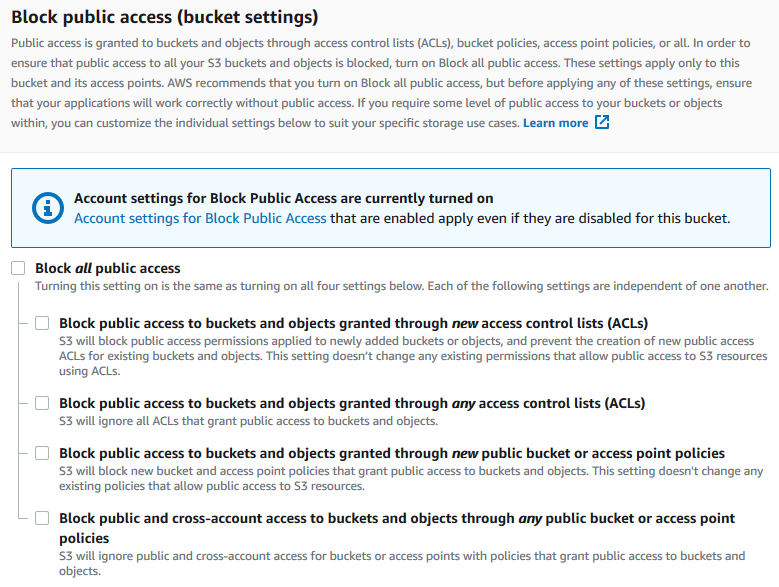
Amazon S3 turns off the Block Public Access settings for your bucket. To create a public static website, you might also have to edit the Block Public Access settings for your account before adding a bucket policy. If the Block Public Access settings for your account are currently turned on, you see a note under Block public access (bucket settings).
Step 9: Attach a bucket policy
In this example, you attach a bucket policy to the domain bucket (example.com)
to allow public read access. You replace the Bucket-Name in
the example bucket policy with the name of your domain bucket, for example
example.com.
After you edit S3 Block Public Access settings, you can add a bucket policy to grant public read access to your bucket. When you grant public read access, anyone on the internet can access your bucket.
Important
The following policy is an example only and allows full access to the contents of your bucket. Before you proceed with this step, review How can I secure the files in my Amazon S3 bucket?
-
Under Buckets, choose the name of your bucket.
-
Choose Permissions.
-
Under Bucket Policy, choose Edit.
-
To grant public read access for your website, copy the following bucket policy, and paste it in the Bucket policy editor.
{ "Version": "2012-10-17", "Statement": [ { "Sid": "PublicReadGetObject", "Effect": "Allow", "Principal": "*", "Action": [ "s3:GetObject" ], "Resource": [ "arn:aws:s3:::Bucket-Name/*" ] } ] } -
Update the
Resourceto your bucket name.In the preceding example bucket policy,
Bucket-Nameis a placeholder for the bucket name. To use this bucket policy with your own bucket, you must update this name to match your bucket name. -
Choose Save changes.
A message appears indicating that the bucket policy has been successfully added.
If you see an error that says
Policy has invalid resource, confirm that the bucket name in the bucket policy matches your bucket name. For information about adding a bucket policy, see How do I add an S3 bucket policy?If you get an error message and cannot save the bucket policy, check your account and bucket Block Public Access settings to confirm that you allow public access to the bucket.
In the next step, you can figure out your website endpoints and test your domain endpoint.
Step 10: Test your domain endpoint
After you configure your domain bucket to host a public website, you can test your endpoint. For more information, see Website endpoints. You can only test the endpoint for your domain bucket because your subdomain bucket is set up for website redirect and not static website hosting.
Note
Amazon S3 does not support HTTPS access to the website. If you want to use HTTPS, you can use Amazon CloudFront to serve a static website hosted on Amazon S3.
For more information, see How do I use CloudFront to serve a static website hosted on Amazon S3?
-
Under Buckets, choose the name of your bucket.
-
Choose Properties.
-
At the bottom of the page, under Static website hosting, choose your Bucket website endpoint.
Your index document opens in a separate browser window.
In the next step, you use Amazon Route 53 to enable customers to use both of your custom URLs to navigate to your site.
Step 11: Add alias records for your domain and subdomain
In this step, you create the alias records that you add to the hosted zone for your domain
maps example.com and
www.example.com. Instead of using IP
addresses, the alias records use the Amazon S3 website endpoints. Amazon Route 53 maintains a
mapping between the alias records and the IP addresses where the Amazon S3 buckets reside.
You create two alias records, one for your root domain and one for your
subdomain.
To add an alias record for your root domain (example.com)
Open the Route 53 console at https://console.aws.amazon.com/route53/
. Note
If you don't already use Route 53, see Step 1: Register a domain in the Amazon Route 53 Developer Guide. After completing your setup, you can resume the instructions.
Choose Hosted zones.
-
In the list of hosted zones, choose the name of the hosted zone that matches your domain name.
-
Choose Create record.
-
Choose Switch to wizard.
Note
If you want to use quick create to create your alias records, see Configuring Route 53 to route traffic to an S3 Bucket.
-
Choose Simple routing, and choose Next.
-
Choose Define simple record.
-
In Record name, accept the default value, which is the name of your hosted zone and your domain.
-
In Value/Route traffic to, choose Alias to S3 website endpoint.
-
Choose the Region.
-
Choose the S3 bucket.
The bucket name should match the name that appears in the Name box. In the Choose S3 bucket list, the bucket name appears with the Amazon S3 website endpoint for the Region where the bucket was created, for example,
s3-website-us-west-1.amazonaws.com (example.com).Choose S3 bucket lists a bucket if:
You configured the bucket as a static website.
The bucket name is the same as the name of the record that you're creating.
The current AWS account created the bucket.
If your bucket does not appear in the Choose S3 bucket list, enter the Amazon S3 website endpoint for the Region where the bucket was created, for example,
s3-website-us-west-2.amazonaws.com. For a complete list of Amazon S3 website endpoints, see Amazon S3 Website endpoints. For more information about the alias target, see Value/route traffic to in the Amazon Route 53 Developer Guide. -
In Record type, choose A ‐ Routes traffic to an IPv4 address and some AWS resources.
-
For Evaluate target health, choose No.
-
Choose Define simple record.
To add an alias record for your subdomain (www.example.com)
-
Under Configure records, choose Define simple record.
-
In Record name for your subdomain, type
www. -
In Value/Route traffic to, choose Alias to S3 website endpoint.
-
Choose the Region.
-
Choose the S3 bucket, for example,
s3-website-us-west-2.amazonaws.com (www.example.com).If your bucket does not appear in the Choose S3 bucket list, enter the Amazon S3 website endpoint for the Region where the bucket was created, for example,
s3-website-us-west-2.amazonaws.com. For a complete list of Amazon S3 website endpoints, see Amazon S3 Website endpoints. For more information about the alias target, see Value/route traffic to in the Amazon Route 53 Developer Guide. -
In Record type, choose A ‐ Routes traffic to an IPv4 address and some AWS resources.
-
For Evaluate target health, choose No.
-
Choose Define simple record.
-
On the Configure records page, choose Create records.
Note
Changes generally propagate to all Route 53 servers within 60 seconds. When propagation is done, you can route traffic to your Amazon S3 bucket by using the names of the alias records that you created in this procedure.
To add an alias record for your root domain (example.com)
The Route 53 console has been redesigned. In the Route 53 console you can temporarily use the old console. If you choose to work with the old Route 53 console, use the procedure below.
Open the Route 53 console at https://console.aws.amazon.com/route53/
. Note
If you don't already use Route 53, see Step 1: Register a domain in the Amazon Route 53 Developer Guide. After completing your setup, you can resume the instructions.
Choose Hosted Zones.
-
In the list of hosted zones, choose the name of the hosted zone that matches your domain name.
-
Choose Create Record Set.
-
Specify the following values:
- Name
-
Accept the default value, which is the name of your hosted zone and your domain.
For the root domain, you don't need to enter any additional information in the Name field.
- Type
-
Choose A – IPv4 address.
- Alias
-
Choose Yes.
- Alias Target
-
In the S3 website endpoints section of the list, choose your bucket name.
The bucket name should match the name that appears in the Name box. In the Alias Target listing, the bucket name is followed by the Amazon S3 website endpoint for the Region where the bucket was created, for example
example.com
											(s3-website-us-west-2.amazonaws.com)
. Alias Target lists a bucket if:You configured the bucket as a static website.
The bucket name is the same as the name of the record that you're creating.
The current AWS account created the bucket.
If your bucket does not appear in the Alias Target listing, enter the Amazon S3 website endpoint for the Region where the bucket was created, for example,
s3-website-us-west-2. For a complete list of Amazon S3 website endpoints, see Amazon S3 Website endpoints. For more information about the alias target, see Value/route traffic to in the Amazon Route 53 Developer Guide. - Routing Policy
-
Accept the default value of Simple.
- Evaluate Target Health
-
Accept the default value of No.
-
Choose Create.
To add an alias record for your subdomain (www.example.com)
-
In the hosted zone for your root domain (
example.com), choose Create Record Set. -
Specify the following values:
- Name
-
For the subdomain, enter
wwwin the box. - Type
-
Choose A – IPv4 address.
- Alias
-
Choose Yes.
- Alias Target
-
In the S3 website endpoints section of the list, choose the same bucket name that appears in the Name field—for example,
www.example.com
											(s3-website-us-west-2.amazonaws.com)
. - Routing Policy
-
Accept the default value of Simple.
- Evaluate Target Health
-
Accept the default value of No.
-
Choose Create.
Note
Changes generally propagate to all Route 53 servers within 60 seconds. When propagation is done, you can route traffic to your Amazon S3 bucket by using the names of the alias records that you created in this procedure.
Step 12: Test the website
Verify that the website and the redirect work correctly. In your browser, enter your URLs. In this example, you can try the following URLs:
-
Domain (
http://example.com) – Displays the index document in theexample.combucket. -
Subdomain (
http://www.example.com) – Redirects your request tohttp://example.com. You see the index document in theexample.combucket.
If your website or redirect links don't work, you can try the following:
-
Clear cache – Clear the cache of your web browser.
-
Check name servers – If your web page and redirect links don't work after you've cleared your cache, you can compare the name servers for your domain and the name servers for your hosted zone. If the name servers don't match, you might need to update your domain name servers to match those listed under your hosted zone. For more information, see Adding or changing name servers and glue records for a domain.
After you've successfully tested your root domain and subdomain, you can set up an Amazon CloudFront
