What is AWS Elastic Beanstalk?
With Elastic Beanstalk you can deploy web applications into the AWS Cloud on a variety of supported platforms. You build and deploy your applications. Elastic Beanstalk provisions Amazon EC2 instances or EKS clusters, configures load balancing, sets up health monitoring, and dynamically scales your environment.
Elastic Beanstalk offers two modes: Standard and Cluster. Beanstalk Standard runs applications directly on Amazon EC2, is highly cost effective when running smaller, or fewer, applications, and supports Windows applications. Beanstalk Cluster runs applications on Amazon EKS and enables faster deployments, faster autoscaling, improved resource utilization when running multiple environments, and managed OpenTelemetry integration.
The following diagram depicts two Beanstalk Standard environments: one web server environment and one worker environment.

The following diagram depicts two Beanstalk Cluster environments sharing an EKS cluster.

Supported platforms
Elastic Beanstalk supports applications developed in Go, Java, .NET, Node.js, PHP, Python, and Ruby. Elastic Beanstalk also supports Docker containers, where you can choose your own programming language and application dependencies. When you deploy your application, Elastic Beanstalk builds the selected supported platform version and provisions one or more AWS resources in your AWS account to run your application. With Beanstalk Cluster mode there is no platform involved; you provide a container image, or source that Elastic Beanstalk builds into one.
You can interact with Elastic Beanstalk through the Elastic Beanstalk console, the AWS Command Line Interface (AWS CLI), the official GitHub Action, or the EB CLI, a high-level command line tool designed specifically for Elastic Beanstalk. You can also define your environments as infrastructure as code, with AWS CloudFormation (CloudFormation) or with Terraform through the AWS provider.
You can perform most deployment tasks, such as changing scaling configuration or monitoring your application, directly from the Elastic Beanstalk web interface (console).
To learn more about how to deploy a sample web application using Elastic Beanstalk, see Learn how to get started with Elastic Beanstalk.
Application deploy workflow
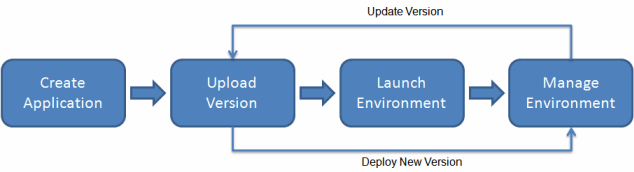
To use Elastic Beanstalk, you create an application, then upload your application source bundle to Elastic Beanstalk. Next, you provide information about the application, and Elastic Beanstalk automatically launches an environment and creates and configures the AWS resources needed to run your code.
After you create and deploy your application and your environment is launched, you can manage your environment and deploy new application versions. Information about the application—including metrics, events, and environment status—is made available through the Elastic Beanstalk console, APIs, and Command Line Interfaces.
The following diagram illustrates Elastic Beanstalk workflow:
Pricing
There is no additional charge for Elastic Beanstalk. You pay only for the underlying AWS resources that your application consumes. For details about pricing,
see the Elastic Beanstalk service detail page
Next steps
We recommend the tutorial, Getting started tutorial, to start using Elastic Beanstalk. The tutorial steps you through creating, viewing, and updating a sample Elastic Beanstalk application.
