OPS04-BP01 Employ and test safe deployment strategies
Safe deployment practices control how a change reaches customers, so that a defect affects the fewest of them before you catch it. When you release changes in increments and check health at each step, you limit the scope of impact and shorten recovery time.
Desired outcome:
-
Your delivery pipeline releases production changes in incremental stages rather than to all customers at once.
-
You have automated health checks at each stage that must pass before the change proceeds to the next.
-
Your deployment strategy matches each workload's fault isolation boundaries, so a failed change is contained to a single host, cell, or Availability Zone.
-
You select and apply a documented safe deployment strategy for every production change.
Common anti-patterns:
-
Teams deploy a change to all of production at once, so a defect reaches every customer at the same time.
-
An in-place update overwrites the running version, which forces a second change to restore the previous version and extends recovery time.
-
Release coordination depends on manual planning across several teams, which limits how often teams can ship features.
-
Deployments proceed without automated health checks, so failures surface only after customers report them.
Benefits of establishing this best practice:
-
A defective change affects a fraction of customers instead of all of them, because deployment stops before full rollout.
-
Recovery is faster because the previous version stays available and traffic can shift back to it.
-
Teams deploy more often and with more confidence, because safety controls reduce the cost of a failed change.
-
Emergency releases become rare, because most defects are caught in an early stage.
Level of risk exposed if this best practice is not established: Medium
Implementation guidance
A fractional deployment releases the change to a small portion of your fleet, verifies it against health signals, then expands in controlled increments.
Fractional deployments work best when the increments align with your fault isolation boundaries — the host, cell, Availability Zone, or Region that contains the effect of a failure. AWS structures this as waves and stages. A wave is a fault container, such as a Region, that deploys in parallel with other containers. Within a wave, the change moves through stages: a one-box stage that takes one host's worth of traffic, then progressively larger fractions within one Availability Zone. Each stage ends with bake time to observe health metrics before the next begins. Without bake time, you expand before problems surface.
Several strategies implement this pattern, differing in cost, speed, and rollback behavior. Rolling deployments replace instances in batches and use the least extra capacity, but a failure can leave the fleet in a mixed-version state. Immutable and blue/green deployments create a parallel set of resources running the new version and shift traffic to it. Rollback shifts traffic back, at the cost of running two environments during the transition. Canary releases send a small share of live traffic to the new version, which catches problems that appear only under real load. Feature flags separate deployment from release, so you can turn a change on or off without another deployment. Most teams combine these.
Avoid in-place updates for high-risk changes. When you modify a running system in place and the change fails, you have no clean previous version to return to. Recovery then means applying another change under pressure, which lengthens downtime.
Take extra care with databases and other stateful resources, because you cannot discard and replace them the way you replace stateless hosts. Blue/green deployments for managed databases create a synchronized staging environment you can test before promoting it, so you validate schema and configuration changes against production-like data before they take traffic. Plan how in-flight transactions and replication are handled during the switch.
Figures 1 through 3 show the
AWS CodeDeploy blue/green workflow for Amazon EC2, Amazon ECS,
and AWS Lambda. AWS CodeDeploy automates in-place and blue/green
deployments across these compute types and integrates with
monitoring, so a failed health check can halt or reverse a
rollout. See
Automating safe, hands-off deployments
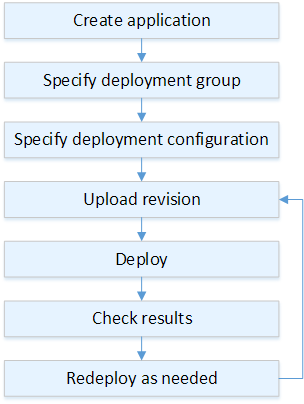
AWS CodeDeploy blue/green deployment process for Amazon EC2
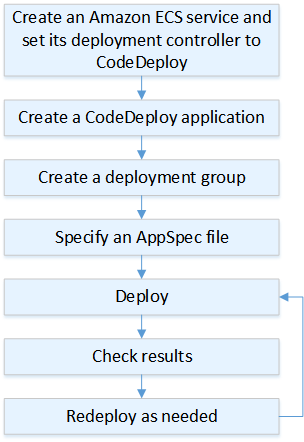
AWS CodeDeploy blue/green deployment process for Amazon ECS
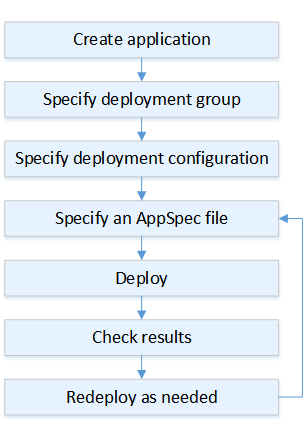
AWS CodeDeploy blue/green deployment process for AWS Lambda
Decouple your continuous integration (CI) pipeline from your
continuous delivery (CD) pipeline. Services such as
Service Catalog
With the pipelines decoupled, you can stage and sequence deployments to fit release constraints such as change freezes and release schedules. A managed service provider (MSP) or software-as-a-service (SaaS) provider can then serve clients with different acceptance testing and release approvals from a single build.
Deployment windows are a separate constraint from fault isolation. Some fleets accept changes only during specific hours, such as Regions with restricted operating-hour windows, or teams spread across time zones with no single window that works for everyone. When a narrow window limits how much of your fleet you can update in one pass, shorten each deployment's duration so more of the fleet completes within the time available. Track how many pipelines have no valid window at all, and widen those windows deliberately.
Implementation steps
-
Gate promotion to production with an approval workflow: Trigger the production rollout sequence when a change is promoted to production, so the safe deployment stages run consistently for every release.
-
Automate deployments with a managed deployment service: Use AWS CodeDeploy to run your chosen strategy. Its deployment options include in-place deployments for Amazon EC2 and on-premises instances, and blue/green deployments for Amazon EC2, AWS Lambda, and Amazon ECS. Where useful, integrate AWS CodeDeploy with other AWS services.
-
Apply blue/green deployments to stateful resources: Use managed blue/green deployments for databases such as Amazon Aurora and Amazon RDS, so you validate changes in a synchronized staging environment before promotion.
-
Monitor each deployment stage: Monitor deployments with Amazon CloudWatch, AWS CloudTrail, and Amazon Simple Notification Service (Amazon SNS) notifications, so a stage that breaches its health criteria stops the rollout.
-
Run automated post-deployment tests: After each stage, run functional, security, regression, integration, and load tests that confirm the change behaves as expected before the next increment begins.
-
Establish deployment troubleshooting procedures: Document how to troubleshoot deployment issues and reverse a rollout, so responders act from a known procedure rather than improvising during an incident.
-
Automate scheduling within constrained deployment windows: For fleets restricted to narrow deployment windows, use AWS Systems Manager Maintenance Windows to schedule deployment tasks within the time available, and measure the fraction of your fleet with no valid window so you can prioritize automation that shortens per-deployment duration.
Resources
Related best practices:
Related documents:
Related examples:
Related workshops:
