REL08-BP04 Deploy using immutable infrastructure
Immutable infrastructure is a model in which running resources are never modified in place. For each change, build new infrastructure with the change, deploy it alongside the existing resources, and shift traffic after you validate the new set. This approach removes failures caused by undocumented, in-place modifications that leave environments in unknown states.
Desired outcome:
-
Your production resources are never patched, reconfigured, or updated in place.
-
When a change is needed, you deploy a new set of resources in parallel, validate it automatically, and shift traffic gradually.
-
Your infrastructure is defined as version-controlled code, so every deployed state is known and reproducible.
-
You can roll back by directing traffic to the previous, unchanged set of resources.
Common anti-patterns:
-
Teams apply security patches, configuration changes, or updates directly to running production resources.
-
Teams allow remote access to production hosts for manual fixes, which reintroduces drift.
-
Teams deploy changes without a rollout pattern that limits user impact.
-
Teams do not detect configuration drift, so resources diverge from their defined state over time.
Benefits of establishing this best practice:
-
Consistency across environments increases because resources are identical and testing is simpler.
-
Configuration drift is avoided because resources are replaced from a known, version-controlled definition.
-
Deployments are atomic: they either complete successfully or nothing changes.
-
Rollback and recovery are fast and safe because the previous working version is left untouched.
-
Security posture improves because disabling remote access to immutable hosts reduces the attack surface.
Level of risk exposed if this best practice is not established: Medium
Implementation guidance
The rule of immutable infrastructure is no in-place modification of running resources. Every change, whether a software update, a security patch, a configuration change, or an application update, results in a new set of resources. When someone connects to a production host to apply a quick fix, the host diverges from its definition and reduces consistency and reproducibility.
Infrastructure as code (IaC) provides a method for practical immutability. When you define provisioning and configuration in declarative, version-controlled templates, rebuilding a resource from scratch becomes routine. IaC also makes the model enforceable: if the only supported path to change is a new deployment from code, you are less likely to miss in-place edits. Automating the build and deployment reduces human error and increases reproducibility.
You need to cut over to new infrastructure without disrupting users. Canary deployment directs a small fraction of traffic to the new version running on a limited number of instances. You scrutinize its behavior, remove traffic if you find critical problems, and continue rolling out at your chosen pace if it holds. Blue/green deployment creates a full parallel fleet of the new version and shifts traffic to it, all at once or gradually with weighted DNS routing. Canary limits exposure with less spare capacity, whereas blue/green enables an instant, complete switch and rollback at the cost of running two full environments.
The following figure shows a blue/green deployment where two parallel environments run the application and DNS routing controls which environment receives traffic.
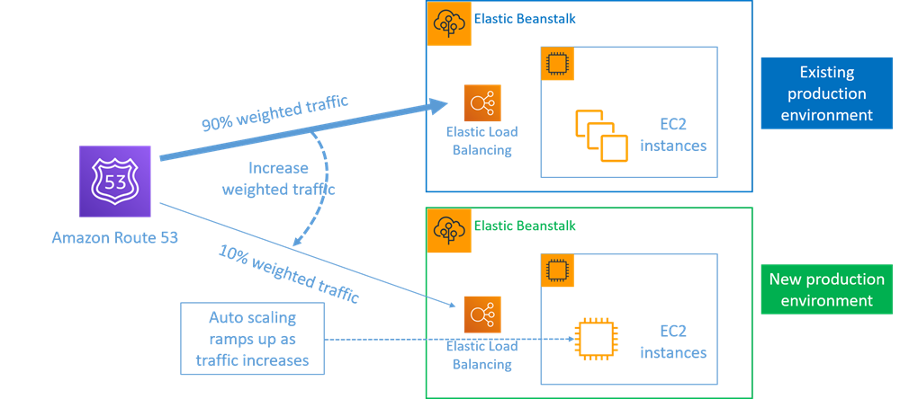
Blue/green deployment with DNS-controlled traffic routing
Drift is any change that gives a resource a different state or configuration than its definition expects, and it undermines immutable infrastructure. A successful implementation detects drift and remediates it, either by correcting the resource or by redeploying from code. This keeps the deployed state aligned with the defined state.
Implementation steps
-
Prevent in-place modification of running resources: Use AWS Identity and Access Management to control who and what can act on resources, and remove the permissions that allow manual, in-place changes to production. Where the workload allows, disable remote access mechanisms such as SSH to enforce the model and reduce the attack surface.
-
Define and automate infrastructure as code: Define provisioning and configuration declaratively in version-controlled templates, and automate their deployment to increase reproducibility. Use AWS CloudFormation
, AWS Serverless Application Model (AWS SAM) , the AWS Cloud Development Kit (AWS CDK) (AWS CDK) , or AWS Cloud Control API to build resources in a repeatable manner. See the Introduction to DevOps on AWS whitepaper for automation patterns. -
Prebake machine images to speed replacement: Prebake your Amazon Machine Images so new resources launch quickly with configuration already applied. Use EC2 Image Builder
to automate the creation, validation, and distribution of secure, up-to-date custom AMIs. -
Use managed services where they fit: For suitable workloads, reduce operational effort with AWS Elastic Beanstalk
to deploy and scale web applications, or AWS CDK Pipelines to give infrastructure teams consistent, automated infrastructure and deployment tooling for serverless and container-based applications. -
Implement a traffic-shifting rollout pattern: Choose canary or blue/green based on your cost and blast-radius trade-off. For canary, set up an API Gateway canary release or use Amazon ECS deployment circuit breaker with rolling updates. For blue/green, follow the techniques in the Blue/Green Deployments on AWS whitepaper. AWS CodeDeploy supports both patterns through deployment configurations.
-
Detect and remediate drift: Monitor for configuration or state changes that diverge from your definitions, and remediate by correcting or redeploying the resource. See Detecting unmanaged configuration changes to stacks and resources.
Resources
Related best practices:
Related documents:
Related videos:
