Storage options for your Amazon EC2 instances
Amazon EC2 provides you with flexible, cost effective, and easy-to-use data storage options for your instances. Each option has a unique combination of performance and durability. These storage options can be used independently or in combination to suit your requirements.
- Block storage
-
-
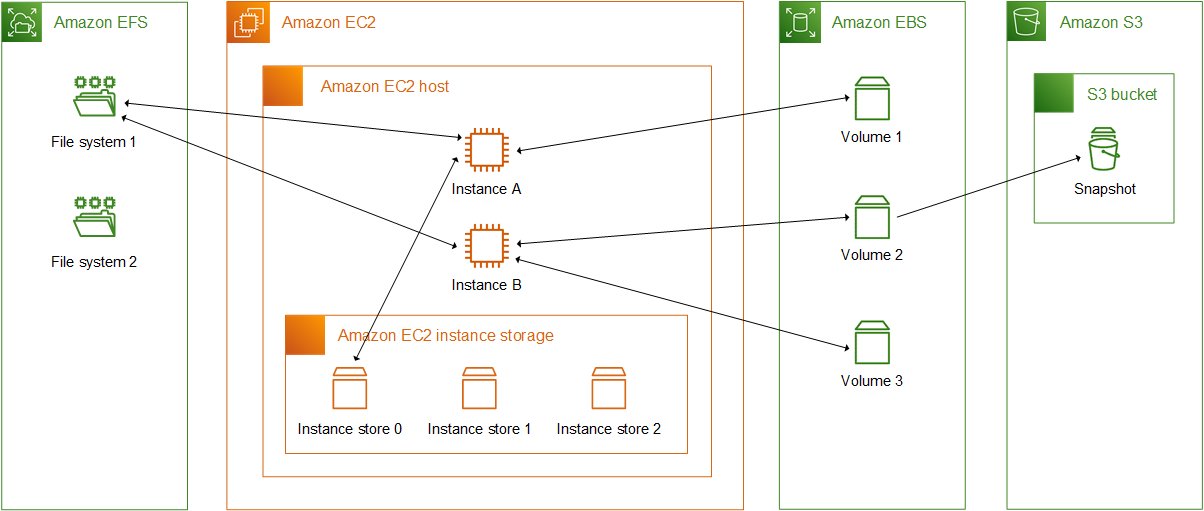
Amazon EBS — Amazon EBS provides durable, block-level storage volumes that you can attach and detach from your instances. You can attach multiple EBS volumes to an instance. An EBS volume persists independently from the life of its associated instance. You can encrypt your EBS volumes. To keep a backup copy of your data, you can create snapshots from your EBS volumes. Snapshots are stored in Amazon S3. You can create an EBS volume from a snapshot.
-
Instance store temporary block storage for EC2 instances — Instance store provides temporary block-level storage for instances. The number, size, and type of instance store volumes are determined by the instance type and instance size. The data on an instance store volume persists only during the life of the associated instance; if you stop, hibernate, or terminate an instance, any data on instance store volumes is lost.
-
- Object storage
-
-
Amazon S3 — Amazon S3 provides access to reliable and inexpensive data storage infrastructure. It is designed to make web-scale computing easier by enabling you to store and retrieve any amount of data, at any time, from within Amazon EC2 or anywhere on the web. For example, you can use Amazon S3 to store backup copies of your data and applications. Amazon EC2 uses Amazon S3 to store EBS snapshots and Amazon S3-backed AMIs.
-
- File storage
-
-
Amazon EFS (Linux instances only) — Amazon EFS provides scalable file storage for use with Amazon EC2. You can create an EFS file system and configure your instances to mount the file system. You can use an EFS file system as a common data source for workloads and applications running on multiple instances.
-
Amazon FSx — With Amazon FSx, you can launch, run, and scale feature-rich, high-performance file systems in the cloud. Amazon FSx is a fully-managed service that supports a wide range of workloads. You can choose between these widely-used file systems: Lustre, NetApp ONTAP, OpenZFS, and Windows File Server.
-
- File caching
-
-
Use Amazon File Cache with Amazon EC2 instances — Amazon File Cache provides temporary, high-performance cache on AWS for processing file data. The cache provides read and write data access to compute workloads on Amazon EC2 with sub-millisecond latencies, up to hundreds of GB/s of throughput, and up to millions of IOPS.
-
The following figure shows the relationship between these storage options and your instance.
AWS Storage pricing
Open AWS Pricing
