DynamoDB low-level API
The Amazon DynamoDB low-level API is the protocol-level interface for DynamoDB. At this level, every HTTP(S) request must be correctly formatted and carry a valid digital signature.
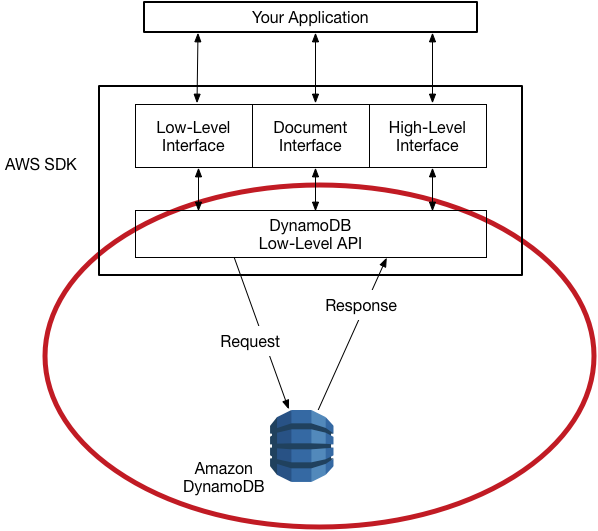
The AWS SDKs construct low-level DynamoDB API requests on your behalf and process the responses from DynamoDB. This lets you focus on your application logic, instead of low-level details. However, you can still benefit from a basic knowledge of how the low-level DynamoDB API works.
For more information about the low-level DynamoDB API, see Amazon DynamoDB API Reference.
Note
DynamoDB Streams has its own low-level API, which is separate from that of DynamoDB and is fully supported by the AWS SDKs.
For more information, see Change data capture for DynamoDB Streams. For the low-level DynamoDB Streams API, see the Amazon DynamoDB Streams API Reference.
The low-level DynamoDB API uses JavaScript Object Notation (JSON) as a wire protocol format.
JSON presents data in a hierarchy so that both data values and data structure are conveyed
simultaneously. Name-value pairs are defined in the format name:value. The data
hierarchy is defined by nested brackets of name-value pairs.
DynamoDB uses JSON only as a transport protocol, not as a storage format. The AWS SDKs use JSON to send data to DynamoDB, and DynamoDB responds with JSON. DynamoDB does not store data persistently in JSON format.
Note
For more information about JSON, see Introducing
JSONJSON.org website.
Request format
The DynamoDB low-level API accepts HTTP(S) POST requests as input. The AWS
SDKs construct these requests for you.
Suppose that you have a table named Pets, with a key schema consisting of
AnimalType (partition key) and Name (sort key). Both of
these attributes are of type string. To retrieve an item from
Pets, the AWS SDK constructs the following request.
POST / HTTP/1.1 Host: dynamodb.<region>.<domain>; Accept-Encoding: identity Content-Length: <PayloadSizeBytes> User-Agent: <UserAgentString> Content-Type: application/x-amz-json-1.0 Authorization: AWS4-HMAC-SHA256 Credential=<Credential>, SignedHeaders=<Headers>, Signature=<Signature> X-Amz-Date: <Date>X-Amz-Target: DynamoDB_20120810.GetItem{ "TableName": "Pets", "Key": { "AnimalType": {"S": "Dog"}, "Name": {"S": "Fido"} } }
Note the following about this request:
-
The
Authorizationheader contains information required for DynamoDB to authenticate the request. For more information, see Signing AWS API requests and Signature Version 4 signing process in the Amazon Web Services General Reference. -
The
X-Amz-Targetheader contains the name of a DynamoDB operation:GetItem. (This is also accompanied by the low-level API version, in this case20120810.) -
The payload (body) of the request contains the parameters for the operation, in JSON format. For the
GetItemoperation, the parameters areTableNameandKey.
Response format
Upon receipt of the request, DynamoDB processes it and returns a response. For the request shown previously, the HTTP(S) response payload contains the results from the operation, as shown in the following example.
HTTP/1.1 200 OK
x-amzn-RequestId: <RequestId>
x-amz-crc32: <Checksum>
Content-Type: application/x-amz-json-1.0
Content-Length: <PayloadSizeBytes>
Date: <Date>
{
    "Item": {
        "Age": {"N": "8"},
        "Colors": {
            "L": [
                {"S": "White"},
                {"S": "Brown"},
                {"S": "Black"}
            ]
        },
        "Name": {"S": "Fido"},
        "Vaccinations": {
            "M": {
                "Rabies": {
                    "L": [
                        {"S": "2009-03-17"},
                        {"S": "2011-09-21"},
                        {"S": "2014-07-08"}
                    ]
                },
                "Distemper": {"S": "2015-10-13"}
            }
        },
        "Breed": {"S": "Beagle"},
        "AnimalType": {"S": "Dog"}
    }
}
At this point, the AWS SDK returns the response data to your application for further processing.
Note
If DynamoDB can't process a request, it returns an HTTP error code and message. The AWS SDK propagates these to your application in the form of exceptions. For more information, see Error handling with DynamoDB.
Data type descriptors
The low-level DynamoDB API protocol requires each attribute to be accompanied by a data type descriptor. Data type descriptors are tokens that tell DynamoDB how to interpret each attribute.
The examples in Request format and Response format show examples of how data
type descriptors are used. The GetItem request specifies S for
the Pets key schema attributes (AnimalType and
Name), which are of type string. The GetItem
response contains a Pets item with attributes of type
string (S), number (N),
map (M), and list (L).
The following is a complete list of DynamoDB data type descriptors:
-
S– String -
N– Number -
B– Binary -
BOOL– Boolean -
NULL– Null -
M– Map -
L– List -
SS– String Set -
NS– Number Set -
BS– Binary Set
The following table shows the correct JSON format for each data type descriptor. Note that numbers are represented as strings to preserve precision, while booleans and nulls use their native JSON types.
| Descriptor | JSON format | Notes |
|---|---|---|
S |
{"S": "Hello"} |
Value is a JSON string. |
N |
{"N": "123.45"} |
Value is a string, not a JSON number. This preserves precision across languages. |
B |
{"B": "dGhpcyBpcyBhIHRlc3Q="} |
Value is a base64-encoded string. |
BOOL |
{"BOOL": true} |
Value is a JSON boolean (true or false),
not a string. |
NULL |
{"NULL": true} |
Value is the JSON boolean true to indicate null. |
M |
{"M": {"Name": {"S": "Joe"}}} |
Value is a JSON object of attribute name–value pairs. |
L |
{"L": [{"S": "Red"}, {"N": "5"}]} |
Value is a JSON array of attribute values. |
SS |
{"SS": ["Red", "Blue"]} |
Value is a JSON array of strings. |
NS |
{"NS": ["1", "2.5"]} |
Value is a JSON array of number strings. |
BS |
{"BS": ["U3Vubnk=", "UmFpbnk="]} |
Value is a JSON array of base64-encoded strings. |
Note
For detailed descriptions of DynamoDB data types, see Data types.
Numeric data
Different programming languages offer different levels of support for JSON. In some cases, you might decide to use a third-party library for validating and parsing JSON documents.
Some third-party libraries build upon the JSON number type, providing their own types
such as int, long, or double. However, the native
number data type in DynamoDB does not map exactly to these other data types, so these type
distinctions can cause conflicts. In addition, many JSON libraries do not handle
fixed-precision numeric values, and they automatically infer a double data type for
digit sequences that contain a decimal point.
To solve these problems, DynamoDB provides a single numeric type with no data loss. To avoid unwanted implicit conversions to a double value, DynamoDB uses strings for the data transfer of numeric values. This approach provides flexibility for updating attribute values while maintaining proper sorting semantics, such as putting the values "01", "2", and "03" in the proper sequence.
If number precision is important to your application, you should convert numeric values to strings before you pass them to DynamoDB.
Binary data
DynamoDB supports binary attributes. However, JSON does not natively support encoding binary data. To send binary data in a request, you will need to encode it in base64 format. Upon receiving the request, DynamoDB decodes the base64 data back to binary.
The base64 encoding scheme used by DynamoDB is described at RFC 4648
