Troubleshooting AWS KMS permissions
When authorizing access to a KMS key, AWS KMS evaluates the following:
-
The key policies of the KMS key. Every KMS key has a
defaultkey policy. A KMS key that is shared through AWS Resource Access Manager (AWS RAM) also has anAWS_RAMkey policy, which AWS RAM creates and manages. AWS KMS evaluates both key policies together. For more information about how AWS KMS evaluates the two key policies, see How permissions are evaluated. Key policies are always defined in the AWS account and Region that owns the KMS key. -
All IAM policies that are attached to the user or role making the request. IAM policies that govern a principal's use of a KMS key are always defined in the principal's AWS account.
-
All grants that apply to the KMS key.
-
Other types of policies that might apply to the request to use the KMS key, such as AWS Organizations service control policies and VPC endpoint policies. These policies are optional and allow all actions by default, but you can use them to restrict permissions otherwise given to principals.
AWS KMS evaluates these policy mechanisms together to determine whether access to the KMS key is allowed or denied. To do this, AWS KMS uses a process similar to the one depicted in the following flowchart. The following flowchart provides a visual representation of the policy evaluation process.

This flowchart is divided into two parts. The parts appear to be sequential, but they are typically evaluated at the same time.
-
Use authorization determines whether you are permitted to use a KMS key based on its key policies, IAM policies, grants, and other applicable policies.
-
Key trust determines whether you should trust a KMS key that you are permitted to use. In general, you trust the resources in your AWS account. But, you can also feel confident about using KMS keys in a different AWS account if a grant or IAM policy in your account allows you to use the KMS key.
You can use this flowchart to discover why a caller was allowed or denied permission to use
a KMS key. You can also use it to evaluate your policies and grants. For example, the flowchart
shows that a caller can be denied access by an explicit DENY statement, or by the
absence of an explicit ALLOW statement, in the key
policy, IAM policy, or grant.
If a KMS key has an AWS_RAM key policy, an explicit Deny
statement in the default key policy overrides an Allow statement in
the AWS_RAM key policy. For example, suppose that the default key
policy denies kms:Encrypt to an account that the AWS_RAM key policy
allows to use the KMS key. Principals in that account can't use the KMS key to encrypt
data. The
AWS_RAM key policy contains only Allow statements, because AWS RAM
managed permissions can only allow actions. Changes to key policies are eventually consistent,
so a change might take a short time to take effect. For more information about eventual consistency, see AWS KMS eventual consistency.
If you are denied access to a KMS key that is shared through AWS RAM, also check the following:
- The resource share
-
Consumers of a resource share can use the permissions in the managed permission of the resource share, which AWS RAM adds to the
AWS_RAMkey policy. Make sure that the KMS key and the caller's account are in a resource share, and that its managed permission includes the action. If the KMS key was shared with an account outside the owner's organization, the account must accept the invitation from AWS RAM. For more information about sharing KMS keys through AWS RAM, see Sharing KMS keys with AWS RAM. - The
AWS_RAMkey policy -
Principals in the account that owns the KMS key can view the
AWS_RAMkey policy by callingGetKeyPolicywith thePolicyNameparameter set toAWS_RAM. Principals in other accounts can't view the key policies of the KMS key. - IAM policies in the consumer account
-
Like any KMS key in another account, a shared KMS key requires IAM policies in the consumer account that allow its principals to use the KMS key. The IAM policies are effective only for actions that the key's key policies allow the consumer account. For more information about IAM policies for KMS keys in other accounts, see Step 2: Add IAM policies in the external account.
- Recent changes
-
Like other changes to AWS KMS resources, changes to a resource share, and to the
AWS_RAMkey policy that AWS RAM writes, are eventually consistent. A change might not take effect immediately. For more information about eventual consistency, see AWS KMS eventual consistency.
The flowchart can explain some common permission scenarios.
Permission Examples
Example 1: User is denied access to a KMS key in their AWS account
Alice is an IAM user in the 111122223333 AWS account. She was denied access to a KMS key in same AWS account. Why can't Alice use the KMS key?
In this case, Alice is denied access to the KMS key because there is no key policy, IAM policy, or grant that gives her the required permissions. The key policy of the KMS key allows the AWS account to use IAM policies to control access to the KMS key, but no IAM policy gives Alice permission to use the KMS key.

Consider the relevant policies for this example.
-
The KMS key that Alice wants to use has the default key policy. This policy allows the AWS account that owns the KMS key to use IAM policies to control access to the KMS key. This key policy satisfies the Does the key policy ALLOW the callers account to use IAM policies to control access to the key? condition in the flowchart.
-
However, no key policy, IAM policy, or grant gives Alice permission to use the KMS key. Therefore, Alice is denied permission to use the KMS key.
Example 2: User assumes role with permission to use a KMS key in a different AWS account
Bob is a user in account 1 (111122223333). He is allowed to use a KMS key in account 2 (444455556666) in cryptographic operations. How is this possible?
When evaluating cross-account permissions, remember that the key policy is specified in the KMS key's account. The IAM policy is specified in the caller's account, even when the caller is in a different account. For details about providing cross-account access to KMS keys, see Allowing users in other accounts to use a KMS key.
-
The key policy for the KMS key in account 2 allows account 2 to use IAM policies to control access to the KMS key.
-
The key policy for the KMS key in account 2 allows account 1 to use the KMS key in cryptographic operations. However, account 1 must use IAM policies to give its principals access to the KMS key.
-
An IAM policy in account 1 allows the
Engineeringrole to use the KMS key in account 2 for cryptographic operations. -
Bob, a user in account 1, has permission to assume the
Engineeringrole. -
Bob can trust this KMS key, because even though it is not in his account, an IAM policy in his account gives him explicit permission to use this KMS key.
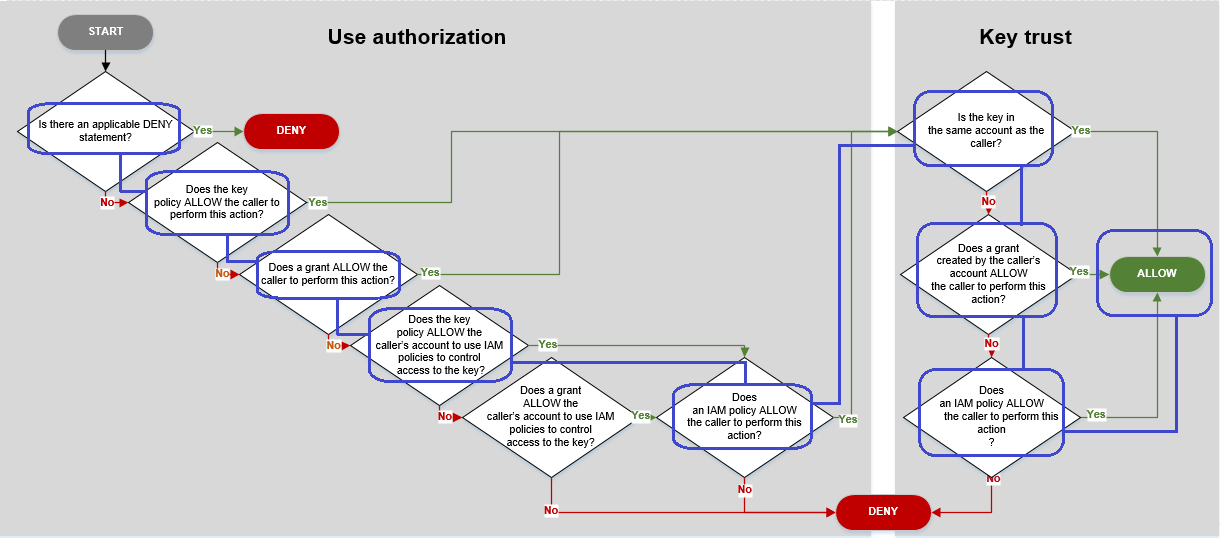
Consider the policies that let Bob, a user in account 1, use the KMS key in account 2.
-
The key policy for the KMS key allows account 2 (444455556666, the account that owns the KMS key) to use IAM policies to control access to the KMS key. This key policy also allows account 1 (111122223333) to use the KMS key in cryptographic operations (specified in the
Actionelement of the policy statement). However, no one in account 1 can use the KMS key in account 2 until account 1 defines IAM policies that give the principals access to the KMS key.In the flowchart, this key policy in account 2 satisfies the Does the key policy ALLOW the caller's account to use IAM policies to control access to the key? condition.
-
An IAM policy in the caller's AWS account (account 1, 111122223333) gives the principal permission to perform cryptographic operations using the KMS key in account 2 (444455556666). The
Actionelement delegates to the principal the same permissions that the key policy in account 2 gave to account 1. To give these permission to theEngineeringrole in account 1, this inline policy is embedded in theEngineeringrole.Cross-account IAM policies like this one are effective only when the key policy for the KMS key in account 2 gives account 1 permission to use the KMS key. Also, account 1 can only give its principals permission to perform the actions that the key policy gave to the account.
In the flowchart, this satisfies the Does an IAM policy allow the caller to perform this action? condition.
-
The last required element is the definition of the
Engineeringrole in account 1. TheAssumeRolePolicyDocumentin the role allows Bob to assume theEngineeringrole.{ "Role": { "Arn": "arn:aws:iam::111122223333:role/Engineering", "CreateDate": "2019-05-16T00:09:25Z", "AssumeRolePolicyDocument": { "Version": "2012-10-17", "Statement": { "Principal": { "AWS": "arn:aws:iam::111122223333:user/bob" }, "Effect": "Allow", "Action": "sts:AssumeRole" } }, "Path": "/", "RoleName": "Engineering", "RoleId": "AROA4KJY2TU23Y7NK62MV" } }
