FND06-BP06 Build strategies for commitment discounts and volume-based pricing
Establish an organization-wide strategy for using cloud pricing models and commitment-based discounts across all accounts. Centralize management of commitment-based offerings to maximize cost savings while maintaining operational flexibility. Surface commitment and reservation recommendations at the organization level so purchasing decisions reflect consolidated usage.
Desired outcome:
-
You have an optimized savings strategy through the use of commitment-based discounts.
-
You have centralized management of pricing models across the organization.
-
You maximize utilization of commitments and volume-based discounts.
-
You have automated processes for commitment management and optimization.
Common anti-patterns:
-
Over-committing to long-term discounts without considering flexibility needs and other workload optimization opportunities such as rightsizing, modernization, and waste reduction.
-
Purchasing commitments at member account level when organization-focused purchases provide better savings.
-
Failing to consider all available commitment options.
-
Not reviewing and adjusting commitment strategies regularly.
-
Using On-Demand pricing for predictable, long-running workloads.
-
Lacking a centralized strategy for commitment purchases.
Benefits of establishing this best practice:
-
Significant cost reduction through volume and commitment discounts, often 20–70 percent depending on commitment type and term length.
-
Better alignment of costs with long-term business planning through predictable pricing.
-
Reduced operational overhead through centralized management.
-
Optimized utilization of commitments across the organization by sharing discounts across accounts and workloads where usage patterns complement each other.
Level of risk exposed if this best practice is not established: Medium
Implementation guidance
Commitment-based pricing trades flexibility for cost savings. The discount sizes are significant (20–70 percent depending on the commitment type and term), but making the trade-off well requires analyzing usage patterns at the organization level. The management account gives you consolidated visibility across all member accounts.
Savings Plans offer flexibility across multiple services (Compute Savings Plans or Database Savings Plans), specific instance families (EC2 Instance Savings Plans), or specific services (SageMaker AI Savings Plans). Reserved Instances provide service-specific savings for services such as Amazon RDS, Amazon Redshift, Amazon ElastiCache, Amazon OpenSearch Service, Amazon DynamoDB, and Amazon MemoryDB. AWS Elemental reservations are available for Amazon MediaLive, Amazon MediaConvert, and Amazon MediaConnect. The Security Savings Bundle offers combined savings on Amazon CloudFront and AWS WAF. Volume-based and tiered pricing for services like Amazon S3 and AWS DataSync provides additional benefit when consolidated within an AWS Organization.
Figure 1 illustrates how a sample web application workload (built on services such as Amazon Route 53, AWS WAF, Amazon CloudFront, Amazon EC2, Amazon RDS, Elastic Load Balancing, Amazon S3, and Amazon EFS) maps to the commitment options available.
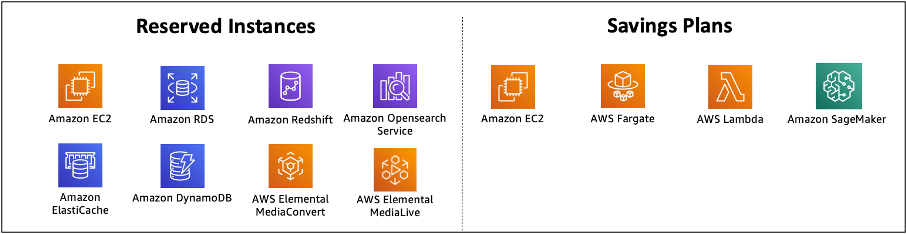
Mapping a web application workload to Reserved Instance and Savings Plans commitments
For services that can benefit from both Reserved Instances and Savings Plans discounts, AWS applies Reserved Instances first. Within Savings Plans, EC2 Instance Savings Plans apply before Compute Savings Plans. This means the most restrictive (and therefore highest-discount) commitments are exhausted first before broader commitments cover the remaining usage.
Commitment sharing is turned on by default in AWS Organizations, so
SPs and RIs purchased at the management account level apply across
all member accounts. This maximizes utilization because a shared
pool absorbs fluctuations across the organization better than
fragmented per-account pools. Some organizations turn off sharing
to improve cost accountability for individual teams, but this
risks underutilization. If cost accountability is the driver,
AWS Billing and Cost Management Conductor
Purchasing commitments before rightsizing locks overprovisioned capacity into the commitment term. A safer order is to eliminate waste first (unused resources, idle instances), then rightsize compute, then evaluate Spot Instances for fault-tolerant workloads, and only then commit to the stable baseline that remains. Spot covers variable, fault-tolerant workloads and commitments cover the predictable baseline, and both can run in parallel within the same optimization strategy. Partial commitments in the 50–70 percent range of baseline usage preserve flexibility for ongoing optimization and workload changes while still capturing meaningful discount.
Regular, smaller purchases adapt better than large infrequent ones. A monthly or quarterly rhythm lets the commitment portfolio evolve as usage patterns shift, reduces the financial risk of any single decision, and responds faster to new workloads or optimization gains that move the baseline.
Implementation steps
-
Establish commitment management governance: Define roles and responsibilities for commitment purchases across your organization. Consider enforcing commitment management policies that only allow relevant stakeholders to make final purchasing decisions. Implement approval workflows for different commitment types and amounts.
-
Configure commitment sharing across accounts: Turn on RI and SP discount sharing in your AWS Organization for broader benefit, unless your business requirements mean that individual teams need to purchase their own commitment discounts (which in some cases might be a budgeting or cost allocation requirement). If you're considering turning off the commitment sharing feature to improve cost accountability for internal teams, consider using AWS Billing and Cost Management Conductor
instead. This provides customizable billing to meet complex business needs, so you can customize billing rates, distribute credits and fees, and share overhead costs and discounts at your discretion. Create processes for regular review and adjustment of commitments. -
Analyze usage patterns: Configure AWS Data Exports with hourly granularity to understand your baseline consumption. Use the Savings Plans Purchase Analyzer for detailed planning. Review AWS Cost Explorer recommendations for both Savings Plans and Reserved Instances, examining projected savings, utilization rates, and payback periods. Consider implementing AWS Cloud Intelligence Dashboards for advanced visualization of usage trends.
-
Rightsize resources before purchasing commitments: Evaluate rightsizing opportunities before committing to discounts to avoid locking in overprovisioned resources. Use AWS Compute Optimizer
recommendations as inputs to your commitment strategy. This step is critical, because purchasing commitments on top of oversized resources locks in waste for the commitment term. Address modernization roadmaps too: if workloads are moving to containers, serverless, or Graviton, commitments on the existing footprint might not pay back. -
Select your Savings Plans mix: Start with Compute Savings Plans
and Database Savings Plans for maximum flexibility. Add EC2 Instance Savings Plans where the instance family is stable but Region or OS might change. Mix one-year and three-year terms to balance discount depth with flexibility, and start with partial commitments (50–70 percent of baseline usage) to preserve flexibility for continued optimization and Spot Instance adoption. -
Add Reserved Instances for deeper service-level discounts: Add service-specific Reserved Instances for Amazon RDS
, Amazon Redshift , Amazon ElastiCache , Amazon OpenSearch Service , Amazon DynamoDB , and Amazon MemoryDB where usage is predictable. Evaluate the Security Savings Bundle for Amazon CloudFront and AWS WAF , and volume-based discount opportunities for services such as Amazon S3 and AWS DataSync . -
Plan commitment purchase cadence: Align purchases with business cycles, budgets, and cost optimization cycles. Implement regular, smaller purchases rather than large, infrequent commitments. This approach reduces risk by letting you adjust your commitment strategy as usage patterns evolve.
-
Monitor commitment utilization and coverage: Use SP/RI utilization and coverage reports to track how your commitments are being used. Utilization measures how much of what you committed to is actually consumed. Consistently above 98 percent signals you can commit more. Sustained below 90 percent signals waste or workload shifts that need investigation. Coverage measures what percentage of eligible spend is protected by commitments, so low coverage points to opportunities for additional purchases. Tracking both together gives the complete picture of commitment effectiveness. Configure utilization alerts through AWS Budgets and set up automated reporting using AWS Budget Reports.
-
Establish commitment governance controls: Restrict commitment purchase authorization to approved roles using IAM policies for individual accounts or service control policies (SCPs) for organization-wide enforcement. For specific Savings Plans and Reserved Instance purchase actions, see Actions defined by AWS Savings Plans. Tag resources to track how business units or teams benefit from shared commitments. Build internal chargeback mechanisms for advanced distribution of commitment benefits across the organization.
Resources
Related best practices:
Related documents:
Related videos:
Related examples:
