REL10-BP01 Deploy the workload to multiple locations
Fires, floods, power loss, network faults, and human error can disable a data center or affect an entire geographic area. Distributing a workload's compute and data across multiple isolated locations removes this single point of failure, so the workload stays available when one location fails. The right number of locations depends on how much downtime and data loss the business can accept.
Desired outcome:
-
Your production workloads run in at least two isolated locations, so a failure in one location does not take the workload offline.
-
Your data is replicated across those locations, and you know where writes must go and how long replication takes.
-
Your location strategy matches the workload's resilience requirements rather than defaulting to the most complex option.
-
Traffic redirects automatically to healthy locations when one location becomes impaired.
Common anti-patterns:
-
Teams run a production workload in a single Availability Zone.
-
Teams adopt a multi-Region architecture when a multi-AZ design meets the requirements, and absorb the added cost and complexity for no gain.
-
Deployments and data drift out of sync between locations, which produces configuration drift or under-replicated data.
-
Teams ignore dependencies between components whose resilience needs differ, so one weak component undermines the whole workload.
-
A component in one Region depends on a component in another Region, which couples the two and weakens the reliability posture.
Benefits of establishing this best practice:
-
The workload withstands power failures, environmental control failures, natural disasters, upstream service failures, and network issues that affect a single location.
-
You can recover service after a sustained location failure because equivalent resources already run elsewhere.
-
Access to a wider capacity pool reduces the chance of insufficient-capacity errors when launching compute.
-
Matching the location strategy to requirements avoids paying for resilience the workload does not need.
Level of risk exposed if this best practice is not established: High
Implementation guidance
AWS organizes its infrastructure into Regions, and each Region contains three or more Availability Zones. An Availability Zone has its own power, cooling, and network connectivity, so a fault in one zone stays contained to that zone. Regions are separated by much greater distance and operate independently, so a failure in one Region is designed not to reach another. Choose which boundary to place resources across based on the failures you need to recover from.
Start with multi-AZ, and choose multi-Region only when you need it. Availability Zones in a Region are close enough for single-digit millisecond latency. You can replicate data synchronously between them and run active/active or active/standby without a user-visible penalty. This covers the failures most workloads face, such as a zone losing power or network. Multiple Regions add protection against a rare Region-wide event at a cost. You duplicate foundational infrastructure in each Region, replication is asynchronous over long distances, and data-residency rules might constrain where you operate. Reserve multi-Region for workloads with extreme resilience requirements, such as critical infrastructure or mandated availability targets.
When a component in one Region calls a component in another Region during normal operation, the two Regions are no longer independent. A failure in one can then cascade to the other. Confirm that the workload runs correctly in a single Region before you extend it across Regions, and keep each Region self-sufficient. Keep deployments and data in sync across locations, because drift prevents the surviving location from taking over.
Some managed data services replicate across Availability Zones by default and tolerate a zone impairment with no action from you. Others require you to enable multi-AZ replication before they fail over automatically. Cross-Region replication almost always requires you to designate where writes go, because most services accept writes in a primary Region and expose read-only replicas elsewhere. Self-managed storage, such as block volumes or instance storage, has no built-in replication, so you must handle it yourself. Before you rely on any data service for resilience, read its documentation. Learn where writes are directed, how replication is monitored, and what the failover behavior is.
The following figure shows the baseline for a production workload. A three-tier design spans three Availability Zones, with a load balancer across the zones and managed data services that replicate automatically.
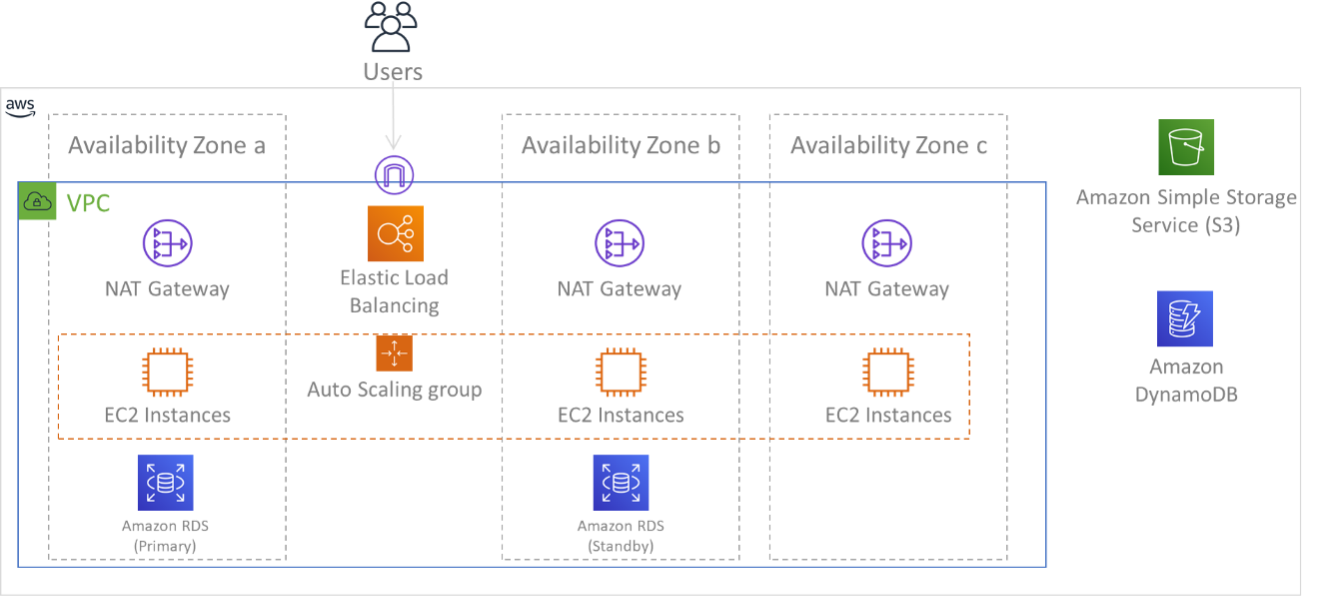
Three-tier workload across three Availability Zones
Consider a secondary Region even when you don't need it for everyday availability. A warm standby or pilot light configuration gives you a disaster recovery target. Replicate baseline infrastructure and keep variable components at a minimal size. If the primary becomes unavailable, scale out the secondary and promote it.
Implementation steps
-
Determine permitted locations: Work with business stakeholders and data-residency experts to decide which AWS Regions can host your resources and data. Record any regulatory constraints that limit where data can reside, because they narrow the location strategies available to you.
-
Choose between multi-AZ and multi-Region: Evaluate how much downtime and data loss the workload can tolerate, and align the decision with your recovery objectives from REL13-BP01 Define recovery objectives for downtime and data loss. Select multi-AZ within a single Region unless extreme resilience or disaster recovery requirements justify the added cost and complexity of multiple Regions.
-
Distribute compute across Availability Zones: Create subnets in multiple zones, each large enough to serve the workload during an incident. Manage instances with EC2 Auto Scaling
, run containers on Amazon ECS or Amazon EKS across those subnets, and place an Application Load Balancer or Network Load Balancer in front so traffic reroutes to healthy zones. -
Replicate data across Availability Zones: For each managed data service, check its user guide to learn whether multi-AZ replication is on by default or must be enabled, and enable it where needed. Avoid single-zone storage configurations for data that requires high durability, and manage replication yourself for any self-managed database or storage.
-
Configure DNS failover within the Region: Use Amazon Route 53 health checks to detect unhealthy endpoints and answer queries with healthy addresses only. Set a short time-to-live on failover records so caching does not delay recovery.
-
Replicate code and images across Regions: For multi-Region workloads, copy machine images and container images to each Region, and enable replication for storage buckets that hold application resources. This makes sure each Region can launch the workload without reaching back to another Region.
-
Deploy compute and configuration into each Region: Reproduce the infrastructure in every chosen Region using infrastructure as code, such as AWS CloudFormation StackSets, and replicate configuration metadata. In a pilot light Region, size variable components to a minimum to save cost, and accept the corresponding increase in recovery time.
-
Replicate data and route traffic across Regions: Choose a replication model that fits your write pattern, such as Amazon DynamoDB global tables
for multi-Region writes or a designated primary write Region for services that expose read-only replicas. Use ARC Region Switch as the recommended mechanism for cross-Region recovery orchestration. It performs the failover as a single operation with pre-flight checks and health validation. For finer-grained control, use Route 53 or AWS Global Accelerator to route users to healthy Regions, and use multi-Region keys in AWS KMS for data encrypted across Regions. -
Validate multi-AZ designs with fault injection: Use AWS Fault Injection Service AZ availability interruption experiments to simulate an entire Availability Zone becoming unavailable, validating that your multi-AZ architecture handles AZ loss without manual teardown of individual resources.
Resources
Related best practices:
Related documents:
Related videos:
