REL13-BP02 Use defined recovery strategies to meet the recovery objectives
A workload needs a planned way to run from a recovery site when its primary location cannot serve it. Choosing that plan is a trade-off between how fast you recover and how much standing infrastructure you pay for and operate. Define a strategy for each workload, drawn from a small set of reusable patterns.
Desired outcome:
-
Each workload has a defined, implemented disaster recovery strategy that meets its recovery objectives.
-
Workloads with similar objectives reuse the same recovery patterns and tooling.
-
Your strategy accounts for both service failover and the protection of data against corruption.
-
You have a documented plan for returning operation to the primary site after an event.
Common anti-patterns:
-
Teams implement inconsistent recovery procedures for workloads that share the same objectives.
-
Recovery is left to be improvised when a disaster occurs, with no strategy defined in advance.
-
A workload has no disaster recovery plan at all.
-
Recovery depends on control plane operations that may be unavailable during the event.
Benefits of establishing this best practice:
-
Common tooling and test procedures become possible because recovery follows defined patterns.
-
Teams share knowledge and implement recovery more consistently across the workloads they own.
-
Recovery objectives are more likely to be met because the strategy is planned, implemented, and tested.
Level of risk exposed if this best practice is not established: High. Without a planned, implemented, and tested strategy, you are unlikely to meet recovery objectives during a disaster.
Implementation guidance
The recovery site can be a separate set of Availability Zones within one AWS Region or a separate Region. Multiple Availability Zones protect against localized events such as fires, floods, and power loss. A separate Region protects against the rare event that makes an entire Region unavailable, though regulatory data-residency rules sometimes rule this out.
The following figure lists the four strategies in increasing order of cost and decreasing order of RTO and RPO.
-
Backup and restore copies data and applications to the recovery site and rebuilds on demand, giving an RPO in hours and an RTO of up to a day.
-
Pilot light keeps core data replicated and always on while compute stays dormant until needed, reaching an RPO in minutes and an RTO in tens of minutes.
-
Warm standby runs a scaled-down but fully functional copy that you scale up on failover, reaching an RPO in seconds and an RTO in minutes.
-
Multi-site active-active serves live traffic from more than one Region, pushing RPO and RTO toward zero at the highest operational cost.
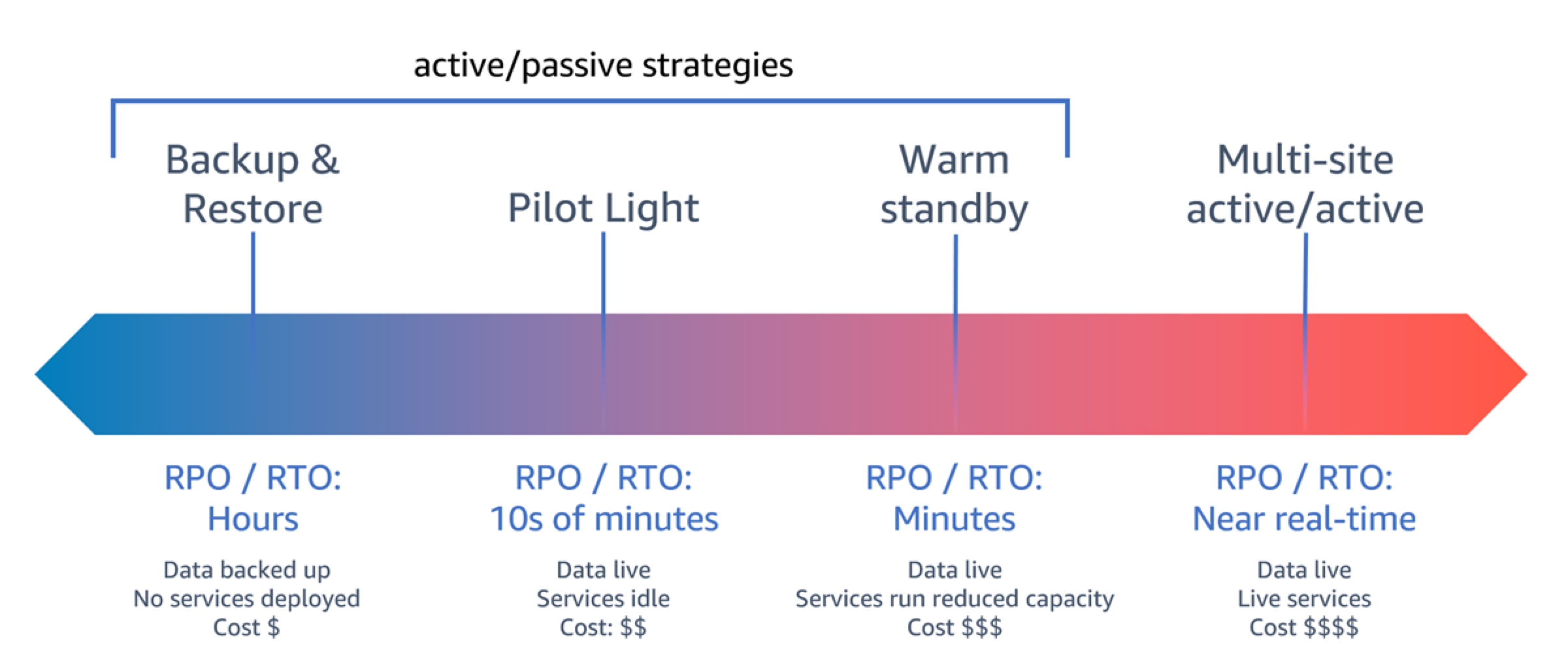
Disaster recovery strategies from backup and restore to multi-site active-active
Pilot light and warm standby both keep a copy of primary-site assets in the recovery site with data replicated and live. The difference is readiness. A pilot light cannot serve requests until you start and scale compute, while a warm standby already handles reduced traffic and only needs to scale up. Pilot light costs less and recovers more slowly. When a warm standby is fully scaled and serving full production load, it becomes hot standby.
Match the strategy to the recovery objectives you already defined. Avoid choosing one more stringent than the business requires, because standing capacity and cross-Region complexity carry ongoing cost. The following figure shows how a maximum acceptable RTO and a spending limit together narrow the field to the strategies that satisfy both. Where you want warm-standby recovery times closer to pilot-light cost, a purpose-built replication service can continuously protect data and orchestrate compute recovery on failover.
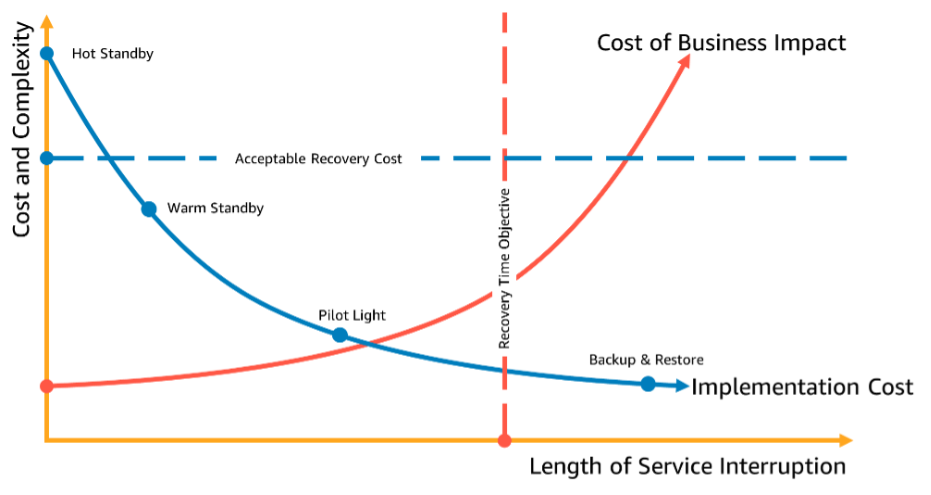
Choosing a disaster recovery strategy by RTO and cost
Replication alone does not make a workload recoverable. Continuous replication copies corruption and deletion to the recovery site as faithfully as it copies good data. Every strategy therefore needs point-in-time backups or versioning in addition to replication, so you can recover to a moment before the data was damaged.
Recovery is not complete when the recovery site takes over. Failback returns operation to the primary site, where data is the problem, and the recovery site now holds the current data. Resynchronize the primary site from it before switching back, sometimes by rebuilding the primary database as a replica of the recovery one. Some organizations avoid a rushed failback by promoting the recovery site to primary and rotating the roles on a schedule.
Implementation steps
-
Select a strategy that meets the objectives: Compare your workload's RTO and RPO against the four strategies and choose the least costly one that satisfies both. Plot the target RTO against your cost ceiling, as shown in Figure 2, to see which strategies qualify. Avoid provisioning against objectives the business has not set. For the reasoning behind this choice, see Business Continuity Plan (BCP).
-
Implement the pattern for your chosen strategy: Build the recovery site according to the strategy you selected, from cross-site backups for backup and restore, to replicated data with dormant compute for pilot light, to a scaled-down live stack for warm standby, to live regional stacks for active-active. Use infrastructure as code so the recovery site is reproducible and consistent with the primary. For Amazon EC2-based workloads that suit a pilot-light cost profile with warm-standby speed, evaluate AWS Elastic Disaster Recovery.
-
Define the standing state of recovery-site resources: Decide what runs in the recovery site during normal operation. Use AWS CloudFormation
to provision infrastructure and AWS CloudFormation StackSets to deploy across accounts and Regions in one operation. Replicate data resources such as Amazon RDS databases or Amazon DynamoDB tables for pilot light, warm standby, and active-active so they are live in the recovery site. Use AWS Backup to schedule and monitor cross-Region backups. -
Prepare the recovery site for failover: Determine the actions needed to make the recovery site production-ready during an event. For pilot light and warm standby, deploy or scale the missing compute, and reserve capacity in advance with Amazon EC2 capacity reservations or AWS Lambda provisioned concurrency where needed. For all strategies, promote replica databases to primary as required. For backup and restore, restore data and rebuild infrastructure and code. Automate these actions so failover is repeatable.
-
Implement traffic redirection: Decide how to reroute traffic to the recovery site, and prefer manually initiated failover with automated steps so a false alarm does not trigger an unnecessary, costly switch. For warm standby and multi-site active/active patterns, use ARC Region Switch to orchestrate the failover as a single operator-initiated operation with pre-flight checks and health validation. This is exactly the pattern of human-triggered but fully orchestrated failover. For complex multi-cell topologies requiring independent per-service routing decisions, use Amazon Application Recovery Controller routing controls. Use data plane operations during failover and avoid control plane dependencies, as described in REL11-BP04 Rely on the data plane and not the control plane during recovery.
-
Design and document failback: Plan how you return to the primary site once the event is over, focusing on resynchronizing data from the recovery site to the primary. Note where managed replication restores the topology automatically, such as Amazon DynamoDB global tables
or Amazon Aurora Global Database managed planned failover, and where you must rebuild manually. Capture the full failover and failback sequence in a playbook that the team reviews periodically.
Resources
Related best practices:
Related documents:
-
Disaster Recovery of Workloads on AWS: Recovery in the Cloud
-
Creating a Multi-Region Application with AWS Services series
-
Building resilient multi-Region Serverless applications on AWS
-
Implementing Multi-Region Disaster Recovery Using Event-Driven Architecture
-
AWS Marketplace: products that can be used for disaster recovery
Related videos:
